VectorStyler
    • Categories
    • Unread
    • Recent
    • Tags
    • Popular
    • Register
    • Login

    Cannot Add Swatches.. or so it appears...

    Scheduled Pinned Locked Moved Bugs in VectorStyler
    5 Posts 2 Posters 3.5k Views 2 Watching
    Loading More Posts
    • Oldest to Newest
    • Newest to Oldest
    • Most Votes
    Reply
    • Reply as topic
    Log in to reply
    This topic has been deleted. Only users with topic management privileges can see it.
    • debraspicherD Offline
      debraspicher
      last edited by

      I deleted all the previous ones sitting in there as I prefer a clean palette panel. After this, I was only able to get a swatch to show up in the panel once. This is what I was trying to figure out when I noticed this bug

      It's showing "Register Color" checked in the Panel menu, so I suspect that it is there registered, but just not showing...

      Video: https://1drv.ms/u/s!AuWHX0h5bAoRiq4554JahRKpzgT1Ng?e=RL36D4
      File: https://1drv.ms/u/s!AuWHX0h5bAoRiq44XvBKB2mi2zZq2Q?e=f9btRt

      Windows 11 Build 26200.7171 (25H2)
      AMD Ryzen 7 9700X with Gigabyte X870E Aorus Pro Ice
      32GB RAM @ 6000MHz
      PNY NVIDIA RTX 5070 Ti 16GB; Display 1: 4K @150%; Display 2: 4K @200%
      Wacom Intuos Pro L (2025); Wacom Intuos Pro M; Epson ET-8550; Siser Romeo

      1 Reply Last reply Reply Quote 0
      • debraspicherD Offline
        debraspicher
        last edited by

        Funky Panel behavior when attempting to resize panel. Starts at around 0:38

        Video: https://1drv.ms/u/s!AuWHX0h5bAoRiq468ZHuDxy8cMTfCw?e=Z4ZKdf

        Windows 11 Build 26200.7171 (25H2)
        AMD Ryzen 7 9700X with Gigabyte X870E Aorus Pro Ice
        32GB RAM @ 6000MHz
        PNY NVIDIA RTX 5070 Ti 16GB; Display 1: 4K @150%; Display 2: 4K @200%
        Wacom Intuos Pro L (2025); Wacom Intuos Pro M; Epson ET-8550; Siser Romeo

        VectorStylerV 1 Reply Last reply Reply Quote 0
        • VectorStylerV Offline
          VectorStyler @debraspicher
          last edited by

          @debraspicher I can only replicate the panel resizing issue.

          I can add colors to the palette, with a color selected from the color panel first.
          It is also possible to drag&drop a color from the color panel target knob (top-left fill/stroke thing) into the palette.
          I also tested this with the attached file.

          debraspicherD 2 Replies Last reply Reply Quote 0
          • debraspicherD Offline
            debraspicher @VectorStyler
            last edited by

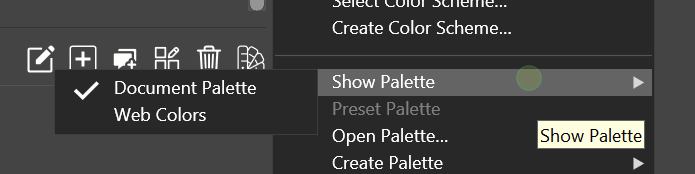
            @VectorStyler It's suddenly working. It wasn't even after resetting the Workspace to Default. So what I did, I loaded another palette using [Panel Menu] Show Palette > Web Colors., just because I suspected maybe the palette was in a "closed' state.. the Document Palette wasn't showing in that list but is now... and because there were no greyed out buttons, there's no way to tell if something is unopened, ie nothing to add swatches to.

            This specifically was missing "Document Palette":
            0_1734630910987_8d377b10-ee03-47ed-bffc-3e83e813ed47-image.png

            Windows 11 Build 26200.7171 (25H2)
            AMD Ryzen 7 9700X with Gigabyte X870E Aorus Pro Ice
            32GB RAM @ 6000MHz
            PNY NVIDIA RTX 5070 Ti 16GB; Display 1: 4K @150%; Display 2: 4K @200%
            Wacom Intuos Pro L (2025); Wacom Intuos Pro M; Epson ET-8550; Siser Romeo

            1 Reply Last reply Reply Quote 1
            • debraspicherD Offline
              debraspicher @VectorStyler
              last edited by

              @VectorStyler said in Cannot Add Swatches.. or so it appears...:

              @debraspicher I can only replicate the panel resizing issue.

              I can add colors to the palette, with a color selected from the color panel first.
              It is also possible to drag&drop a color from the color panel target knob (top-left fill/stroke thing) into the palette.
              I also tested this with the attached file.

              FWIW, I did test/check these methods. They weren't working either.

              Windows 11 Build 26200.7171 (25H2)
              AMD Ryzen 7 9700X with Gigabyte X870E Aorus Pro Ice
              32GB RAM @ 6000MHz
              PNY NVIDIA RTX 5070 Ti 16GB; Display 1: 4K @150%; Display 2: 4K @200%
              Wacom Intuos Pro L (2025); Wacom Intuos Pro M; Epson ET-8550; Siser Romeo

              1 Reply Last reply Reply Quote 1
              • First post
                Last post
