VectorStyler
    • Categories
    • Unread
    • Recent
    • Tags
    • Popular
    • Register
    • Login

    Pencil tool defaults back to a black stroke (instead of "no-stroke")
    Scheduled Pinned Locked Moved Bugs in VectorStyler
    12 Posts 3 Posters 9.5k Views 2 Watching
    Loading More Posts
    • Oldest to Newest
    • Newest to Oldest
    • Most Votes
    Reply
    • Reply as topic
    Log in to reply
    This topic has been deleted. Only users with topic management privileges can see it.
    • M Offline
      monsterfox
      last edited by

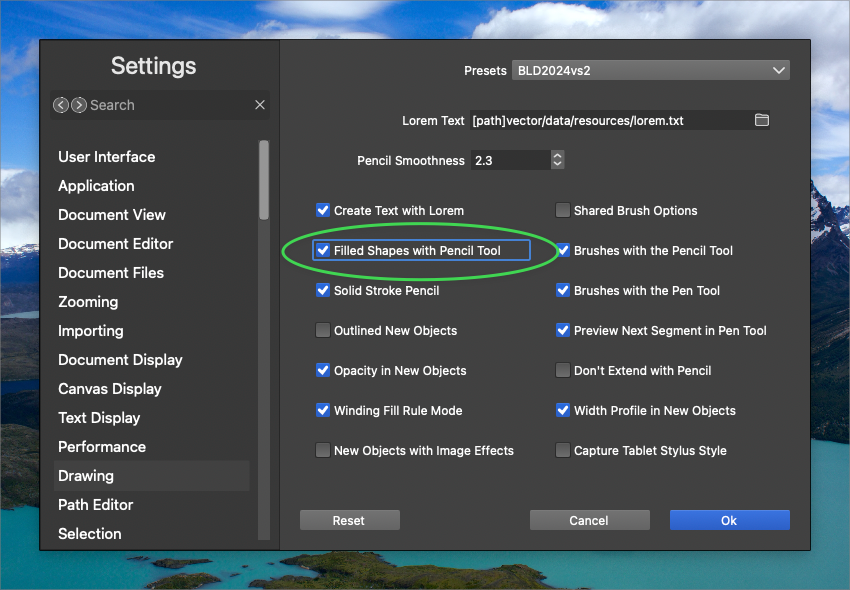
      @Boldline You need to save the settings as another and replace your current settings.

      BoldlineB 1 Reply Last reply Reply Quote 0
      • VectorStylerV Offline
        VectorStyler @Boldline
        last edited by

        @Boldline I will try to replicate this.

        BoldlineB 1 Reply Last reply Reply Quote 1
        • BoldlineB Offline
          Boldline @monsterfox
          last edited by

          @monsterfox I appreciate your input, but I'm not understanding fully what you mean. I have a saved custom settings preset I use that has the "Filled shapes with pencil tool" active already. It still insists on keeping the stroke active

          šŸŽ macOS Tahoe 26.2, Mac mini (M1, 2020), Chip Apple M1, Memory 16 GB
          Cintiq 27QHD Display and LG Ultra HD Display

          1 Reply Last reply Reply Quote 1
          • BoldlineB Offline
            Boldline @VectorStyler
            last edited by Boldline

            @VectorStyler I noticed when I try to use the pencil tool with fill only - it auto switches away from the color that was already in the active fill box in the context menu. It's also choosing two different blacks - one for the fill and a different one for the stroke.

            Here is a link to a video showing this

            I tested this with a fresh document on my intel mac running the build 52 and it worked just fine. When I then updated it to the newest build 54, it was not working correctly for me. I don't know if something related to the pencil tool changed from build 52 to build 54?

            šŸŽ macOS Tahoe 26.2, Mac mini (M1, 2020), Chip Apple M1, Memory 16 GB
            Cintiq 27QHD Display and LG Ultra HD Display

            VectorStylerV 1 Reply Last reply Reply Quote 1
            • VectorStylerV Offline
              VectorStyler @Boldline
              last edited by

              @Boldline The root cause of the problem is identified now, the fix will be in the next build.

              Meanwhile, as a workaround, check the Angle of the pencil head in the Pencil tool options, it should be zero.

              BoldlineB 2 Replies Last reply Reply Quote 1
              • BoldlineB Offline
                Boldline @VectorStyler
                last edited by

                @VectorStyler I’m so glad you were able to find the cause of the issue and fix it! I’m impressed. Thank you for that

                šŸŽ macOS Tahoe 26.2, Mac mini (M1, 2020), Chip Apple M1, Memory 16 GB
                Cintiq 27QHD Display and LG Ultra HD Display

                1 Reply Last reply Reply Quote 1
                • BoldlineB Offline
                  Boldline @VectorStyler
                  last edited by

                  @VectorStyler said in Pencil tool defaults back to a black stroke (instead of "no-stroke"):

                  Meanwhile, as a workaround, check the Angle of the pencil head in the Pencil tool options, it should be zero.

                  Where would I check the angle of the pencil head?
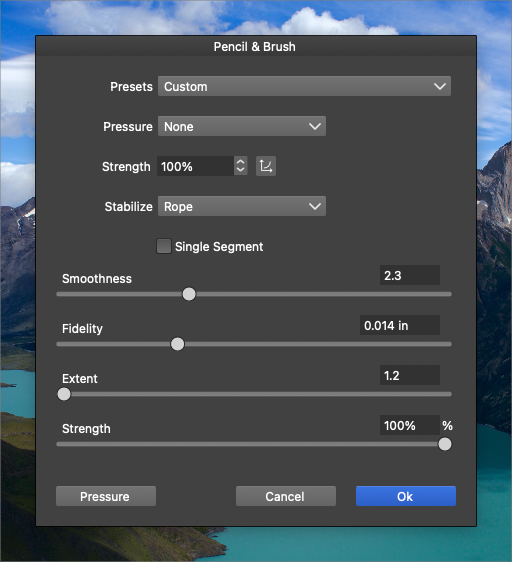
                  0_1735584832924_6c4206e7-c39e-4155-a4b1-335ce6942417-BLD 2024-12-30 at 13.53.35.png

                  šŸŽ macOS Tahoe 26.2, Mac mini (M1, 2020), Chip Apple M1, Memory 16 GB
                  Cintiq 27QHD Display and LG Ultra HD Display

                  VectorStylerV 2 Replies Last reply Reply Quote 1
                  • VectorStylerV Offline
                    VectorStyler @Boldline
                    last edited by

                    @Boldline In the current stroke options (stroke panel icon bar, first button), the angle should be zero.
                    (I was wrong about the place).

                    1 Reply Last reply Reply Quote 0
                    • VectorStylerV Offline
                      VectorStyler @Boldline
                      last edited by

                      @Boldline THis angle issue will be fixed in the next build.

                      BoldlineB 1 Reply Last reply Reply Quote 0
                      • BoldlineB Offline
                        Boldline @VectorStyler
                        last edited by

                        @VectorStyler ok. Mine was already set to zero and the issue remained. Is that expected?

                        šŸŽ macOS Tahoe 26.2, Mac mini (M1, 2020), Chip Apple M1, Memory 16 GB
                        Cintiq 27QHD Display and LG Ultra HD Display

                        VectorStylerV 1 Reply Last reply Reply Quote 1
                        • VectorStylerV Offline
                          VectorStyler @Boldline
                          last edited by

                          @Boldline said in Pencil tool defaults back to a black stroke (instead of "no-stroke"):

                          Is that expected?

                          Yes

                          1 Reply Last reply Reply Quote 1
                          • First post
                            Last post
