VectorStyler
    • Categories
    • Unread
    • Recent
    • Tags
    • Popular
    • Register
    • Login

    Two HSL Options in Color Settings Options

    Scheduled Pinned Locked Moved Bugs in VectorStyler
    2 Posts 2 Posters 2.3k Views 2 Watching
    Loading More Posts
    • Oldest to Newest
    • Newest to Oldest
    • Most Votes
    Reply
    • Reply as topic
    Log in to reply
    This topic has been deleted. Only users with topic management privileges can see it.
    • D Offline
      DMBrown
      last edited by

      In the modal window resulting from selecting Styles>Color Settings... is an Options button which produces a list of selections for choosing various color modes to be shown in the UI. The list includes two HSL selections. With the first enabled the corresponding HSL values are correct. With the second enabled, the corresponding HSL values are incorrect. I assume this is a bug of some sort. I have attached a screenshot of the Options menu.

      Mac Studio M2 Ultra
      macOS 15.2
      VectorStyler 1.2.054
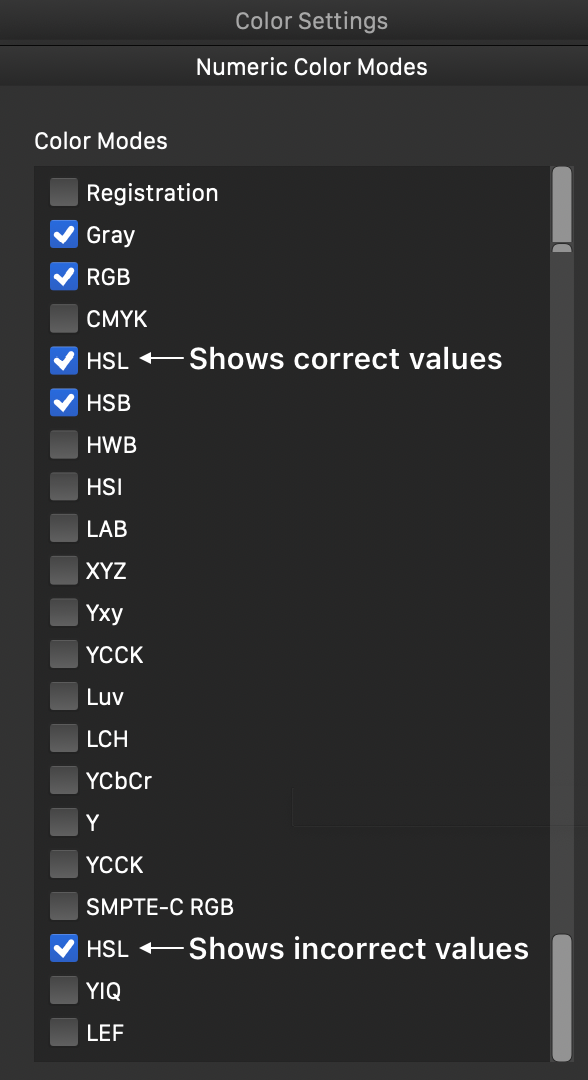
      0_1736013928093_VectorStyler Color Mode Options.png

      VectorStylerV 1 Reply Last reply Reply Quote 1
      • VectorStylerV Offline
        VectorStyler @DMBrown
        last edited by

        @DMBrown Yes, this is a bug. Will be fixed.

        1 Reply Last reply Reply Quote 0
        • First post
          Last post