VectorStyler
    • Categories
    • Unread
    • Recent
    • Tags
    • Popular
    • Register
    • Login

    Greyed Menu Items

    Scheduled Pinned Locked Moved Bugs in VectorStyler
    25 Posts 2 Posters 37.8k Views 2 Watching
    Loading More Posts
    • Oldest to Newest
    • Newest to Oldest
    • Most Votes
    Reply
    • Reply as topic
    Log in to reply
    This topic has been deleted. Only users with topic management privileges can see it.
    • F Offline
      fdarnel
      last edited by fdarnel

      I started trying last VS version, and regularly the menus are completely greyed, while the tools continue to work. I must then restart VS. Mac Mini under macOS 14.7.4. Does anyone have this problem?

      VectorStylerV 2 Replies Last reply Reply Quote 1
      • VectorStylerV Offline
        VectorStyler @fdarnel
        last edited by

        @fdarnel Can you send a screenshot when this happens.
        On MacOS, the menu is accessible when a modal view is opened (a view that does not allow actions in the background on the document). But in this case yes, all menus are grayed while the view is open.
        The same applies while alert views are open.

        1 Reply Last reply Reply Quote 0
        • F Offline
          fdarnel
          last edited by

          No other windows opened. For the moment, it does not happen anymore ...

          VectorStylerV 1 Reply Last reply Reply Quote 1
          • VectorStylerV Offline
            VectorStyler @fdarnel
            last edited by

            @fdarnel If you seen this again, please make a recording.

            1 Reply Last reply Reply Quote 0
            • F Offline
              fdarnel
              last edited by

              Here it is. I just tried cmd-&(1) for Actual size (which by th way doesn't work on my Mac Mini, french keyboard).
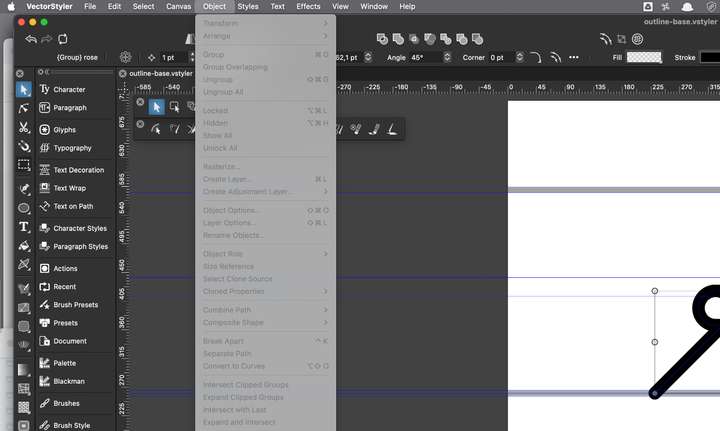
              0_1740822577205_menus.png

              VectorStylerV 1 Reply Last reply Reply Quote 1
              • VectorStylerV Offline
                VectorStyler @fdarnel
                last edited by

                @fdarnel I can confirm the cmd+1 issue with french keyboard. But I could not replicate the menu graying.
                Could be some kind of workspace/settings issue.

                One thing to try is to send me the workspace and settings files by email to csraba at vectorstyler.com
                These can be found in the user folder: Help -> Reveal Workspace Folder

                1 Reply Last reply Reply Quote 0
                • F Offline
                  fdarnel
                  last edited by

                  Yes, but Help menu is greyed 🙂 May I restart VS before ?

                  VectorStylerV 1 Reply Last reply Reply Quote 1
                  • VectorStylerV Offline
                    VectorStyler @fdarnel
                    last edited by

                    @fdarnel said in Greyed Menu Items:

                    Yes, but Help menu is greyed 🙂 May I restart VS before ?

                    Yes, you can restart VS (workspace is saved).

                    The whole thing looks like some view is opened. What happens if you press ESC with the greyed menus?

                    1 Reply Last reply Reply Quote 0
                    • F Offline
                      fdarnel
                      last edited by

                      I tried, nothing. I don't see any over view opened.

                      1 Reply Last reply Reply Quote 0
                      • F Offline
                        fdarnel
                        last edited by

                        What folder to send, just resources?

                        VectorStylerV 2 Replies Last reply Reply Quote 1
                        • VectorStylerV Offline
                          VectorStyler @fdarnel
                          last edited by

                          @fdarnel just resources

                          1 Reply Last reply Reply Quote 0
                          • VectorStylerV Offline
                            VectorStyler @fdarnel
                            last edited by

                            @fdarnel I could not replicate the greying issue (tried on a macOS 14.6 also with French keyboard mode).

                            I will keep this issue open and test more.

                            Does the graying of the menu goes away if you press the Esc key?

                            1 Reply Last reply Reply Quote 0
                            • F Offline
                              fdarnel
                              last edited by

                              No, it doesn't, I have to restart VS.

                              VectorStylerV 2 Replies Last reply Reply Quote 1
                              • VectorStylerV Offline
                                VectorStyler @fdarnel
                                last edited by

                                @fdarnel I will try to figure out the root cause for this.

                                1 Reply Last reply Reply Quote 0
                                • VectorStylerV Offline
                                  VectorStyler @fdarnel
                                  last edited by

                                  @fdarnel About the cmd+1: a workaround for now is to customize the shortcuts, and reassign manually this shortcut.

                                  I'm curious, if you reassign the shortcut for cmd+1 (so that it works as zoom 1:1) will that gray the menus.

                                  1 Reply Last reply Reply Quote 0
                                  • F Offline
                                    fdarnel
                                    last edited by

                                    @VectorStyler said in Greyed Menu Items:

                                    to customize the shortcuts

                                    Where to customize the shortcuts?

                                    VectorStylerV 1 Reply Last reply Reply Quote 0
                                    • VectorStylerV Offline
                                      VectorStyler @fdarnel
                                      last edited by

                                      @fdarnel Application Menu -> Keyboard Shortcuts

                                      1 Reply Last reply Reply Quote 0
                                      • F Offline
                                        fdarnel
                                        last edited by

                                        Well, I changed for Command-& in the setting, it works, but is now referenced as Command-7 in the View menu.

                                        VectorStylerV 1 Reply Last reply Reply Quote 1
                                        • VectorStylerV Offline
                                          VectorStyler @fdarnel
                                          last edited by

                                          @fdarnel said in Greyed Menu Items:

                                          Well, I changed for Command-& in the setting, it works, but is now referenced as Command-7 in the View menu.

                                          I will try to sort this out. The cmd+1 in the French layout is the cmd+ampersand, which is cmd+7.

                                          I will try to sort these things out. BTW: there is also a UI translation planned before 1.3

                                          1 Reply Last reply Reply Quote 0
                                          • F Offline
                                            fdarnel
                                            last edited by

                                            OK, at least it works. If you need some help for translation.

                                            VectorStylerV 1 Reply Last reply Reply Quote 0
                                            • First post
                                              Last post