XLS for features and ideas - Megathread
-
@Daniel said in XLS for features and ideas - Mega Thread:
100% opacity shouldn't be the maximum possible
I have known about this in Photoline. This is a great feature, but it is a bit difficult to use it.
I think this is doable. -
@VectorStyler: That's a good question about what to list: Two solutions:
-
Either completely remove the FX button and just retain stroke and fill because as I said FX should be a non-modal, dockable, panel. See the pdf I attached previously. (There should also be an option to completely delete the branch.)
-
Allow customisation of the list that shows up when clicking FX. For my workflow, I would need even for the most complex projects only the following: 4 point and mesh warp, inner, outer shadow and glow, box and gaussian blur, noise, bevel, contour, blend, and extrude. That's it. That's a 10 item list. Others might want to add more to this list.
I will do the panel for a large image effect like curves adjustment and show how the panel can double up.
What do you mean by it would be difficult to combine shape and image effects?
I understand the final effect depends on the order of effects. This can be defined and factored at the branch level. The branch I've drawn is merely a placeholder and does not accurately reflect how effects will actually appear in a design program.
An extra aside:
- FX ought to behave like any other tool. Principle Even: Make different tools behave similarly to decrease cognitive load. What I mean is this. Say I have the curves adjustment panel open. I click on image, apply adjustments. Now, without closing the curves panel, I should be allowed to simply click on a second object, and apply curves a second time. In other words, FX should behave exactly like say, the colour editor. Please check Xara for what I mean.
Interactive control: The controls in VS are not intuitive. The large circles with controls are intrusive. Imagine this scenario. Say, I want to change the bevels of multiple objects. How would do it? They might not all have the same bevel size. Instead of the large, intrusive circles, they should be arrows (as in Xara) or a change in cursor (as in FH and Affinity).
-
-
@VectorStyler: It's difficult to use only for certain things. But in PL, you can create powerful liquify layers and set their opacity to more than 100% and create incredible distortions that would be otherwise impossible. It's also useful for certain blend modes.
-
@Daniel said in XLS for features and ideas - Mega Thread:
powerful liquify layers and set their opacity to more than 100%
I have to test this more. I hope it works at individual pixel level.
-
Out of curiosity, could you tell me what the benefit
of an opacity of -200 to +200 % is?
i did not know what thats good for and I can't imagine what it means. -
@Subpath: what it essentially does is to change the interaction of blend modes and gives you greater control. In some FX, for instance blurs, it lets you invert the blur by setting it to negative opacity and produce sharpening for specific areas of the image, combined with masking.
In photo editing, negative opacities are useful for producing sharpening effects too. In liquify layers, it allows you to create very fine displacements. These are just some of the ways I use it.
The potential is endless. PL is a vastly superior program compared to PS. Consider for instance that entire portable app is just 70 odd MB. But the trade off in flexibility is somewhat less user friendly experience.
-
@Daniel said in XLS for features and ideas - Mega Thread:
negative
I also think gradients should have an intensity slider alongside opacity. Opacity controls the transparency of individual stop. Intensity controls the transparency of the gradient as whole. This is completely independent of layer opacity.
So there are three levels of transparency: stop transparency, gradient opacity, layer opacity.
-
@Subpath @VectorStyler: https://imgur.com/a/9b5I2DS - Here's just a very simple example. The liquify layer can have overset opacity. Invert the liquify effect in both directions. +/- 100. Not only can you liquify it this way, you can even nest liquify layers into liquify layers. This is just one example how over setting opacity helps.
-
@Daniel, thank you
I feel a little more enlightened
-
@VectorStyler: just noticed your comment on the appearance panel. I don't think it's merely about appearance. It should also show group level. Text objects should have text settings underneath. Selecting the object at outermost level should should transform options. Selecting a whole layer should show Layer settings. Clicking on clipped objects showed show clipped object and clipping shape. So on and so forth.
-
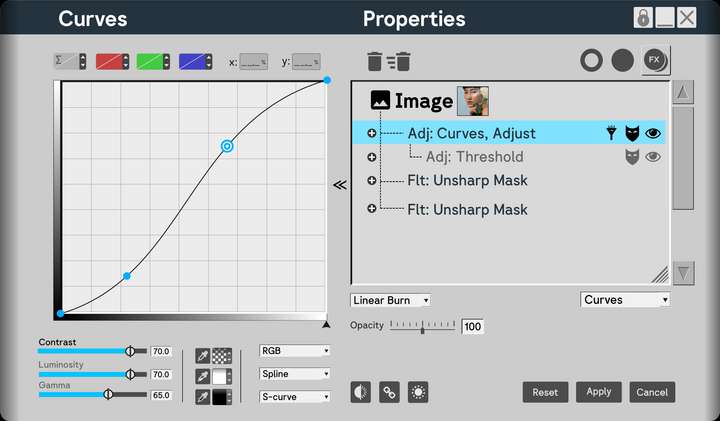
Here's how the panel would look like for complex FX. Notice that you have the option to show masks and hide FX too. You should also be able to simply scroll to zoom in and out the contents of the properties as well as resize the properties section individually, apart from the size of the panel itself. This is what the hatches in the corner are for. The dropdown in the right hand side corner allows you to change the FX at the chosen level. For instance, I may create a curves adjustment, and decide I actually want Unsharp Mask, for instance. I don't need to delete it. Simply change it. Finally the reveal arrows should let me close the enlarged view without losing access to blend mode and opacity.
The details can be tinkered with. The idea is solid.
I replicated elements from PL to show that even the most complex FX can fit in.
Anyway, that's everything from me for the time being. I genuinely think this will make navigation in VS so much easier.
-
@Daniel But why not having the list on the left side and the effect options on the right?
The effect has to be selected first to have its options visible. -
This post is deleted! -
@VectorStyler: that depends on where it is docked. The settings can pop out from any side. If it's docked to the left, the settings pop to the right, and vice versa. I'm right biased. I split my screen into two halves. All tools on the left. All contextual panels such as layer, FX and so on to the right. There's no hard and fast rule.
-
New suggestion addeed:
F: Vector Network
Source Software: Figma
Reason to include: Allows to make complex vector edits very easy.
Principle Used: Expand: If a tool can be made more useful either through additional modes or compatibilities, add such modes and compatibilites.How to include: Vector networks are one of the most useful concepts. Only Figma has it. And vgc.io has it as a proof of concept. The code is available freely if you wish to refer. Figma's own implementation is fairly limited. The idea is extremely simple: Allow multiple paths to share a single node. This should NOT be a separate tool, but an option available both within Node and Pen Tool. Here's one way of doing it. Say I wish to create a network.
In pen tool, I should have a mode called vector network mode. With this mode active, I should be allowed to create a curve, then click out of the curve, and insert a new node in the middle of that curve and draw a new path. Now that node is shared between the two curves.
In node tool, it should happen similarly.
-
@Daniel said in XLS for features and ideas - Mega Thread:
Vector Network
I added ths to the backlog, but probably it will be after 1.3
-
@VectorStyler: thanks. This is fairly low in priority to be honest.
I'd like if possible to address the quality of life challenges in VS first. VS already has a vast and rich array of tools, more than any designer will ever use in the course of their daily workflow. That's a compliment.
Now, what's needed is a solid improvement to workflow and responsiveness.
-
Two more suggestions for improvements added: On screen toggle for switching between dark and light mode, like in Lunacy and other apps. On screen slider for reducing dithering for complex documents, like in XDP and many other apps.
-
@Daniel said in XLS for features and ideas - Mega Thread:
On screen toggle for switching between dark and light mode
In VS there are multiple light/dark themes and also a few "gray" ones. I have to figure out how to do this.
On screen slider for reducing dithering for complex documents
Can you send me a screenshot of this?
-
@VectorStyler: Here's one way to do it. Allow the user within the program settings to choose their preferred dark and light settings. Now these are the only two options that show up when you toggle on screen.
Or even clever: Allow the user to drag a grey from the colour line, and holding down Alt, drop it on the UI. This changes the colour of the UI to that grey. Have 60% value difference for contrast between UI and text and icons. That is, when the user drops 80% grey on the UI, the text and icon are set automatically to 20% white. 70% UI Grey, 10% Text and Icons. 60% UI Grey, 100% black. You get the idea.
In XDP, you can drag and drop a colour from the colour line onto the artboard and background and change it to whatever colour you want. You can even drop patterns and bitmap. This is because XDP also publishes fully functional websites in HTML5 format.
I will record a video for the slider.

