XLS for features and ideas - Megathread
-
@VectorStyler: that depends on where it is docked. The settings can pop out from any side. If it's docked to the left, the settings pop to the right, and vice versa. I'm right biased. I split my screen into two halves. All tools on the left. All contextual panels such as layer, FX and so on to the right. There's no hard and fast rule.
-
New suggestion addeed:
F: Vector Network
Source Software: Figma
Reason to include: Allows to make complex vector edits very easy.
Principle Used: Expand: If a tool can be made more useful either through additional modes or compatibilities, add such modes and compatibilites.How to include: Vector networks are one of the most useful concepts. Only Figma has it. And vgc.io has it as a proof of concept. The code is available freely if you wish to refer. Figma's own implementation is fairly limited. The idea is extremely simple: Allow multiple paths to share a single node. This should NOT be a separate tool, but an option available both within Node and Pen Tool. Here's one way of doing it. Say I wish to create a network.
In pen tool, I should have a mode called vector network mode. With this mode active, I should be allowed to create a curve, then click out of the curve, and insert a new node in the middle of that curve and draw a new path. Now that node is shared between the two curves.
In node tool, it should happen similarly.
-
@Daniel said in XLS for features and ideas - Mega Thread:
Vector Network
I added ths to the backlog, but probably it will be after 1.3
-
@VectorStyler: thanks. This is fairly low in priority to be honest.
I'd like if possible to address the quality of life challenges in VS first. VS already has a vast and rich array of tools, more than any designer will ever use in the course of their daily workflow. That's a compliment.
Now, what's needed is a solid improvement to workflow and responsiveness.
-
Two more suggestions for improvements added: On screen toggle for switching between dark and light mode, like in Lunacy and other apps. On screen slider for reducing dithering for complex documents, like in XDP and many other apps.
-
@Daniel said in XLS for features and ideas - Mega Thread:
On screen toggle for switching between dark and light mode
In VS there are multiple light/dark themes and also a few "gray" ones. I have to figure out how to do this.
On screen slider for reducing dithering for complex documents
Can you send me a screenshot of this?
-
@VectorStyler: Here's one way to do it. Allow the user within the program settings to choose their preferred dark and light settings. Now these are the only two options that show up when you toggle on screen.
Or even clever: Allow the user to drag a grey from the colour line, and holding down Alt, drop it on the UI. This changes the colour of the UI to that grey. Have 60% value difference for contrast between UI and text and icons. That is, when the user drops 80% grey on the UI, the text and icon are set automatically to 20% white. 70% UI Grey, 10% Text and Icons. 60% UI Grey, 100% black. You get the idea.
In XDP, you can drag and drop a colour from the colour line onto the artboard and background and change it to whatever colour you want. You can even drop patterns and bitmap. This is because XDP also publishes fully functional websites in HTML5 format.
I will record a video for the slider.
Work: Windows 11 | Intel i9 14900HS (24 Cores/32 Threads) | GeForce RTX 4070 | 64 GB RAM
Personal: Windows 11 | Amd Ryzen 9 7950X (16 Core, 32 Threads) | GeForce RTX 3060 | 32 GB RAM -
Heck, why should it be gray alone?! Drag and drop any colour you want onto the UI!
-
@Daniel said in XLS for features and ideas - Mega Thread:
Allow the user to drag a grey from the colour line, and holding down Alt, drop it on the UI.
This is a bit problematic, as the theme should contain other colors that are in harmony with the main background UI color
-
@VectorStyler: Fair enough. Just grays alone should be great then. Also, I misspopke. I meant to say, anti-aliasing slider, not dithering.
-
@Daniel said in XLS for features and ideas - Mega Thread:
anti-aliasing slider
In VS there some anti-aliasing options in View->Subpixel.
It is also possible to set the anti-aliasing grid size of one pixel in View -> Display -> Display Options -
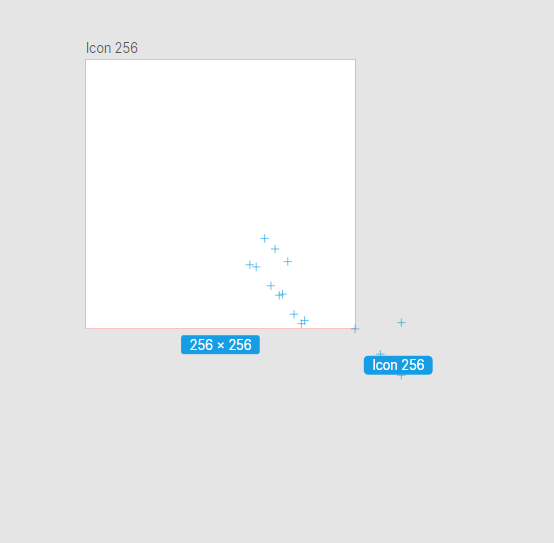
F: On-screen snapping points for common page and screen sizes along with labels, when resizing canvas. See Lunacy for a very elegant implementation. Along with this, allow content to resize with canvas if this is turned on. Like so. Notice those +, they're snapping points for common sizes.
The way you can improve on this is to allow users to create custom sizes as presets and allow these to show up as snapping points with the related label.
Work: Windows 11 | Intel i9 14900HS (24 Cores/32 Threads) | GeForce RTX 4070 | 64 GB RAM
Personal: Windows 11 | Amd Ryzen 9 7950X (16 Core, 32 Threads) | GeForce RTX 3060 | 32 GB RAM -
@Daniel said in XLS for features and ideas - Mega Thread:
@VectorStyler: Continuous export is just another instance of Affinity's confusing UX copy. They of course mean Export Again.
What is it you're referring to here in Affinity? Never heard about UX copy?
-
"User experience copywriting (UX copywriting) is different from regular copywriting, like advertising copywriting. Instead, its purpose is to create copy for digital channels such as apps and websites that tell the user how to do something, for example, how to use a product.
Incorporating good UX copy is a crucial element in product design, and should work in harmony with user interface (UI) design. It plays a big part in helping end users navigate through an action they're trying to complete — whether that's on a website, an app, or another digital channel.
UX copy should always be:
Simple
Easy to understand
Helpful
Precise
It needs to:Answer user questions—before they're asked
Demonstrate knowledge of the product
Set expectations
Examples of UX copy include:Microcopy
Content for a chatbot
Product or in-product copy
Interface copy
UI content"What I do for a living.
Work: Windows 11 | Intel i9 14900HS (24 Cores/32 Threads) | GeForce RTX 4070 | 64 GB RAM
Personal: Windows 11 | Amd Ryzen 9 7950X (16 Core, 32 Threads) | GeForce RTX 3060 | 32 GB RAM -
@VectorStyler: I thought about this way of dealing with objects in VS, and it is indeed a much better and superior way. Because what tree view allows you to do is essentially treat vector fill and vector stroke as two distinct but related objects. You can select and transform fill and stroke independently, as well as apply FX to fill and stroke independently, without having to convert line to shape, and all those extra steps. Does any other program allow you to do this? I checked XDP: No. Illy: No. Figma: No. PL: No. Affinity Designer: No. Inkscape: Yes, but through path effects. And tada, FreeHand does, exactly as I had anticipated!
-
@Daniel said in XLS for features and ideas - Mega Thread:
You can select and transform fill and stroke independently, as well as apply FX to fill and stroke independently, without having to convert line to shape, and all those extra steps.
This can be done in the Appearance panel, for individual stroke / fill items.
-
@Daniel said in XLS for features and ideas - Mega Thread:
On-screen snapping points for common page and screen sizes along with labels, when resizing canvas.
Something similar exists in VS with Size References. You can mark objects with Object -> Size Reference, and then enable "Snap to Size References". Then when resizing or drawing (objects or artboards), their size will snap to the size reference object sizes.
-
Just wanted to thank you for your suggestions and ideas.
I read here every now and then.Even though I only understand 5%, let's say 10%, of everything,
I've never delved particularly deeply into UI design. Instead,
I mostly solved problems with workarounds using scripts (Autohot Key).
I still find the suggestions and the exchange interesting.
I'm always happy to learn something new.Win 11
CPU: AMD Ryzen 5 9600X, 6-core.
GPU: Nvidia Geforce RTX 5070. -
@VectorStyler: I figured out after I wrote the comment. Now it's a matter of consolidating it all together into a single place, contextually, clearly. Please let me know if you ever need any help thinking this through. I'm very invested in this. By the way, I had the opportunity to speak to the developers of Graphite.rs, who're working on something very similar. It's in the next alpha release, actually. It's a FOSS project.
-
@Subpath: You're welcome, and I'll have to confess that I have my own selfish reasons too.
I work for a large creative agency with a huge design team (300 members + 217 contractors); and me and my mates were really pissed at how shitty Adobe was. As a product, as a program, as a company. We hate it. We coined a phrase to express our disgust, derived from Rome, "Adobe Delenda Est". It's a paraphrase of the phrase used by Cato the Elder when he was campaigning for a war against Carthage, Carthago Delenda Est. Carthage Must Be Destroyed! We went on a wild goose chase, studying the UX of literally every software that we could get our hands on, vector, photo editing, 3D, animation, DTP, et al. We also spoke to dozens of illustrators, photographers, designers, architects, engineers, academics. Ran focus groups to discuss issues.
Here's just a small screen grab of a 400-page long file. We then whittled it down to just 9 terms, and 9 simple, If-Then, statements. It took us 8 months of work. We then created a simple matrix to apply the logic. I prefaced it with a manifesto. Here it is: If you wish to read. It's a draft. It's just 1 page. It tells you exactly why I'm doing this. I effin' refuse to settle for shitty design tools. If a carpenter, a plumber, won't settle for shitty hammer or wrench, why should we? But the options are so few.
Of all the vector software we studied, VS has the greatest potential to live up to our war cry, "Adobe Must Be Destroyed". But it cannot happen unless the UI/UX challenges are addressed. That's why I'm doing this.
We were really, really, really banking on another British software, until they effin' sold out to an Australian company, which shall remain unnamed. They've signalled clearly where their focus is, amateur hobbyists, who don't bill their hours to clients, who have the luxury of workarounds.
0_1742988490004_Tool Simplification Matrix.pdf



