VectorStyler
    • Categories
    • Unread
    • Recent
    • Tags
    • Popular
    • Register
    • Login

    XLS for features and ideas - Megathread

    Scheduled Pinned Locked Moved Features and Ideas
    191 Posts 11 Posters 570.1k Views 9 Watching
    Loading More Posts
    • Oldest to Newest
    • Newest to Oldest
    • Most Votes
    Reply
    • Reply as topic
    Log in to reply
    This topic has been deleted. Only users with topic management privileges can see it.
    • DanielD Offline
      Daniel @Subpath
      last edited by

      @Subpath: True, but Corel is Canadian. Your larger point still stands.

      Work: Windows 11 | Intel i9 14900HS (24 Cores/32 Threads) | GeForce RTX 4070 | 64 GB RAM
      Personal: Windows 11 | Amd Ryzen 9 7950X (16 Core, 32 Threads) | GeForce RTX 3060 | 32 GB RAM

      1 Reply Last reply Reply Quote 2
      • DanielD Offline
        Daniel
        last edited by

        Soft Groups: The ability to group objects without bringing them to the same layer. This is useful because it lets you group multiple different elements such as texts objects, objects with FX, gradients and so on. And yet, retain them each in their own categorical layers.

        For instance, I can group a text object with an image, and yet, for the sake of simplicity, I can keep all the images in the image layer. Soft grouping lets me maintain layer order yet have groups outside this order.

        Work: Windows 11 | Intel i9 14900HS (24 Cores/32 Threads) | GeForce RTX 4070 | 64 GB RAM
        Personal: Windows 11 | Amd Ryzen 9 7950X (16 Core, 32 Threads) | GeForce RTX 3060 | 32 GB RAM

        1 Reply Last reply Reply Quote 0
        • DanielD Offline
          Daniel
          last edited by

          Export File Attributes:

          This collects all the information on colour and their hex codes, stroke widths, dash patterns, corner radii, text properties, FX information, broken down per objects. It's a essentially a meta data file. In .text format. Useful to give to client's design teams. As a part of handover.

          Work: Windows 11 | Intel i9 14900HS (24 Cores/32 Threads) | GeForce RTX 4070 | 64 GB RAM
          Personal: Windows 11 | Amd Ryzen 9 7950X (16 Core, 32 Threads) | GeForce RTX 3060 | 32 GB RAM

          VectorStylerV 1 Reply Last reply Reply Quote 1
          • VectorStylerV Offline
            VectorStyler @Daniel
            last edited by VectorStyler

            @Daniel said in XLS for features and ideas - Mega Thread:

            It's a essentially a meta data file.

            One thing to note: in VS you can save the ".vstyler" file in JSON or XML format. This is not an export feature, but it is the native VS file.

            The format can be selected in Document Setup -> File

            1 Reply Last reply Reply Quote 1
            • DanielD Offline
              Daniel
              last edited by

              https://m.youtube.com/watch?v=xn4HuDQEPwM&pp=ygUOQ2FwcyBsb2NrIGJvb2s%3D

              If anyone is interested in how Design has been ruined by vulturous, predatory capitalism, have a listen to this. It's called Caps Lock by Ruben Pater. Book of same name too.

              Work: Windows 11 | Intel i9 14900HS (24 Cores/32 Threads) | GeForce RTX 4070 | 64 GB RAM
              Personal: Windows 11 | Amd Ryzen 9 7950X (16 Core, 32 Threads) | GeForce RTX 3060 | 32 GB RAM

              S 1 Reply Last reply Reply Quote 0
              • S Offline
                Subpath @Daniel
                last edited by Subpath

                @Daniel,

                that's an interesting topic, but I think the "General Dicussion" section of the forum
                may be a better place for this. Additionally, you could add a link to it here.

                Win 11
                CPU: AMD Ryzen 5 9600X, 6-core.
                GPU: Nvidia Geforce RTX 5070.

                1 Reply Last reply Reply Quote 1
                • DanielD Offline
                  Daniel
                  last edited by Daniel

                  @VectorStyler: Icons for showing screen colours, print colours, cyan, magenta, yellow and key. There should be 5 icons. One of it should be a toggle switch between print and screen colours. And there should be three 4 icons showing Cyan, Magenta, Yellow and Key separately.

                  Work: Windows 11 | Intel i9 14900HS (24 Cores/32 Threads) | GeForce RTX 4070 | 64 GB RAM
                  Personal: Windows 11 | Amd Ryzen 9 7950X (16 Core, 32 Threads) | GeForce RTX 3060 | 32 GB RAM

                  1 Reply Last reply Reply Quote 0
                  • DanielD Offline
                    Daniel
                    last edited by Daniel

                    @VectorStyler: Interactive highlight for nodes, handles and curves. This is not a feature but a question of interactive feedback. As already noted, having a highlight to show which exact segment of the curve is being manipulated upon hover is useful. Likewise, the nodes and handles must enlarge slightly (AND/OR change colour?) on hover. This is again quality-of-life improvement. See Lunacy for a version of what I mean.

                    Work: Windows 11 | Intel i9 14900HS (24 Cores/32 Threads) | GeForce RTX 4070 | 64 GB RAM
                    Personal: Windows 11 | Amd Ryzen 9 7950X (16 Core, 32 Threads) | GeForce RTX 3060 | 32 GB RAM

                    1 Reply Last reply Reply Quote 0
                    • DanielD Offline
                      Daniel
                      last edited by Daniel

                      Lock node coordinate position: Select nodes, and lock them to their coordinate positions. Just like you'd do to any object.

                      Work: Windows 11 | Intel i9 14900HS (24 Cores/32 Threads) | GeForce RTX 4070 | 64 GB RAM
                      Personal: Windows 11 | Amd Ryzen 9 7950X (16 Core, 32 Threads) | GeForce RTX 3060 | 32 GB RAM

                      VectorStylerV 1 Reply Last reply Reply Quote 1
                      • VectorStylerV Offline
                        VectorStyler @Daniel
                        last edited by

                        @Daniel said in XLS for features and ideas - Mega Thread:

                        Lock node coordinate position: Select nodes, and lock them to their coordinate positions. Just like you'd like any object.

                        This I assume would be used in the Node tool, so it cannot move those nodes.

                        But when moving the whole objects, these should be movable, right?

                        DanielD 1 Reply Last reply Reply Quote 0
                        • DanielD Offline
                          Daniel @VectorStyler
                          last edited by Daniel

                          @VectorStyler: Yes, that is correct. The node position should locked relative to the rest of the nodes. Not the absolute position on canvas. That would mean that the object itself is locked. Since the object cannot be moved.

                          Think of it like stakes in the ground when you're putting up a tent. The stake position once hammered in remains unchanged, while you can adjust the rest of the tent flaps and cover.

                          Work: Windows 11 | Intel i9 14900HS (24 Cores/32 Threads) | GeForce RTX 4070 | 64 GB RAM
                          Personal: Windows 11 | Amd Ryzen 9 7950X (16 Core, 32 Threads) | GeForce RTX 3060 | 32 GB RAM

                          VectorStylerV 1 Reply Last reply Reply Quote 1
                          • VectorStylerV Offline
                            VectorStyler @Daniel
                            last edited by

                            @Daniel Can you collect these also into the XLS file, for better organization.

                            DanielD 1 Reply Last reply Reply Quote 1
                            • DanielD Offline
                              Daniel @VectorStyler
                              last edited by

                              @VectorStyler will do shortly

                              Work: Windows 11 | Intel i9 14900HS (24 Cores/32 Threads) | GeForce RTX 4070 | 64 GB RAM
                              Personal: Windows 11 | Amd Ryzen 9 7950X (16 Core, 32 Threads) | GeForce RTX 3060 | 32 GB RAM

                              1 Reply Last reply Reply Quote 1
                              • DanielD Offline
                                Daniel
                                last edited by Daniel

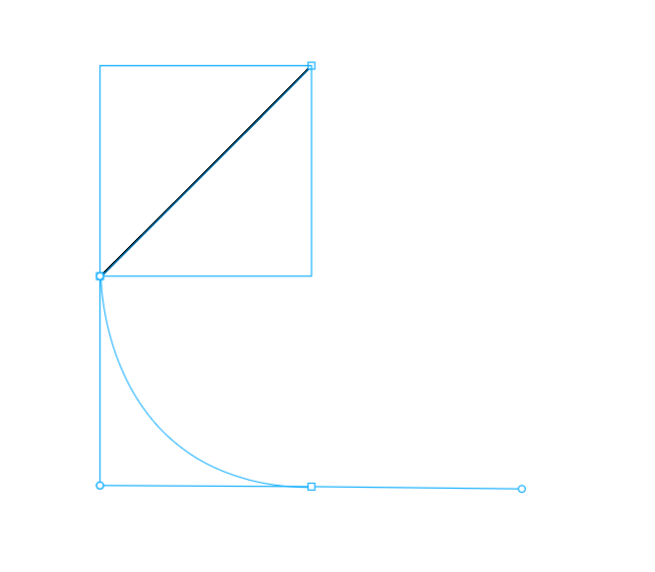
                                @VectorStyler, @Boldline: Graphite.Rs has a very useful 45-degree snapping guide when using pen-tool. This is very useful for creating smooth curves with just the normal pen tool. It might be worth adding this before Bezigon Tool if you think Bezigon will take time. See below for what I mean.

                                But if you think Bezigon can be implemented quickly, then it is worth shipping this guideline feature along with it. Because they compliment each other. Will collect into XLS when I do housekeeping on this thread.

                                P.S: Checked this out further. Holding down shift actually calls up an additional dashed line guide, which I can't screenshot as I have to let go off Shift. This guide can snap at 15-degree incremental points. Super useful. Super intuitive.
                                0_1743420846608_35d36aea-a493-4c68-914f-08a8b9d56592-image.png

                                Work: Windows 11 | Intel i9 14900HS (24 Cores/32 Threads) | GeForce RTX 4070 | 64 GB RAM
                                Personal: Windows 11 | Amd Ryzen 9 7950X (16 Core, 32 Threads) | GeForce RTX 3060 | 32 GB RAM

                                1 Reply Last reply Reply Quote 2
                                • DanielD Offline
                                  Daniel
                                  last edited by

                                  @VectorStyler: All features and ideas are up to date on XLS. And added one new idea: Group nodes.

                                  Work: Windows 11 | Intel i9 14900HS (24 Cores/32 Threads) | GeForce RTX 4070 | 64 GB RAM
                                  Personal: Windows 11 | Amd Ryzen 9 7950X (16 Core, 32 Threads) | GeForce RTX 3060 | 32 GB RAM

                                  1 Reply Last reply Reply Quote 1
                                  • DanielD Offline
                                    Daniel
                                    last edited by Daniel

                                    Embed External Image File: Don't know what your plans are for developing a dedicated image editor (PictureStyler?). If you have no such plans (I'd actually prefer this as you can focus exclusively on vector editing) , then here's an idea: Allow users to embed an image file within VS (like Placeholder objects in PL, and Smart Objects in PS, and linked files in Affinity). Then, allow users to click through to a dedicated image editing app (I recommend PL), make their edits and come back.

                                    The reason I recommend PL is because PL already supports external applications. Exactly as I've described here. You can open any object in an external application just as long as that external application saves in the same location, over the same file, as you were working on when you were inside PL. The support formats are TIFF, JPEG and PDF. That is broad enough for most use cases.

                                    This might not be an easy task to accomplish. Might want to slot in for the long term roadmap.

                                    That is my official 100th post on the forum! 👀 🕺 😂

                                    Work: Windows 11 | Intel i9 14900HS (24 Cores/32 Threads) | GeForce RTX 4070 | 64 GB RAM
                                    Personal: Windows 11 | Amd Ryzen 9 7950X (16 Core, 32 Threads) | GeForce RTX 3060 | 32 GB RAM

                                    1 Reply Last reply Reply Quote 1
                                    • DanielD Offline
                                      Daniel
                                      last edited by

                                      Contextual changes to the colour swatches upon selecting objects. Indicating stroke, fill, and gradient stops.

                                      Work: Windows 11 | Intel i9 14900HS (24 Cores/32 Threads) | GeForce RTX 4070 | 64 GB RAM
                                      Personal: Windows 11 | Amd Ryzen 9 7950X (16 Core, 32 Threads) | GeForce RTX 3060 | 32 GB RAM

                                      1 Reply Last reply Reply Quote 1
                                      • DanielD Offline
                                        Daniel
                                        last edited by

                                        Close all files without saving and return to files, to the current scroll location in each file.

                                        Work: Windows 11 | Intel i9 14900HS (24 Cores/32 Threads) | GeForce RTX 4070 | 64 GB RAM
                                        Personal: Windows 11 | Amd Ryzen 9 7950X (16 Core, 32 Threads) | GeForce RTX 3060 | 32 GB RAM

                                        VectorStylerV 1 Reply Last reply Reply Quote 1
                                        • DanielD Offline
                                          Daniel
                                          last edited by

                                          Thumbnail view on hover over the files tab. If multiple files are open in VS, allow a thumbnail view on hovering over the tabs.

                                          Work: Windows 11 | Intel i9 14900HS (24 Cores/32 Threads) | GeForce RTX 4070 | 64 GB RAM
                                          Personal: Windows 11 | Amd Ryzen 9 7950X (16 Core, 32 Threads) | GeForce RTX 3060 | 32 GB RAM

                                          1 Reply Last reply Reply Quote 1
                                          • VectorStylerV Offline
                                            VectorStyler @Daniel
                                            last edited by

                                            @Daniel said in XLS for features and ideas - Mega Thread:

                                            Close all files without saving and return to files, to the current scroll location in each file.

                                            This is not clear: where is the current scroll location ? Is the a "reveal file" type of action?

                                            DanielD 1 Reply Last reply Reply Quote 0
                                            • First post
                                              Last post
