VectorStyler
    • Categories
    • Unread
    • Recent
    • Tags
    • Popular
    • Register
    • Login

    What tools are efficient for drawing curves In one step?

    Scheduled Pinned Locked Moved General Discussion
    25 Posts 5 Posters 38.0k Views 4 Watching
    Loading More Posts
    • Oldest to Newest
    • Newest to Oldest
    • Most Votes
    Reply
    • Reply as topic
    Log in to reply
    This topic has been deleted. Only users with topic management privileges can see it.
    • DanielD Offline
      Daniel @Subpath
      last edited by Daniel

      @Subpath: it is beautiful. Thank you. The idea of smooth curves is so ancient. As in literally thousands of years old. If you'd like to see fascinating study of how curves were used across cultures, get a used copy of Designa by Wooden Books. And get Helicon to go with it.

      https://woodenbooks.com/index.php?id_product=203&controller=product

      Every page is packed with information.

      Work: Windows 11 | Intel i9 14900HS (24 Cores/32 Threads) | GeForce RTX 4070 | 64 GB RAM
      Personal: Windows 11 | Amd Ryzen 9 7950X (16 Core, 32 Threads) | GeForce RTX 3060 | 32 GB RAM

      1 Reply Last reply Reply Quote 1
      • L Offline
        lilith @lilith
        last edited by

        @lilith Adobe Illustrator Curvature mathematical principle(maybe):
        https://people.engr.tamu.edu/schaefer/research/kcurves.pdf

        L 1 Reply Last reply Reply Quote 0
        • L Offline
          lilith @lilith
          last edited by

          @lilith A new spline:
          https://raphlinus.github.io/curves/2018/12/21/new-spline.html
          https://github.com/raphlinus/spiro
          https://github.com/raphlinus/spline-research
          alt text

          1 Reply Last reply Reply Quote 1
          • L Offline
            lilith @Subpath
            last edited by lilith

            @Subpath @VectorStyler look this :https://raphlinus.github.io/curves/2018/12/21/new-spline.html
            try it :https://spline.technology/demo/

            S 1 Reply Last reply Reply Quote 1
            • S Offline
              Subpath @lilith
              last edited by

              @lilith

              Thanks, a great find. I like it and found it interesting
              to play with the demo. Seems like an easy way for
              nice curves.

              Win 11
              CPU: AMD Ryzen 5 9600X, 6-core.
              GPU: Nvidia Geforce RTX 5070.

              DanielD 1 Reply Last reply Reply Quote 1
              • DanielD Offline
                Daniel @Subpath
                last edited by Daniel

                @lilith that's the hyperbezier combining three types of splines.

                Work: Windows 11 | Intel i9 14900HS (24 Cores/32 Threads) | GeForce RTX 4070 | 64 GB RAM
                Personal: Windows 11 | Amd Ryzen 9 7950X (16 Core, 32 Threads) | GeForce RTX 3060 | 32 GB RAM

                1 Reply Last reply Reply Quote 1
                • DanielD Offline
                  Daniel
                  last edited by

                  @VectorStyler: Have you ever used something all your life before you suddenly realised how it actually works? And you feel stupid for never noticing? Well, I just had that moment. Xara's Shape Tool (the alternative to pen tool) is actually a modified Catmull Rom Spline! DOH!!! It has existed for 3 decades. The cubic bezier pen tool is cleverly and poorly hidden away within the button palette as a separate icon that you can pull into your interface. That's just stupid.

                  Work: Windows 11 | Intel i9 14900HS (24 Cores/32 Threads) | GeForce RTX 4070 | 64 GB RAM
                  Personal: Windows 11 | Amd Ryzen 9 7950X (16 Core, 32 Threads) | GeForce RTX 3060 | 32 GB RAM

                  VectorStylerV 1 Reply Last reply Reply Quote 0
                  • VectorStylerV Offline
                    VectorStyler @Daniel
                    last edited by

                    @Daniel said in What tools are efficient for drawing curves In one step?:

                    The cubic bezier pen tool is cleverly and poorly hidden away within the button palette as a separate icon that you can pull into your interface.

                    maybe the UI got too complicated with all the options.

                    I will try this once I get the time.

                    DanielD 1 Reply Last reply Reply Quote 1
                    • DanielD Offline
                      Daniel @VectorStyler
                      last edited by Daniel

                      @VectorStyler: Sure, please do. You'll find it under Windows >> Control Bar >> Button Palette. The last option in the list. And you'll get this. 0_1743593287956_55b5abbf-155e-48aa-ab26-e5b7db924b8d-image.png
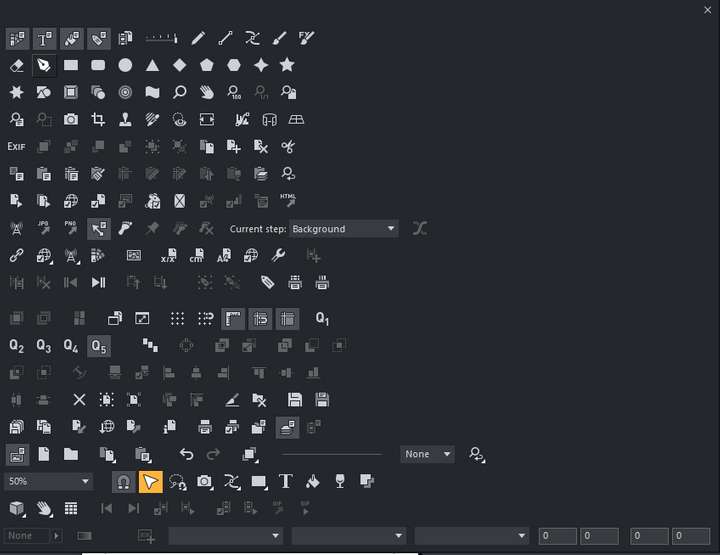
                      Second item on second row. Hold down Alt and pull into your tool bar.

                      Here's something else that's quite cool about Xara. You can hold down Alt and pull most icons and place them into your toolbar.

                      However, I don't think it was because of the complicated UI. I think they made a deliberate choice to promote the Shape Tool, which is extremely useful for organic shape drawing.

                      Work: Windows 11 | Intel i9 14900HS (24 Cores/32 Threads) | GeForce RTX 4070 | 64 GB RAM
                      Personal: Windows 11 | Amd Ryzen 9 7950X (16 Core, 32 Threads) | GeForce RTX 3060 | 32 GB RAM

                      1 Reply Last reply Reply Quote 1
                      • DanielD Offline
                        Daniel
                        last edited by Daniel

                        https://www.dafont.com/calligraphia-latina-free.charmap - This is one of the most beautiful decorative fonts there is, a reproduction of Johan Georg Schwander's Magnum Opus, Calligraphia Latina. The reason I'm posting here is, if anyone would like to practice their pen tool skills, I recommend taking one of these glyphs and reproducing it in one uninterrupted flow. And you'll realise that it's well-nigh impossible to do that without the Bezigon or Spiro Path. Again, the challenge isn't that you can't do it with the pen tool. You can. The challenge is that doing it one, uninterrupted movement end-to-end takes extraordinary skill and effort.

                        Original Specimen are here. https://archive.org/details/calligraphycalli0000schw

                        Work: Windows 11 | Intel i9 14900HS (24 Cores/32 Threads) | GeForce RTX 4070 | 64 GB RAM
                        Personal: Windows 11 | Amd Ryzen 9 7950X (16 Core, 32 Threads) | GeForce RTX 3060 | 32 GB RAM

                        1 Reply Last reply Reply Quote 1
                        • F Offline
                          fde101 Global Moderator @Daniel
                          last edited by

                          @Daniel said in What tools are efficient for drawing curves In one step?:

                          Cubic bezier - Has two points, start and end, and four control handles, 2 each. The so called "pen tool".

                          Not quite.

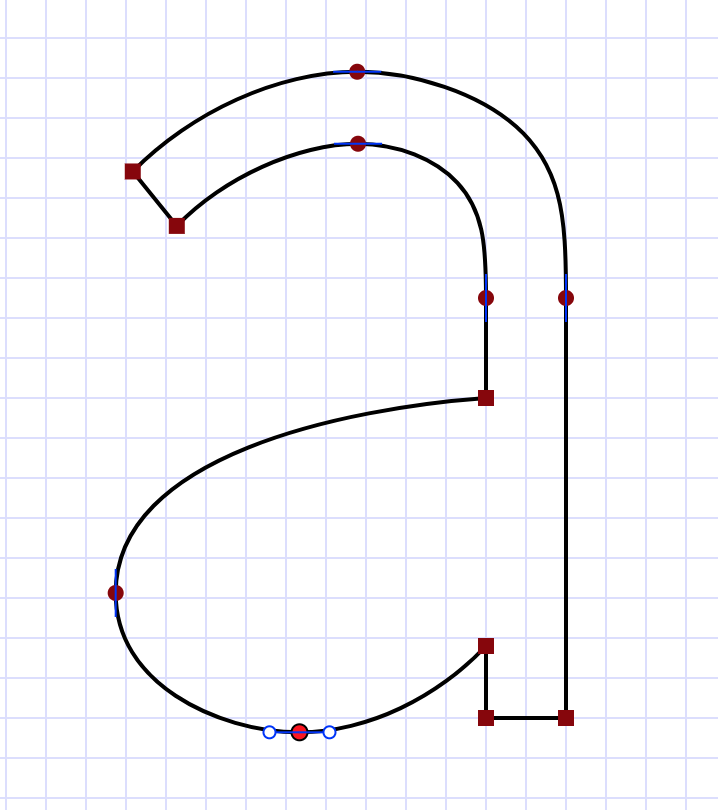
                          Not quite - each segment of a true Cubic Bézier has two control points, one for each end - you often see two control points at a handle because there is one for each of the segments connected to it; if the curve is not closed then the end points will only have one each since there is only one segment coming from them.

                          Curiously, the pen tools in most drawing apps do present a second control handle when manipulating an end point on an open shape, though some of them (such as Affinity Designer) only show it when you are manipulating the one that belongs there. Mathematically that shouldn't be there, which has me wondering what the apps are actually doing when they present one on that end point.

                          1 Reply Last reply Reply Quote 2
                          • First post
                            Last post
