VectorStyler
    • Categories
    • Unread
    • Recent
    • Tags
    • Popular
    • Register
    • Login

    Snapping forces orthogonal

    Scheduled Pinned Locked Moved Bugs in VectorStyler
    11 Posts 2 Posters 7.0k Views 2 Watching
    Loading More Posts
    • Oldest to Newest
    • Newest to Oldest
    • Most Votes
    Reply
    • Reply as topic
    Log in to reply
    This topic has been deleted. Only users with topic management privileges can see it.
    • F Offline
      Fertuffo
      last edited by

      Why when I enable snapping the lines are forced to orthogonal direction, even though I didn't enable the option?

      VectorStylerV 1 Reply Last reply Reply Quote 0
      • VectorStylerV Offline
        VectorStyler @Fertuffo
        last edited by

        @Fertuffo I tried to replicate this, but with snapping enabled, I can draw lines in any direction.
        Which snapping option was enabled?
        Maybe a recording might help.

        F 1 Reply Last reply Reply Quote 0
        • F Offline
          Fertuffo @VectorStyler
          last edited by

          @VectorStyler

          This is the short clip
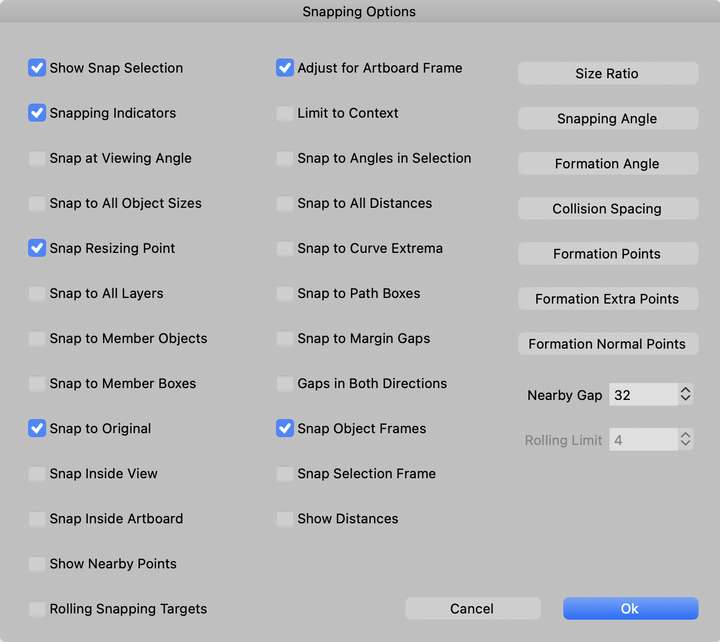
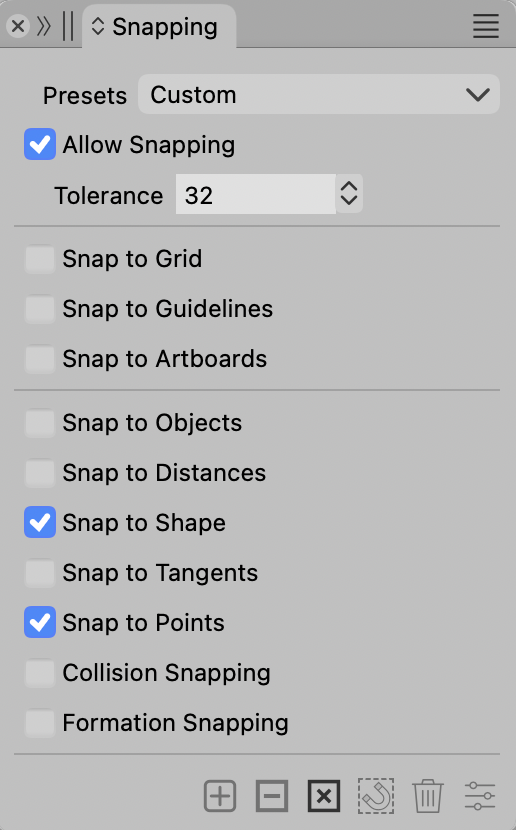
          and these are my options:

          1_1748631716806_SCR-20250530-seno.png
          0_1748631816868_SCR-20250530-seko.png

          VectorStylerV 1 Reply Last reply Reply Quote 1
          • VectorStylerV Offline
            VectorStyler @Fertuffo
            last edited by

            @Fertuffo I set the same options, but I still could not replicate it, here is how I have it: https://share.cleanshot.com/m2mG79yj

            is the Shift key held while using the Pen tool? than can cause this.

            Otherwise, try reseting all settings / workspace to the defaults.

            F 1 Reply Last reply Reply Quote 0
            • F Offline
              Fertuffo @VectorStyler
              last edited by

              @VectorStyler Resetting to default workspace worked just fine.
              Is there a way to temporarily disable the ortho/45 degree snap? I noticed that this feature is very useful but in some cases can cause problems when snapping to nearby points.
              Thank you

              F 1 Reply Last reply Reply Quote 0
              • F Offline
                Fertuffo @Fertuffo
                last edited by

                @Fertuffo I have to correct myself. After creating a new document, the problem reoccurs. Resetting the workspace now does not solve the problem anymore.
                The snapping system has been behaving very strangely lately

                VectorStylerV 1 Reply Last reply Reply Quote 0
                • VectorStylerV Offline
                  VectorStyler @Fertuffo
                  last edited by

                  @Fertuffo Send me by email your settings / workspace files.

                  F 1 Reply Last reply Reply Quote 0
                  • F Offline
                    Fertuffo @VectorStyler
                    last edited by

                    @VectorStyler
                    Ok.
                    The problems seemed to be solved when I saved my custom settings to a file. Oddly enough, after some time of working, the snapping started to go crazy again.
                    I'll send you my settings anyway.
                    Thanks

                    VectorStylerV 2 Replies Last reply Reply Quote 1
                    • VectorStylerV Offline
                      VectorStyler @Fertuffo
                      last edited by

                      @Fertuffo Got the workspace files, but still could not replicate it.
                      I opened a bug on this and will try to find out what could cause this kind of problem.

                      1 Reply Last reply Reply Quote 0
                      • VectorStylerV Offline
                        VectorStyler @Fertuffo
                        last edited by

                        @Fertuffo if the "Allow Snapping" (in Snapping panel) is disabled, then is there an issue?

                        F 1 Reply Last reply Reply Quote 0
                        • F Offline
                          Fertuffo @VectorStyler
                          last edited by

                          @VectorStyler said in Snapping forces orthogonal:

                          if the "Allow Snapping" (in Snapping panel) is disabled, then is there an issue?
                          no issues when "Allow snapping" is disabled.
                          I'm not having any problems at the moment with the snapping. I'll let you know.
                          Thanks

                          1 Reply Last reply Reply Quote 1
                          • First post
                            Last post