VectorStyler
    • Categories
    • Unread
    • Recent
    • Tags
    • Popular
    • Register
    • Login

    Bugs on node editing
    Scheduled Pinned Locked Moved Bugs in VectorStyler
    5 Posts 2 Posters 2.7k Views 2 Watching
    Loading More Posts
    • Oldest to Newest
    • Newest to Oldest
    • Most Votes
    Reply
    • Reply as topic
    Log in to reply
    This topic has been deleted. Only users with topic management privileges can see it.
    • F Offline
      Fertuffo
      last edited by

      I experienced two potential bugs:

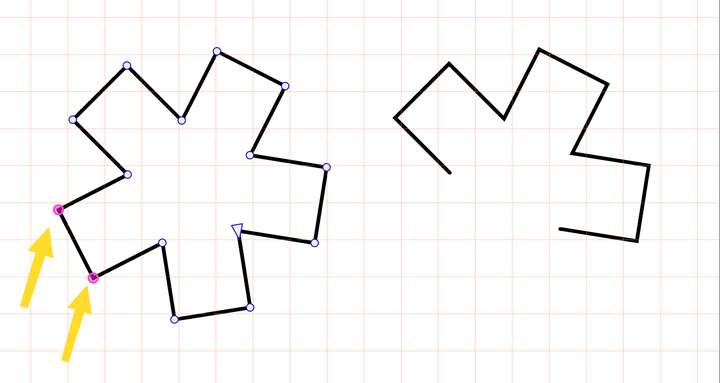
      1. "Remove between nodes" command behaves in unwanted ways:

      0_1751460519830_SCR-20250702-ndkd.png

      0_1751460162634_SCR-20250702-mzca.png

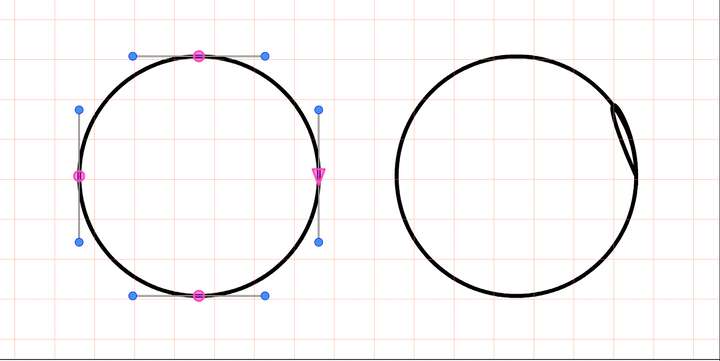
      1. "Add path nodes" command returns weird curves:

      0_1751460464830_SCR-20250702-ndbi.png

      0_1751460175463_SCR-20250702-naaz.png

      VectorStylerV 1 Reply Last reply Reply Quote 1
      • VectorStylerV Offline
        VectorStyler @Fertuffo
        last edited by

        @Fertuffo I cannot replicate these. Are these commands accessed from the Path panel?

        F 1 Reply Last reply Reply Quote 0
        • F Offline
          Fertuffo @VectorStyler
          last edited by

          @VectorStyler "Remove between nodes" is a button accessed in the "Customize Toolboxes" menu.
          "Add path nodes" is the last button in the Path panel.

          The first one would be very useful, but removes way more nodes than expected

          VectorStylerV 1 Reply Last reply Reply Quote 1
          • VectorStylerV Offline
            VectorStyler @Fertuffo
            last edited by

            @Fertuffo Got it, now I can replicate this, I will fix this for the next build

            F 1 Reply Last reply Reply Quote 1
            • F Offline
              Fertuffo @VectorStyler
              last edited by

              @VectorStyler Thanks very much

              1 Reply Last reply Reply Quote 0
              • First post
                Last post