VectorStyler
    • Categories
    • Unread
    • Recent
    • Tags
    • Popular
    • Register
    • Login

    Control key modifier when moving node, the bottom right node moves as well

    Scheduled Pinned Locked Moved Bugs in VectorStyler
    3 Posts 2 Posters 1.3k Views 1 Watching
    Loading More Posts
    • Oldest to Newest
    • Newest to Oldest
    • Most Votes
    Reply
    • Reply as topic
    Log in to reply
    This topic has been deleted. Only users with topic management privileges can see it.
    • BoldlineB Online
      Boldline
      last edited by

      I think this is a bug. I am trying to move the top middle node straight upward without deviating to the left or right sides. Last I remember, the control modifier on mac was supposed to allow this. When I depress the control key modifier while moving a node with my mouse, the bottom right node moves along with it.

      I apologize for asking this again, but I still cannot figure out how to move a node and constrain it's direction to a 90 degree angle for example... even the control key modifier aside from this issue with the extra node moving does not accomplish that goal.
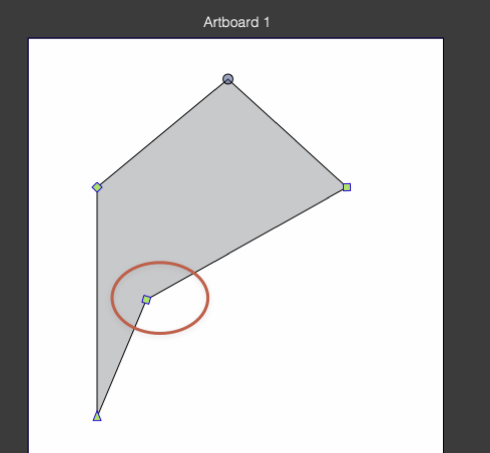
      In this video showing the problem, I accidentally added another node on the left side and it also moved when I pulled the node in the center top

      0_1759853297544_71a1a295-3a86-4b3c-9da7-0ed614e6866f-image.png

      🍎 macOS Tahoe 26.2, Mac mini (M1, 2020), Chip Apple M1, Memory 16 GB
      Cintiq 27QHD Display and LG Ultra HD Display

      VectorStylerV 1 Reply Last reply Reply Quote 1
      • VectorStylerV Offline
        VectorStyler @Boldline
        last edited by

        @Boldline It should work with holding Shift.

        BoldlineB 1 Reply Last reply Reply Quote 0
        • BoldlineB Online
          Boldline @VectorStyler
          last edited by

          @VectorStyler said in Control key modifier when moving node, the bottom right node moves as well:

          @Boldline It should work with holding Shift.

          If I use shift, it does not want to cooperate and go straight upward.

          UPDATE: I had "constrain line angle" checked. When I turned this off, it allowed for shift to work as intended.
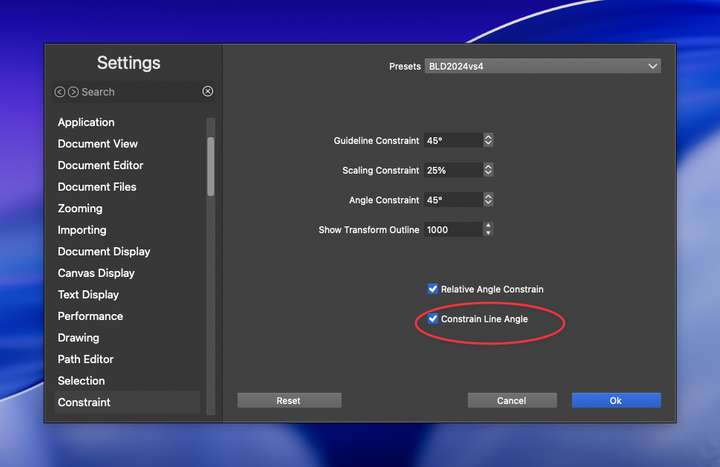
          0_1759855206331_90a63bef-fe52-4cce-85d2-a1656a1702a7-CleanShot 2025-10-07 at 12.38.27.png

          🍎 macOS Tahoe 26.2, Mac mini (M1, 2020), Chip Apple M1, Memory 16 GB
          Cintiq 27QHD Display and LG Ultra HD Display

          1 Reply Last reply Reply Quote 1
          • First post
            Last post
