VectorStyler
    • Categories
    • Unread
    • Recent
    • Tags
    • Popular
    • Register
    • Login

    New Youtube video : VectorStyler Repeater Basics

    Scheduled Pinned Locked Moved Tutorials
    21 Posts 6 Posters 8.3k Views 6 Watching
    Loading More Posts
    • Oldest to Newest
    • Newest to Oldest
    • Most Votes
    Reply
    • Reply as topic
    Log in to reply
    This topic has been deleted. Only users with topic management privileges can see it.
    • S Offline
      Subpath @EricP
      last edited by Subpath

      @EricP

      Great job! 👍
      I learned a few things I didn't know before.

      Since I also enjoy experimenting, simply for the joy of discovery,
      your videos really appeal to me. I'm excited to see what else you
      have in store. ☺

      I will of course recommend your channel.

      Win 11
      CPU: AMD Ryzen 5 9600X, 6-core.
      GPU: Nvidia Geforce RTX 5070.

      1 Reply Last reply Reply Quote 1
      • E Offline
        EricP
        last edited by

        @Subpath Thanks! Glad you liked it and learnt new stuff. I usually learn from you 🙂

        S 1 Reply Last reply Reply Quote 1
        • S Offline
          Subpath @EricP
          last edited by Subpath

          @EricP
          🙂
          Thus, we will all become smarter.

          Win 11
          CPU: AMD Ryzen 5 9600X, 6-core.
          GPU: Nvidia Geforce RTX 5070.

          1 Reply Last reply Reply Quote 1
          • A Offline
            achillepr @EricP
            last edited by

            @EricP Thanks, we need many many tutorials. VS is very good but quite difficult!

            E 1 Reply Last reply Reply Quote 1
            • S Offline
              Subpath
              last edited by Subpath

              @EricP

              Wow!
              You're pretty fast.
              I've already seen your second video.
              Really impressive.

              @achillepr
              VectorStyler isn't something you can learn; you can just wander
              around in it and admire the scenery. 🙂

              But joking aside, it will take some time, but the basic things
              aren't that complicated. You can always ask questions; usually
              someone will be able to help.

              Win 11
              CPU: AMD Ryzen 5 9600X, 6-core.
              GPU: Nvidia Geforce RTX 5070.

              E 1 Reply Last reply Reply Quote 1
              • E Offline
                EricP @achillepr
                last edited by

                @achillepr absolutely ! I'm glad this is helpful for existing users too.
                My goal is to help with the initial learning curve, which took me some time due to limited documentation and resources.

                Once you understand how some of the unique concepts work in the application, things go much faster.

                1 Reply Last reply Reply Quote 0
                • E Offline
                  EricP @Subpath
                  last edited by EricP

                  @Subpath Yes, I just published another video. It took me ages to get to do the first one, but then it's pretty easy. I know you said you don't want to publish your tutorials on YT but maybe you could think about it again:)

                  Link to new video Apply Color to VectorStyler Repeater : https://youtu.be/t3J3pAQj0dY?si=50YaFozqryNTOQnW
                  0_1762523494102_VectorStyler repeater coloring thumbnail.png

                  S 1 Reply Last reply Reply Quote 4
                  • S Offline
                    Subpath @EricP
                    last edited by Subpath

                    @EricP said in New Youtube video : VectorStyler Repeater Basics:

                    I know you said you don't want to publish your tutorials on YT but maybe you could think about it again:)

                    I've thought about this a few times, partly because I keep getting
                    asked about it. I can only speak for now, but I consider it still very
                    unlikely.

                    Win 11
                    CPU: AMD Ryzen 5 9600X, 6-core.
                    GPU: Nvidia Geforce RTX 5070.

                    1 Reply Last reply Reply Quote 1
                    • L Online
                      Li Xiao @EricP
                      last edited by

                      @EricP
                      The video tutorial with operation and voice narration makes it much easier for beginners to understand — great job!

                      Since I made the purchase, I’ve recorded over two hundred videos. Most of them were made for friends who bought the software after my recommendation, mainly to solve specific issues. The demo files used in those recordings were provided by the people who asked the questions, so they’re not suitable for public sharing.

                      The combination of various features makes VectorStyler incredibly powerful. Even when I encounter some issues, it inspires me to think of many ways to solve them.

                      S 1 Reply Last reply Reply Quote 4
                      • S Offline
                        Subpath @Li Xiao
                        last edited by Subpath

                        @Li-Xiao said in New Youtube video : VectorStyler Repeater Basics:

                        The combination of various features makes VectorStyler incredibly powerful. Even when I encounter some issues, it inspires me to think of many ways to solve them.

                        That's exactly one of the reasons why I like VS. The many ways to
                        approach a task. I'm quite aware that this can be overwhelming for
                        some.

                        To them, I can only recommend sticking to what they need or are
                        familiar with. I think the basics aren't complicated, sometimes not
                        in the way you're used to, but not complicated. Later, they'll really
                        appreciate the other possibilities.

                        When I started with computer illustration, I came across an article—
                        I think it was in (german) Page magazine—titled "Zen in the Art of Illustration."
                        The lessons I learned from this article have stayed with me ever
                        since and have left a deep impression. I believe the title was derived
                        from the book "Zen and the Art of Motorcycle Maintenance"

                        A simple exercise was to draw a very child like basic house using
                        every conceivable tool, and there are countless possibilities.

                        Win 11
                        CPU: AMD Ryzen 5 9600X, 6-core.
                        GPU: Nvidia Geforce RTX 5070.

                        1 Reply Last reply Reply Quote 3
                        • E Offline
                          EricP
                          last edited by

                          New video posted : Control your shapes with variables in VectorStyler

                          https://youtu.be/K2JZD1L1b4o

                          0_1762882677009_VectorStyler number variables thumbnail.png

                          S 1 Reply Last reply Reply Quote 5
                          • S Offline
                            Subpath @EricP
                            last edited by Subpath

                            @EricP

                            Isn't that vector graphics magic? 🙂

                            My admiration and respect for @VectorStyler the Dev of
                            this Gem has always been very high. But from today on,
                            he is the "David Copperfield of vector graphics" to me. 🎩

                            Btw. a very deep bow from me to you. For making this great Tutorials ! 👍

                            Win 11
                            CPU: AMD Ryzen 5 9600X, 6-core.
                            GPU: Nvidia Geforce RTX 5070.

                            1 Reply Last reply Reply Quote 3
                            • E Offline
                              EricP
                              last edited by

                              New video posted : Transform Shapes with Effects in VectorStyler

                              link : https://youtu.be/84fYbg1jcjQ?si=Gq6aG8RziVej3QQr

                              0_1763215157554_VS shape effects thumbnail.png

                              1 Reply Last reply Reply Quote 5
                              • K Offline
                                Kumr
                                last edited by

                                @EricP There are amazing videos and are very helpful. Need some help here for a project.

                                I am trying to pack the three objects in the shape. I am not able to figure out how to add space and spread objects of variable shapes and sizes in random mode. Kind of circle packing but with objects.
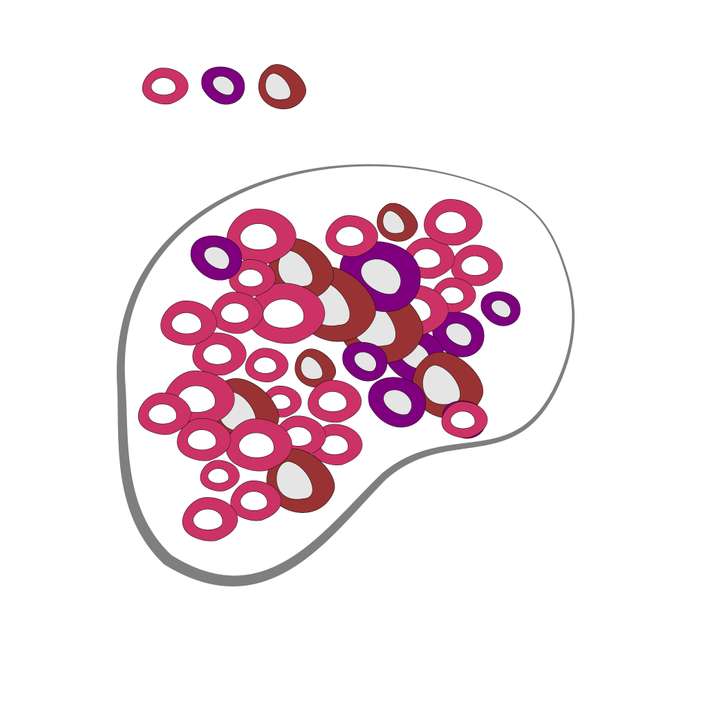
                                0_1763354040182_Repeater.jpg

                                Attaching the file here.
                                0_1763354384477_Repeater.vstyler

                                M1 MacBook Air, 16GB, macOS Sonoma 14.4.1

                                1 Reply Last reply Reply Quote 0
                                • E Offline
                                  EricP
                                  last edited by

                                  @Kumr yes there is no circle packing option in VectorStyler, at least yet. It was requested but it's quite complex to implement.

                                  I tried to modify your file but could not get to satisfactory design.
                                  I tried the following :
                                  1- use grid pattern instead of random, to have control on spacing, then use "adjustement" settings in additional repeater settings to randomize a bit the position and rotation
                                  2 add a transparent circle to each shape to impose some spacing on the random distribution, but it did not have an effect (2nd canvas)

                                  maybe others will have better ideas

                                  0_1763362871384_1763354385554-repeater2.vstyler

                                  S 1 Reply Last reply Reply Quote 0
                                  • S Offline
                                    Subpath @EricP
                                    last edited by Subpath

                                    @EricP , @Kumr

                                    There is a little Circle Packing Tool here:
                                    https://github.com/ehufsted/HalftonePAL
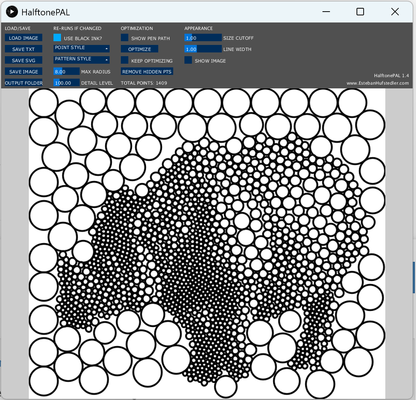
                                    0_1763364931484_CirclePacking-tool.png

                                    You can export the file as an SVG.
                                    Import it into VS.
                                    Ungroup all and fill all with the same color.

                                    Then, use the "Colorize" with only three colors and select "Randomize."
                                    After that, you can select the objects by their color
                                    and modify them, resize them, or do whatever you want.

                                    Win 11
                                    CPU: AMD Ryzen 5 9600X, 6-core.
                                    GPU: Nvidia Geforce RTX 5070.

                                    1 Reply Last reply Reply Quote 3
                                    • K Offline
                                      Kumr
                                      last edited by

                                      @EricP thank you for all your time and help. I’ll try to use the methods in the file shared.

                                      @Subpath that little tool might have been helpful, but it’s not opening on my Mac. I keep getting a message that it’s either damaged or can’t be opened. I tried the fix suggested on the website, but no luck.

                                      There are some scripts available for Illustrator that can be used for circle packing. I’ll experiment with them and hope it works.

                                      Thanks again for the help.

                                      M1 MacBook Air, 16GB, macOS Sonoma 14.4.1

                                      1 Reply Last reply Reply Quote 2
                                      • E Offline
                                        EricP
                                        last edited by

                                        New video posted : Color your vector design in vectorstyler

                                        https://youtu.be/e5BqIlhPDVw?si=SzJdZePtnPI18W4l
                                        0_1763918624781_VS color effects.png

                                        1 Reply Last reply Reply Quote 5
                                        • First post
                                          Last post