Bug: selecting multiple nodes and/or handles stops working
-
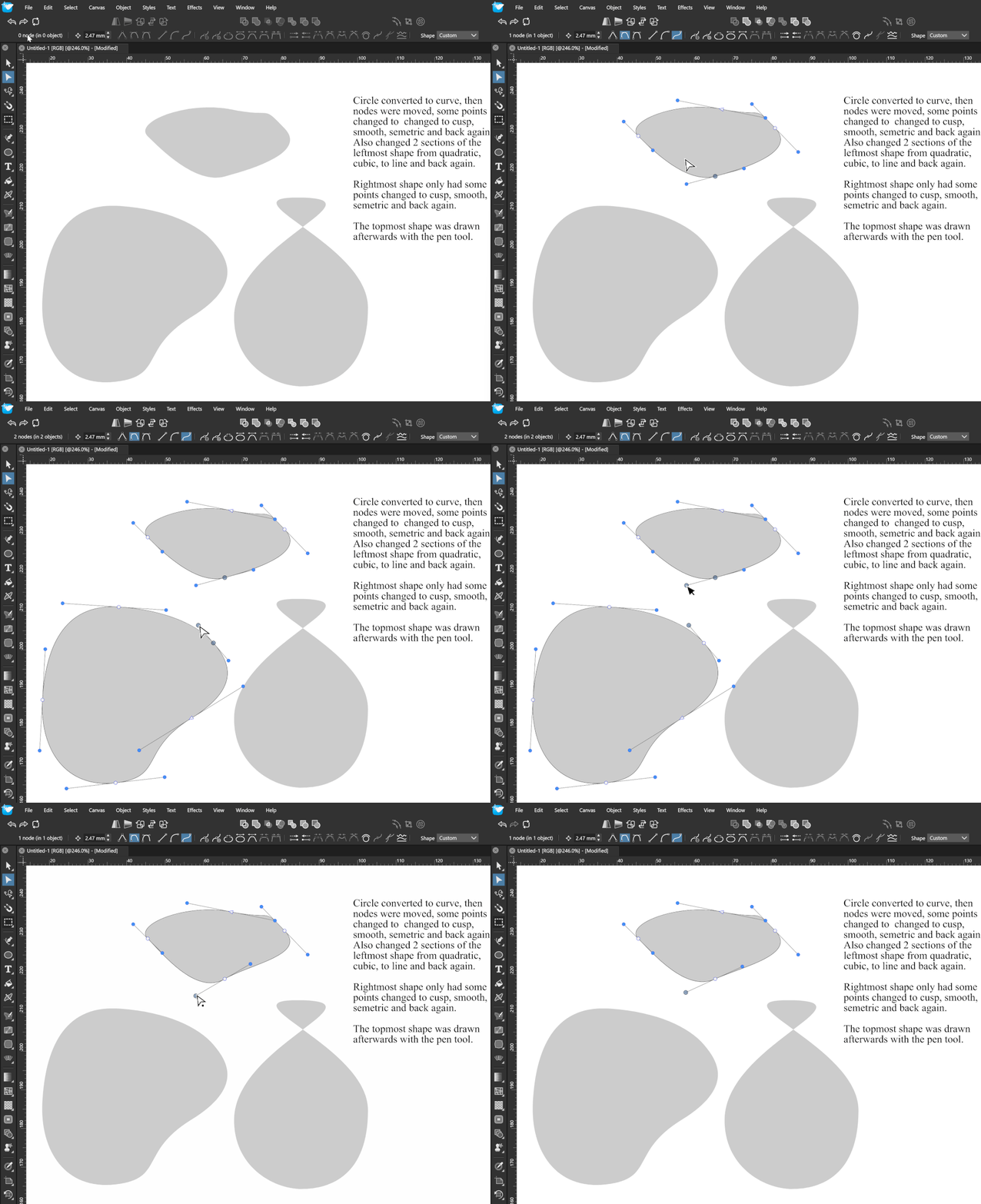
@VectorStyler Hey I managed to reproduce the same issue again. I wrote a note of the steps I took in this gif.
The lower shapes were just circles that i converted to curves. The top shape was drawn directly with the pen tool.
The lower shapes, I just moved some nodes with the node tool. Changed some node types and segment types. That's all. Afterward, selecting multiple points of the top shape and bottom shape doesn't work as before.Sure, clicking and dragging allows selecting nodes from both shapes with the node tool but this does not fix the bug - which is that node handes from two different shapes can not be moved together as before. It also makes precise shape editing a bit annoying, fiddly. 0_1763239650638_Node selection bug.vstyler
-
@ai_slop I used the example but still could not replicate it.
I suspect that there could be some other settings, or workspace state that might affect this.
I always test with default settings (only changed the Path node selection mode).The settings and workspace files can be found in:
c:\Users<user-name>\AppData\Local\NumericPath\VectorStyler1.2\vector\data\resources\ folder or in the
c:\Users<user-name>\AppData\Roaming\NumericPath\VectorStyler1.2\vector\data\resources\ folderThese XML files contain the current state of the UI (after exiting) like panels, positions and sizes and the current state of the settings.
If you can send me those files, I could replicate the same workspace and try it again.
-
@VectorStyler I haven't done anything else in VS since the last update so I didn't change anything. The only setting I remember changing was Settings > Path Editor I have set Control Handle Mode to "All".
I've uploaded the workspace files you requested. They were in the Local appdata folder.
0_1763335432320_VS Workspace files.zipIn your testing, did you add the nodes to selection using shift+click, not click and drag? This is important as it's the only way (that I'm aware of) that allows for only selecting handles from multiple shapes.
Thanks for looking into this.
-
@ai_slop said in Bug: selecting multiple nodes and/or handles stops working:
did you add the nodes to selection using shift+click, not click and drag?
I added the nodes with click+drag and then the control points with shift+click
-
@VectorStyler Can't be reproduced then? I don't know what else to tell you! As bugs go it's not the end of the world. Moving multiple handles simultaneously is such a useful feature for symmetical work and mesh edits though, it's a pity it's a bit erratic for me.
-
@ai_slop If you revert back to the default settings, does the issue still occur on your end?
-
@ai_slop said in Bug: selecting multiple nodes and/or handles stops working:
Can't be reproduced then?
Could not replicate it here yet. I keep the bug open and return to it later.
-
@Boldline Hi.
Yes I restored settings to default. The bug still occurs. It's working correctly for about 5 minutes while I select and move nodes, and change node types and segment types. Then after five minutes alt+clicking multiple nodes stops working.
Is it possible that I'm misunderstanding something? How should I go about moving multiple node handles at once in VS from 2 different shapes (e.g. a symmetrical logo) , or what settings should be active? I'm familiar with symbols or instances but I think there's a lot of value in being able to modify multiple handles at the same time just like nodes.
0_1763420182929_Untitled-1.vstyler
I saved a new test file, relaunched the app and it works again....only for another five minutes when the bug comes back lol. Oh well. Selecting individual nodes by clicking and dragging works, but then node handles can't be selected this way in VS. Annoying for symmetrical designs

-
@ai_slop From the recording it clearly seems to be a bug here. Multiple handles should be selectable and movable as you show.
The problem is that this cannot be replicated here, but I will try it more.
You mentioned that it takes about 5 minutes and it then it breaks, is there any other action or tool used in this time, or just the Node tool?
-
No, no other action taken. Just the node tool. I move around some nodes and change the node types and segment types in the context bar. I hold alt adjusting some handles and that's all. Then the bug occurs. I'm on windows 11. If you need any other info about my system, let me know. Feel free to PM also.

