Opacity slider for Drop Shadow gets stuck at top of slider
-
Loving the new 1.3 release and the major improvements in the 1.3.002 build!
You fixed the issue with the drop shadow going crazy when the direction goes outside the traditional lower right side of the object. There is one more issue I thought I had mentioned with the drop shadow in that [previous post], but apparently not. (https://www.vectorstyler.com/forum/topic/5461/drop-shadow-improvements) I wanted to be sure you saw and fixed:This issue was present in the VS 1.3.001 release if that helps.
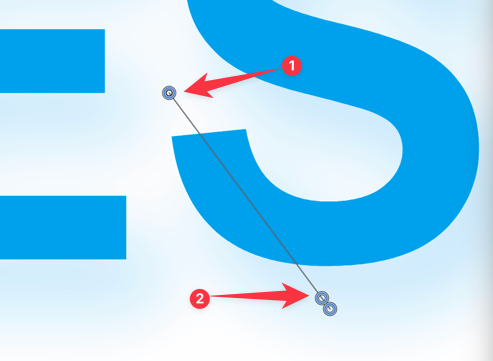
The indicator symbol to edit the opacity will get stuck at the top of the slider and is irretrievable. (indicator #1 in image below), where I assume it should stop just before the end like in (indicator #2 in image below). I noticed today that if the slider for the opacity gets stuck at the top of the slider, it stays stuck in any new document opened. If I restart VS, it becomes accessible again.
-
@Boldline I will try to replicate and fix this ASAP.

