VectorStyler
    • Categories
    • Unread
    • Recent
    • Tags
    • Popular
    • Register
    • Login

    Importing SVG with embedded bitmap

    Scheduled Pinned Locked Moved Bugs in VectorStyler
    5 Posts 3 Posters 610 Views 3 Watching
    Loading More Posts
    • Oldest to Newest
    • Newest to Oldest
    • Most Votes
    Reply
    • Reply as topic
    Log in to reply
    This topic has been deleted. Only users with topic management privileges can see it.
    • M Offline
      marce
      last edited by marce

      Hi! Im testing the ways i can wrap text around images with transparency. Transparency of PNG are not used currently in VS as an empty space where text can flow, so, i thought that if i embed inside a SVG file a PNG with a vector silhouette in the background, it can be easier to wrap text around it.
      But when i import the SVG with a bitmap with transparency embedded, and the vector silhouette behind, VS shows it in a weird way. I mean, only the behind silhouette is displayed, and then, if i resize the imported SVG beyond artboard, the bitmap embedded is displayed in weird way.
      Here is the original SVG, as is shown in explorer thumbnail:

      0_1765726126138_a1141a9b-e4c5-4d8c-9340-d274f81a543e-image.png
      If you drag it to VS, it is displayed this way:
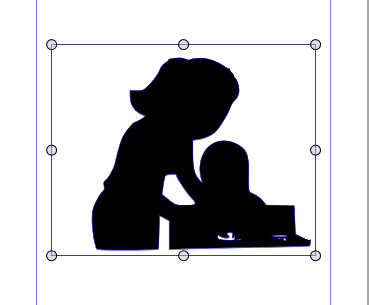
      0_1765726161113_9092841d-1c3e-4cab-a5b4-43c86f313362-image.png
      And when you resize it beyond Artboard boundaries, it becomes this:
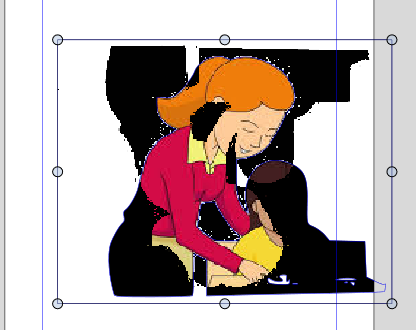
      0_1765726200021_ed6ef6b2-cf3b-45c0-a233-87b4acf2729a-image.png

      Im attaching the SVG file0_1765726237828_Maestra ayudar.svg

      Ryzen 9 3900X on Asus prime x570-p
      Memory 48gb ddr4
      Nvidia gtx 970 on an Asus strix, 4gb gddr5
      NVMe CT100p 1TB

      E VectorStylerV 2 Replies Last reply Reply Quote 1
      • E Offline
        EricP @marce
        last edited by

        @marce I think you need to remove the fill of clipping mask to let the bitmap be visible

        Here's a quick example : 0_1765728225834_text wrap.vstyler
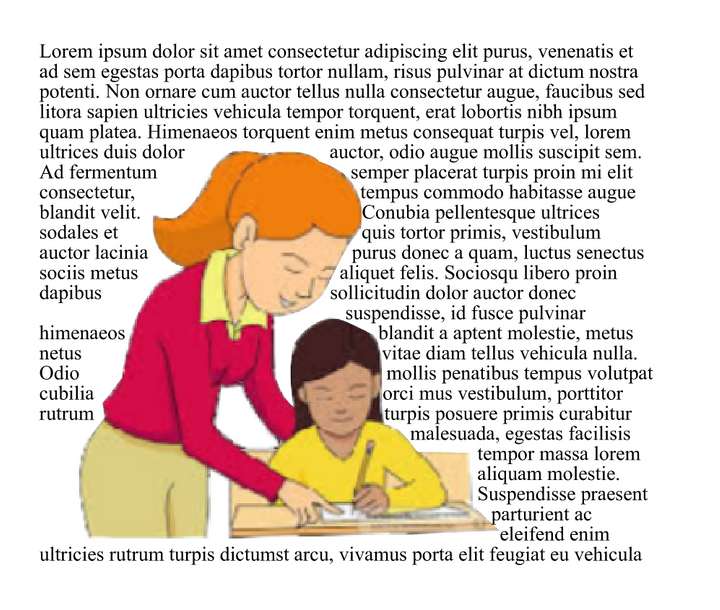
        0_1765728245054_2bc07a85-79ff-4123-a713-cfb67fc29ac6-image.png

        M 1 Reply Last reply Reply Quote 0
        • VectorStylerV Offline
          VectorStyler @marce
          last edited by

          @marce Did not get the SVG, the attached file is a PNG

          1 Reply Last reply Reply Quote 0
          • M Offline
            marce @EricP
            last edited by

            @EricP Thanks your help!! Good result. I opened the file you attach. But... what you did? Explain it to me, please.

            Ryzen 9 3900X on Asus prime x570-p
            Memory 48gb ddr4
            Nvidia gtx 970 on an Asus strix, 4gb gddr5
            NVMe CT100p 1TB

            M 1 Reply Last reply Reply Quote 0
            • M Offline
              marce @marce
              last edited by

              @marce said in Importing SVG with embedded bitmap:

              @EricP Thanks your help!! Good result. I opened the file you attach. But... what you did? Explain it to me, please.

              I figure it, reading the other thread. Thanks a lot again!

              Ryzen 9 3900X on Asus prime x570-p
              Memory 48gb ddr4
              Nvidia gtx 970 on an Asus strix, 4gb gddr5
              NVMe CT100p 1TB

              1 Reply Last reply Reply Quote 0
              • First post
                Last post