VectorStyler
    • Categories
    • Unread
    • Recent
    • Tags
    • Popular
    • Register
    • Login

    Dotted dash lines (corner alignment and even distribution)

    Scheduled Pinned Locked Moved Implemented Features
    10 Posts 3 Posters 11.8k Views 1 Watching
    Loading More Posts
    • Oldest to Newest
    • Newest to Oldest
    • Most Votes
    Reply
    • Reply as topic
    Log in to reply
    This topic has been deleted. Only users with topic management privileges can see it.
    • A Offline
      Arde
      last edited by

      It might be that I am just missing a feature, but I have not managed to get dots (rounded dash ends) evenly distributed (with scaling but equal gaps) in the kinds of shapes as below in the middle. The dashes are aligned with cusp corners but they do not get evenly distributed (as they do with e.g. ellipses and when using square-like line ends with dashed outlines) .
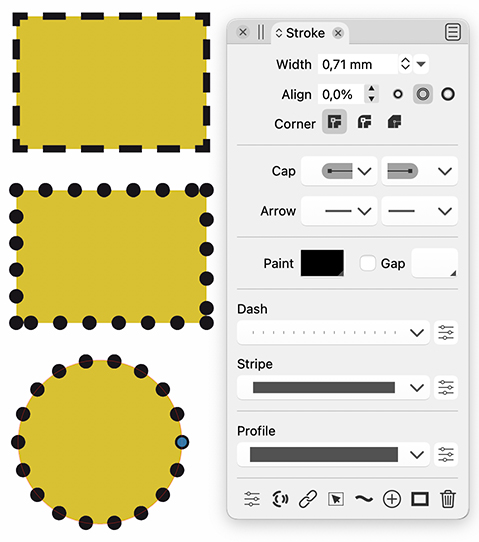
      0_1626432566461_dashes_dots_aligned.jpg

      VectorStylerV 2 Replies Last reply Reply Quote 0
      • VectorStylerV Offline
        VectorStyler @Arde
        last edited by

        @Arde Sorry for the late answer: Align Dash to Corners in the Stroke panel menu should do this.
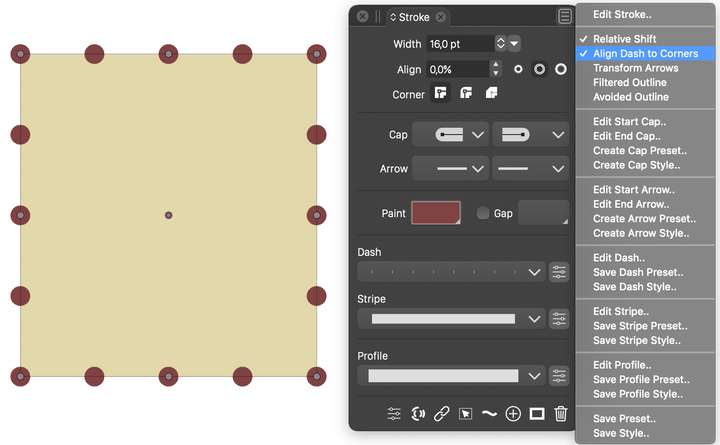
        0_1626451650070_strokepanel.png

        b77B A 2 Replies Last reply Reply Quote 1
        • b77B Offline
          b77 @VectorStyler
          last edited by b77

          @vectoradmin Oh… I was also wondering about this apparent limitation the other day — I was looking for some checkbox in the Dash settings, and nothing did the trick.

          I think most users would expect it to be found there.

          MacBook Pro (Intel) running Monterey 12.6.4

          VectorStylerV 1 Reply Last reply Reply Quote 1
          • VectorStylerV Offline
            VectorStyler @b77
            last edited by

            @b77 It is there in the Dash editor view, but for some reason unknown 🙂 it has a different name: Align to Cusp, I will fix that.

            b77B 1 Reply Last reply Reply Quote 0
            • b77B Offline
              b77 @VectorStyler
              last edited by b77

              @vectoradmin I knew and used 'Align to cusp', just tried it again and with zero-width Dash it doesn't seem to work. It works only if the Dash is a positive number (not zero).

              MacBook Pro (Intel) running Monterey 12.6.4

              VectorStylerV 1 Reply Last reply Reply Quote 0
              • VectorStylerV Offline
                VectorStyler @b77
                last edited by

                @b77 "Align to cusp" sets the same property as "Align Dash to Corners". In this example the dash is 0 and the gap is 4.
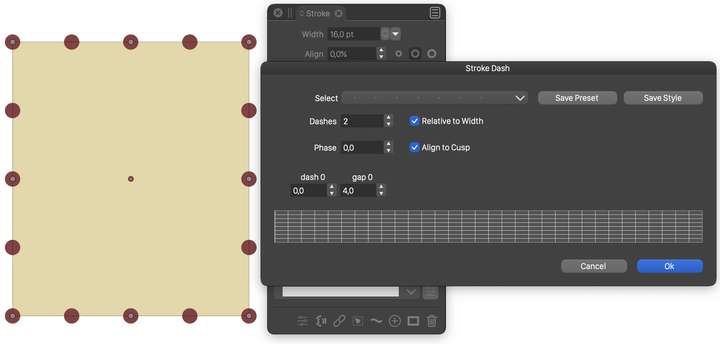
                0_1626459823497_strokepanel2.png

                Are there some problems with some specific shape?

                b77B 1 Reply Last reply Reply Quote 0
                • b77B Offline
                  b77 @VectorStyler
                  last edited by b77

                  @vectoradmin It happens with a simple rectangle: https://recordit.co/O5OfO2phhC
                  As soon as I change the Dash 0-length value, the dashes align as they should.

                  MacBook Pro (Intel) running Monterey 12.6.4

                  1 Reply Last reply Reply Quote 0
                  • A Offline
                    Arde @VectorStyler
                    last edited by

                    @vectoradmin said in Dotted dash lines (corner alignment and even distribution):

                    Align Dash to Corners in the Stroke panel menu should do this.

                    I was using this setting, and it does not work for me. I tried with many dash & gap values, e.g. 0 and 2, and 0 and 4, and it does not work with any that have zero as the first value (using round caps and aiming at perfect dot shape). (It works only in in special cases when making a specific width/height for the shape):
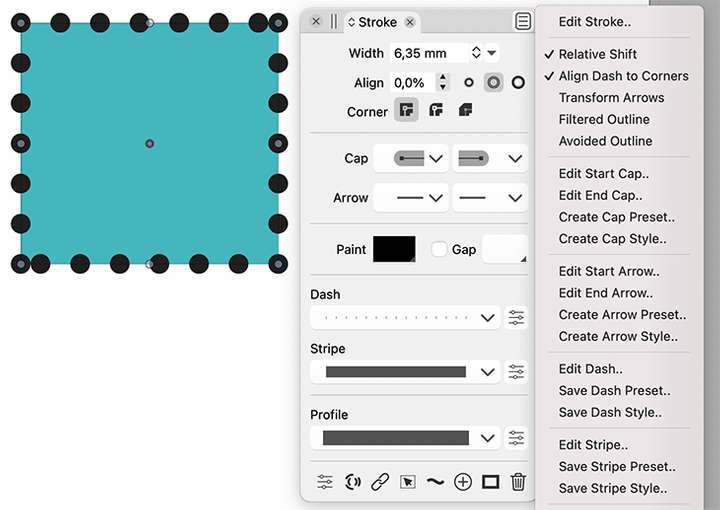
                    0_1626494050946_dashes_dots_aligned2.jpg

                    VectorStylerV 1 Reply Last reply Reply Quote 0
                    • VectorStylerV Offline
                      VectorStyler @Arde
                      last edited by

                      @Arde Looks like in certain cases the 0 gap is not aligned, I added this as a bug, will be fixed.

                      1 Reply Last reply Reply Quote 0
                      • VectorStylerV Offline
                        VectorStyler @Arde
                        last edited by

                        @Arde This has been fixed in build 1.0.044

                        1 Reply Last reply Reply Quote 0
                        • First post
                          Last post