Gradient tool
-
I don't actually use the gradient tool in any vector app as Shutterstock sees such added effects as a raster and not a true vector.
I'm just making this report in efforts to help with development.
I have a feeling the gradient tool is bugged. It's explained why I think so on this short video.
If my accent is too thick, let me know and I will type out my commentaries in the future.
-
Hi,
Seems that there is some other error.
Just looking at the video it appears so that when you open the popup list of gradient presets from the panel, it does not show some gradients. Linear and radial are visible, but not the others.
It could be that gradients are not displayed for some reason on your machine.
One way to test this is to change the Compute Engine mode to "Software" in the Prefereces -> Performance section.
restart and check if gradients work in that case. -
When you open the gradient list in the panel, it should look like this:
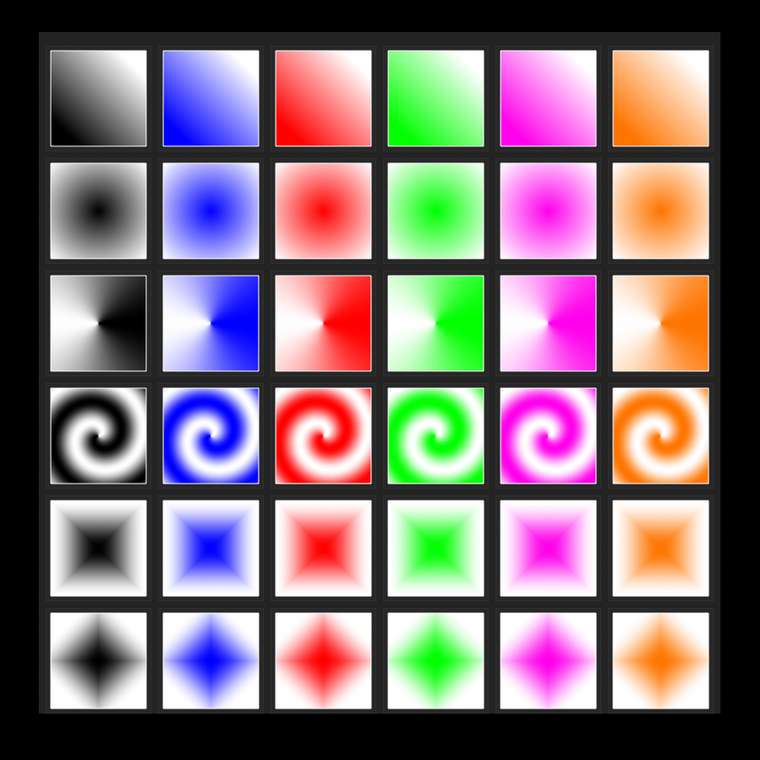
-
What is your mac specs (especially GPU)?
-
@vectoradmin
MacOs Catalina
Version 10.15.6
Memory 10 GB 1333 MHz DDR3
Graphics Intel HD Graphics 4000 1536 MBI'll have time to experiment with preference changes later tonight.
-
I did everything you said with the change of preferences. It worked!
Full gif wont upload though. It is perhaps too big. I can upload a video instead if you want.
-
HI,
I'm more concerned with the part that did not work: gradients with GPU Metal acceleration.
So this is a recent Mac Mini model, using Intel GPU?
This is a problem and I have to find a solution. -
I had to take a second look at it. The serial
number and appearance of the ports matches of
this model.Apparently the model is late 2012. I think I forgot that I ordered a later model at the time. It does however, have Intel GPU.
-
I can confirm that the Intel HD bug is replicated here also (on Intel HD only).
It seems that there are some Metal (Apple technology) driver support problems for intel hd gpus.
Will try to find a fix.
Meanwhile: for a bit better performance, you can try to select OpenCL in the Compute Engine field of Preferences -> Performance section.
with OpenCL the GPU is used for rendering gradients and effects, but has a different driver. -
Hi,
Just wanted to give an update on this one. Support for Intel HD 4000 had to be disabled, as it has problematic Metal compute driver implementation (other developers observed also).
In the new build, the Metal option is not available for IntelHD 4000.
It is recommended to use the OpenCL (Open Compute Language) option for the compute engine selection in the VectorStyler preferences.