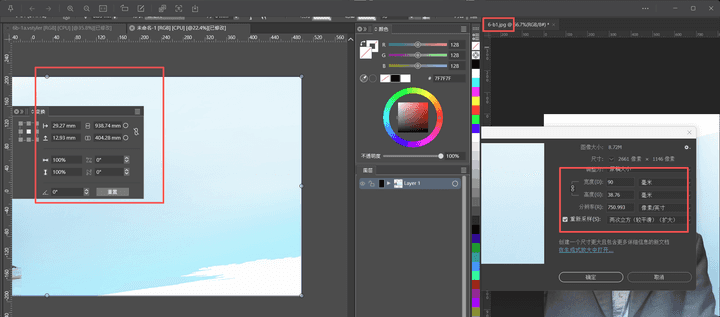
There are a few issues that I hope can be improved.
-
- Press the alt key to copy text, the response is slow and sluggish. Especially when there is a lot of text, it becomes more laggy
- Adding two font folders in the font manager will only display the fonts from the first folder added?
- I feel that the overall operation is not smooth enough and there is a sense of delay. Compare Illustrator
- The size in PS is not consistent with that in VS
-
@macos said in There are a few issues that I hope can be improved.:
Thanks for the feedback, I will test these as soon as possible.
What kind of machine config you used?- Press the alt key to copy text, the response is slow and sluggish. Especially when there is a lot of text, it becomes more laggy
I would need an example file for this to replicate.
- Adding two font folders in the font manager will only display the fonts from the first folder added?
Only one font folder / collection is shown at a time. In the top-right corner of the font selection list there is a dropdown (shows "Installed Fonts" to select the active font collection). If you want to combine multiple folders of fonts into one collection, place these into a common parent folder and add that.
- I feel that the overall operation is not smooth enough and there is a sense of delay. Compare Illustrator
Examples needed here.
- The size in PS is not consistent with that in VS
Is this for an imported or exported image? And in what file format? An example might help.
-
@VectorStyler Please see the image.!