[Style Picker] Drag&drop
-
I would like to ask you what do you think about this functionality. It's about Style Picker.
I mean copying a style with drag and drop. No need to select objects. These are detected on the basis of the location of the mouse.
I don't know if it is feasible and if it would be functional for you.
https://recordit.co/GIyGU0RqaRMacBook Air M4 24Gb, Tahoe 26.3.1
-
@encart I think it is feasible to do.
The main issue is that it must be added as an option (preferences), to change the style picker mode of operation (there are already two modes). The traditional mode must remain (it is expected).
Technically, it is not a major problem. -
@encart That's an interesting idea - Just playing devil's advocate here - does it save time over clicking on the object you want to edit and then tapping on the "i" key and then clicking on the one you want to copy? Would there be a way to do this if you wanted to edit mutiple objects at one time? Would this not be a limited option if the source object is large and clunky on the screen?
-
I just discovered that holding down the ALT allows you to click next objects directly. So I don't know if dragging makes sense. Perhaps this would make it easier to change a single object, but for many objects the current system works fine.
BUT, this is not my greatest discovery.
During testing, this window appeared to me. For the first time since using VS.
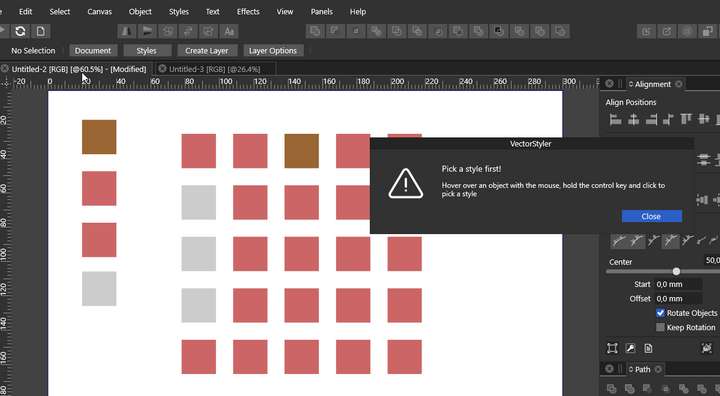
More of these explanatory tips could be useful. Is there still a lot of this type. I guess it's time consuming, especially now that a lot of things are still changing.
-
@encart that's cool! Reminds me a little of what Affinity does by giving you hints at the bottom of the screen based on what tool you have selected at that moment
-
@Boldline Yes, their solution works great. Overall, when it comes to ergonomics, Affinity is in my opinion a lot nicer than the Illustrator. When I think of something, I check how they solved it, because it usually works more intuitively than in the Adobe product.
-
@encart In version 1.0.044 there a style picker mode "Select -> Options -> Drag&Drop Styles" that will work as requested.


