Bezigon Tool
-
@Daniel said in Bezigon Tool:
I created a demo application of both versions for bezigon for those who want to try it: https://limewire.com/d/luGLt#jogenjIi9V - It works on Windows only. It also has demo instructions in the pdf. So you can play around with it. It might throw a warning when you open it because it has no digital signature. But it costs $$$ to get digital signature... so pardon me.
This is good. Thanks a lot!
-
It is much easier to explain this in a video. I am going to record one tomorrow.
 For both VS and PL devs.
 -
@boldline @vectorstyler : https://youtu.be/w3ieED1z4gM - Here's the full breakdown.
The basic secret to the correct implementation is simple.
Every segment's handle is 39% of the segment length on either side, and every handle point points straight at the previous node until the next node is placed. In other words, every handle lies on the chord between two nodes until the next node is placed. That is the secret to Bezigon. At the moment, VectorStyler's implementation does not follow this logic, hence the awkward shapes it builds.
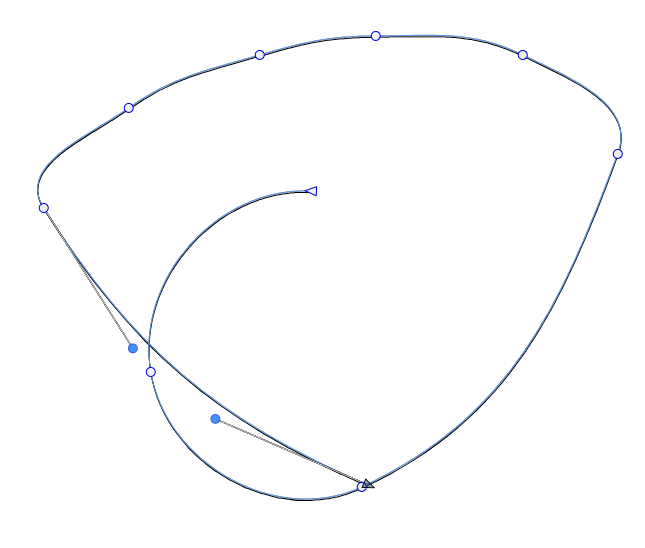
The loss in curvature becomes exponentially worse as the distance between the nodes grow.
Work: Windows 11 | Intel i9 14900HS (24 Cores/32 Threads) | GeForce RTX 4070 | 64 GB RAM
Personal: Windows 11 | Amd Ryzen 9 7950X (16 Core, 32 Threads) | GeForce RTX 3060 | 32 GB RAM -
@vectorstyler: Just to add to this: We managed to test our algorithm further and we're extremely happy to say: We're off from FreeHand's at most by 0.008%, and typically about 0.005%, of each handle’s length. That is, 1 part in 13,000–20,000. The direction difference is effectively zero, at most 0.0003°. So that is a level of accuracy that you thankfully do not need to reproduce painfully. Please have a look at our algorithms! Thank you!
-
@Daniel said in Bezigon Tool:
Please have a look at our algorithms!
I will try to include it in the next build. Thanks!
-
@VectorStyler: At this point, you must think I am spamming this thread, but I promise this adds a great deal of value to what you're doing. My colleague who helped with the writing reverse engineered the number, 0.39 from pure screenshots. He did use AI, but even then - it is quite brilliant that he did it. Albeit he did not have to. Blender had worked it all out!
Found this brilliant piece of code from a Blender thread, which of course, is Open Source:
We use: 0.39 × own segment. Their comment explains why: a Bézier curve best approximates a quarter circle when the handle is 0.5519 of the radius, and dividing that by the chord, √2, gives 0.39.
This is it.
if (ELEM(BEZIER_HANDLE_AUTO, type_left, type_right)) {
    const float3 prev_diff = position - prev_position;
    const float3 next_diff = next_position - position;
    float prev_len = math::length(prev_diff);
    float next_len = math::length(next_diff);
    if (prev_len == 0.0f) {
      prev_len = 1.0f;
    }
    if (next_len == 0.0f) {
      next_len = 1.0f;
    }
    const float3 dir = next_diff / next_len + prev_diff / prev_len;

    /* The magic number 2.5614 is derived from approximating a circular arc at the control point.
     * Given the constraints:
     *
     * - `P0=(0,1),P1=(c,1),P2=(1,c),P3=(1,0)`.
     * - The first derivative of the curve must agree with the circular arc derivative at the
     *   endpoints.
     * - Minimize the maximum radial drift.
     *   one can compute `c ≈ 0.5519150244935105707435627`.
     *   The distance from P0 to P3 is `sqrt(2)`.
     *
     * The magic factor for `len` is `(sqrt(2) / 0.5519150244935105707435627) ≈ 2.562375546255352`.
     * In older code of blender a slightly worse approximation of 2.5614 is used. It's kept
     * for compatibility.
     *
     * See https://spencermortensen.com/articles/bezier-circle/. */
    const float len = math::length(dir) * 2.5614f;
    if (len != 0.0f) {
      if (type_left == BEZIER_HANDLE_AUTO) {
        const float prev_len_clamped = std::min(prev_len, next_len * 5.0f);
        left = position + dir * -(prev_len_clamped / len);
      }
      if (type_right == BEZIER_HANDLE_AUTO) {
        const float next_len_clamped = std::min(next_len, prev_len * 5.0f);
        right = position + dir * (next_len_clamped / len);
      }
    }
  }
https://tikz.dev/library-edges - And then, there is also this library, which again uses the same value, rounded up 0.3915... So we hit the jackpot.
From these, we have two more suggestions. The ability to clamp handles and to approximate true circles. I'll explain more later.
Work: Windows 11 | Intel i9 14900HS (24 Cores/32 Threads) | GeForce RTX 4070 | 64 GB RAM
Personal: Windows 11 | Amd Ryzen 9 7950X (16 Core, 32 Threads) | GeForce RTX 3060 | 32 GB RAM -
@Daniel Thanks this is good!
-
@Daniel Is the "Tangent" node type same as "Symmetric"?
-
@VectorStyler: No. Tangent or connector node is not the same as symmetric:
Sharp - Basically has no handles - Straight line segment: But in our algorithm, we have made Sharp nodes to have handles because this means there is no need to convert them. You just pull the handle.
Cusp - A subtype of Sharp node, where both or one of the handle exits and can be moved in any direction independent of each other.
Smooth - Both handles collinear but can be sized independently.
Symmetric - Both handles collinear and locked to same size.
Connector/Tangent Node - Node that sit at the transition between straight line and curved segments to help form mathematically precise transitions so there are never any kinks. This is achieved by having the handle follow the direction of the straight line exactly. A tangent node is only really useful if it has one handle, but it is possible for it to have two handles. In every case, the handles always point back at the chord of the adjacent nodes. When the adjacent node moves, the corresponding facing handle moves with it.
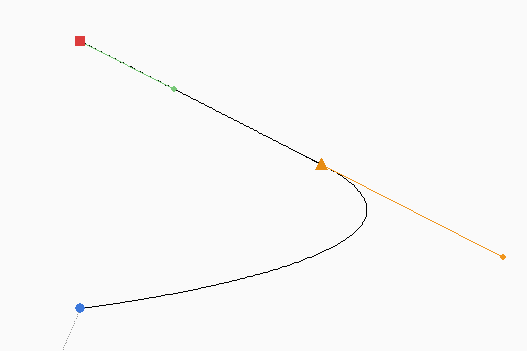
The orange triangle is a tangent node and the handle lies on the chord to the square node forming a mathematically precise transition. When you move the red node, the tangent is repositioned. Like so.
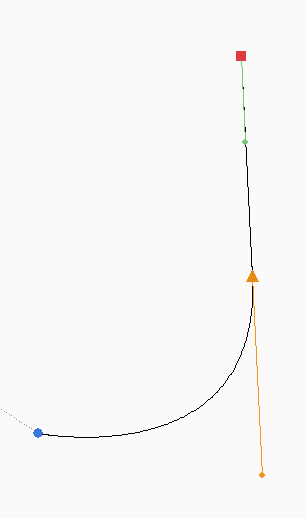
This guarantees that I don't need to worry about my transition. Our documentation exhaustively explains this.
Work: Windows 11 | Intel i9 14900HS (24 Cores/32 Threads) | GeForce RTX 4070 | 64 GB RAM
Personal: Windows 11 | Amd Ryzen 9 7950X (16 Core, 32 Threads) | GeForce RTX 3060 | 32 GB RAM -
Just wanted to say that I'm following this with great interest and I look forward to buying VectorStyler once you have an implementation of the tool working the way Daniel has shown it in his YouTube clip.
The Bezigon tool is infinitely superior to the Pen and I would be so happy to have a version of the 'Freehand implementation' on a modern Mac
-
@Daniel said in Bezigon Tool:
The loss in curvature becomes exponentially worse as the distance between the nodes grow.
Which version of VectorStyler is this from?
-
@Daniel said in Bezigon Tool:
Our documentation exhaustively explains this.
The documentation also contains editing step. Does this mean that the Bezigon tool can edit existing shapes? or that the Node tool should function as in this documentation?
(I should try Freehand somehow)
-
@Daniel said in Bezigon Tool:
The Bezigon package is attached as Bezigon-packages.zip.
The "Bezigon 4.2.0" could also contain some important open path cases, just to see how the start/end tangent directions are for open paths.
-
@VectorStyler said in Bezigon Tool:
(I should try Freehand somehow)
You can try FreeHand - it works "flawlessly" on Windows 11. (Using it daily myself...)
I'm safekeeping a FreeHand MX Installer.exe (v. 11.0.2) that installs a trial version on Windows 11. Runs just fine in Win7 compatibility mode.
There is an extensive built-in manual, but I have the 400+ pages PDF user manual from MacroMedia too.Furthermore Adobe released perpetual serial numbers for MacroMedia products when they shut down the license server, after the CS2 era.
After all, a lot of customers owned licenses for FreeHand MX, Director MX etc., so they were obliged to allow re-installation of these.Just say the word - love to be of help here!
Best regards
Lars Herold -
@VectorStyler: The one before the last patch.
-
@VectorStyler: The rule is always simple. And you can understand this if you look at the Tangent permutation table. The handles always follow the chord of one or the other neighbouring nodes. Always.
-
@larsherold: You don't need to this anymore. Thankfully. You can create a portable version of FreeHand. It is extremely simple. Install FreeHand using Sandboxie within a Sandboxed location. Now you have a copy that has zero dependency on Windows registries. You can copy the contents and use it anywhere!
-
@VectorStyler: I sent you both the installer and keys in DM a while ago. I also have a portable version. So I can send that if you want.
-
@Daniel said in Bezigon Tool:
Install FreeHand using Sandboxie within a Sandboxed locatio...
Ah, interesting. I have very little experience with sandboxing, virtualization and so on. I do have FreeHand running on an M2 Mac in Windows via Parallels, but I guess it's a different creature.
I still find the native installation on Win is well behaved - and completely legit, as I have the original installation media and valid license card from back then...
Still many basic features in this 2005 application that work so well, Illustrator doesn't come close now 20 years later, Bezigon as a case in point!
-
@larsherold: Yes, FH is still to be bested. This is because FreeHand is an outgrowth of intensely vector focused software: Altsys' Fontographer. Released 30 years ago, it is what introduced Bezigon. Building FH on top of Fontographer engine gave them extraordinary power. Adobe sucks compared to it.
Virtualisation is easier than people think. Sandboxie is a shareware. You simply need to start it, and then run the installation inside a sandbox. Now the contents inside the sandbox are completely isolated - this means that they're device independent. Hence completely portable.
There are many tutorials out there on this if you want to try. I do it this way because it means that should I change my computer in the future, and some Windows update breaks FreeHand, then I have a portable edition that I don't have to install.

