Bezigon Tool
-
said in Bezigon Tool:
Just to add to this: We managed to test our algorithm further and we're extremely happy to say: We're off from FreeHand's at most by 0.008%, and typically about 0.005%, of each handle’s length. That is, 1 part in 13,000–20,000. The direction difference is effectively zero, at most 0.0003°. So that is a level of accuracy that you thankfully do not need to reproduce painfully. Please have a look at our algorithms! Thank you!
Do you recall this comment? Well, now that I have decompiled and looked at the code. I can tell you exactly why it is 0.008% deviation from FreeHand output. Because FreeHand uses the constant of 0.3899994: 16.16 fixed-point, 1.6 millionths below 0.39.
Now you know that mine is indeed a clean-room RE and not a decompiled bullshit. Besides, there are other exceptions and edges cases that I have accounted for that I couldn't get in the decompiled code. Those are all accounted for in mine. Finally, I have also made the whole function much more intuitive by allowing handles to remember their lengths after conversions from node types - something FH does not do.

-
@Daniel Got it.
-
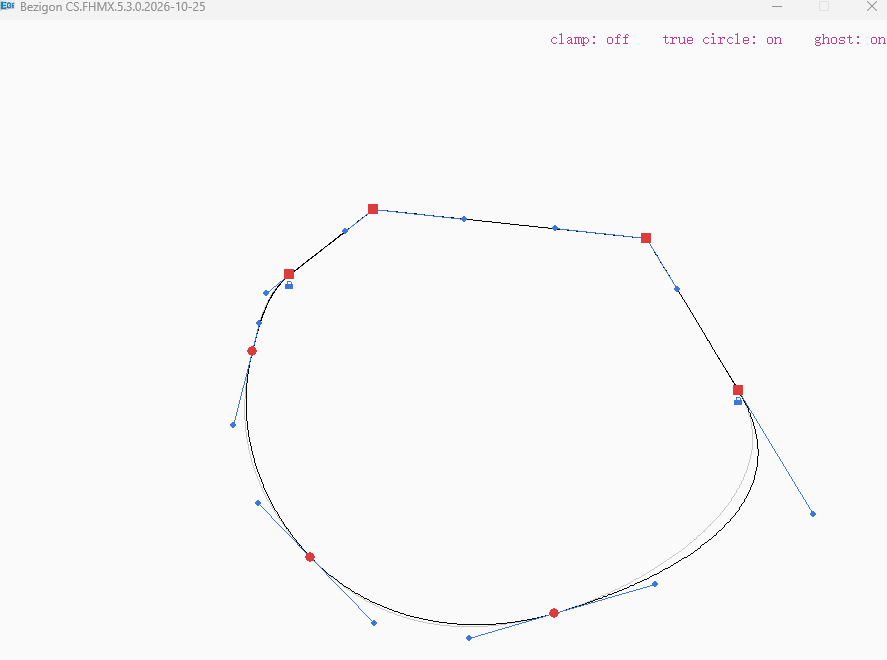
@VectorStyler: Just an update; Over the weekend, we managed to figure out how to set per node flag and lock the nodes: It works beautifully and reproduces the tangent node behaviour within the two node scheme that we now have in VS. You'll see the little blue lock under the node. That's the node locked to chord!
You'll also notice the clamping function, true-circle approximation as well as ghost lines for comparison. We managed to simplify the APIs, cut down the entire library by about 30% in length.
We did use AI to run tests (as before) and tests produce FreeHand's results across millions of random paths.
I'll document everything thoroughly and do a handover. After this, it's entirely up to you how you wish to implement it. But I've handed you all the pieces you need.
-
@Daniel Thank you for all your work and the effort you put into reverse engineering this. That’s really awesome! I was very interested in its behaviour and what it feels like to work with, so I used Claude AI to create a small playground with your code. You can find it here.
You mentioned a new revision of the code, and I would be very interested in incorporating that as well. Would we be able to get it somewhere?
Since your code has already made its way into discussions in PhotoLine and Inkscape, I think it would be great to have a central place to get the latest version. I would love to see the code on GitHub, a platform for version control, so we can all access it there and know where to find the latest original source.
-
@signalwerk: Thanks! Since I released that code, the code has gone through a huge churn cycle. We had to strip and rebuild. Not because the logic is wrong. It is perfectly usable. But because we had a new idea. Tangent node is really not a separate node, but a cusp node with handle locked to chord. The idea is as simple as it is obvious. The implementation however is a whole new monster. Because, now you have to figure out how is this lock going to work.
We use De Casteljau algorithm to preserve shape when inserting new node on existing shapes. But then locking is a unique case. So we had work out every single on of these cases manually. By hand. FreeHand is of no use here. Because FreeHand does not preserve shape. It brutally applies a tangent node with both handles instantly available. That is not intuitive or even purposeful. So after 10 further iterations of back and forth, we discovered the solution. It is simple too:
Locked node ALWAYS gives precedence to a sharp node's chord when a smooth neighbour is present. Where both neighbours are either square or locked or combination of the two, the locked node in between them has no handle automatically. If a manual handle is draw out, this gets preserved in subsequent operations.
This is our labour of love and addition to 40 year old Bezigon algorithm.
However, there's something even more interesting we've done.
We built a drag gesture layer which allows you to drag nodes, handles and segments using modifiers. Alt to break, Ctrl to unite. This will become obvious when people actually try it. These gestures are actually native to PL. We built it for the benefit of PL devs who have to integrate it into the program. So we wanted to show them how Bezigon can sit perfectly alongside their existing gestures model.
But then, we realised that in the process of doing this, we had created a dependancy! FUCK!
Now anyone who wanted to implement in must also implement these gestures. So another round: We created two layers. Geometry layer. Drag gesture layer. Completely separate as headers and algorithms. You can strip out gestures without losing a thing.
https://drive.google.com/file/d/1BDM-JtO3t5E3_iCCTFpNOw5Xa4DwZwM-/view?usp=sharing - Here's the new demo file. You can download, play and enjoy. You will get a warning on Windows. No digital signature. Ignore it. It's safe. PRESS D to see the handles. Forgot to add. K for clamp. C/S/L for toggling between Cusp, Smooth and Locked. G for Ghost Lines. O for True Circle. R for reset to Bezigon Handles. Ctrl + Z/Y for Undo/Redo. Esc to Clear Canvas. Enter or Alt Click to finish drawing curve.
We've also included Clamp, True Circle and Ghost Lines as options. Clamping exists for extremely close nodes which have enormous handles. Clamp makes sure that the length of the handle is not greater than either 2 or 5 times greater than distance between the nodes. True circles is basically a subset of Bezigon. It overrides Bezigon and approximates true circles like Spiro Path does.
So you have enormous flexibility built directly into the algorithm, which I hope @vectorstyler implements as options for bezigon.
Final note: EGE, the Open Source engine that we used before was not sufficient. So we rewrote the demo in Raylib. Well, my colleague did.
It works wonderfully. And we also took AI's help (GLM this time) to write an exhaustive test suite. Covering millions of paths. And we compared this with FreeHand.
The deviation is 0.0008%. Because FH uses 0.3899994 as the approximating constant.
At this point, my autistic, perfectionistic streak is completely satisfied. Please give me a kiss (applause) of appreciation. I am tired now. I've gotten this monkey off my back. Thank you!
I'll share the full code base after documentation is done. There's a lot to rewrite.
Work: Windows 11 | Intel i9 14900HS (24 Cores/32 Threads) | GeForce RTX 4070 | 64 GB RAM
Personal: Windows 11 | Amd Ryzen 9 7950X (16 Core, 32 Threads) | GeForce RTX 3060 | 32 GB RAM -
@signalwerk said in Bezigon Tool:
code on GitHub, a platform for version control, so we can all access it there and know where to find the latest original source.
I don't know how to use it. I'd rather not create an account either. One less account. I am happy to hand you the complete code with documentation. You're free to post it there if you want. Since its under MIT anyone can use it permissively.
-
@Daniel Sounds really impressive! Forgive my naiveté, but it sounds like this could be applied to the pen tool as well
-
@Boldline: What specifically? Bezigon algorithm to Bezier pen tool? Because while it is tempting to group them together, they're actually complementary, rather than same. Bezigon does precisely what Bezier pen tool cannot do. Automatic approximation of curves.
If you mean clamping and true circle, yes, you could do that. Because you can draw a curve, and the true circle option would basically force it into an arc.
Have a play with it first of all. I think you'll really like it.
-
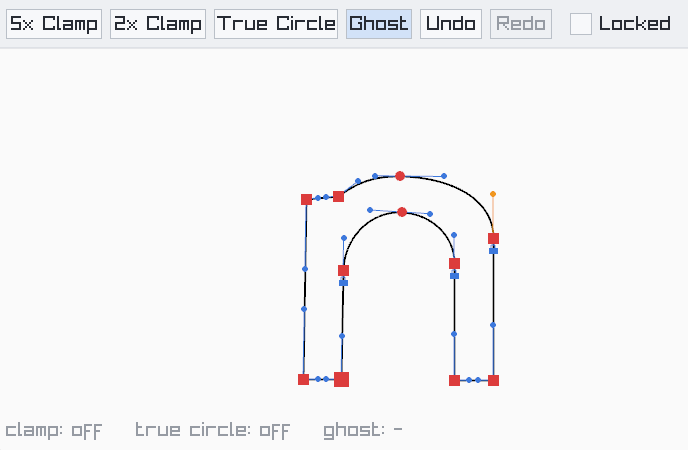
So happy! I drew that in 10 seconds! Notice them little locks. So cute.
Work: Windows 11 | Intel i9 14900HS (24 Cores/32 Threads) | GeForce RTX 4070 | 64 GB RAM
Personal: Windows 11 | Amd Ryzen 9 7950X (16 Core, 32 Threads) | GeForce RTX 3060 | 32 GB RAM -
@Daniel Thank you for your explanation and your work! That all sounds super exciting. Since I don't have a Windows computer, I can't run your test, but I will definitely have a look at the new code and probably adapt the online editor I made to the new version.
I understand that you don't want to open a GitHub account. It was just a suggestion to maximise the impact. But now that I've found this thread, I'll follow along here. -
@Daniel I tried the bezigon playground simulator. The key commands for each type of node felt very natural; smooth with a shift-click, tangent with a control-click, a corner with the regular click and no modifier. I'd love to see the bezigon tool set up this way in VS