Online fonts not listed in Windows version
-
@Arde Type 1 fonts should also work on the Mac version (including M1).
One problem might when the font is installed, and for some reason VS does not detect it.One way to work around these is to create a folder with these fonts, and then add that folder in the Text -> Font Manger menu. VS can access fonts from any folder, even if not installed into the system.
-
@vectoradmin said in Online fonts not listed in Windows version:
One way to work around these is to create a folder with these fonts, and then add that folder in the Text -> Font Manger menu. VS can access fonts from any folder, even if not installed into the system.
I have tried this, and also installing single Type 1 files from within VS Font Manager, but I just cannot get any of these fonts to render on canvas. Installed Type 1 fonts show in menus but nothing is displayed, but fonts in specific folders or separately selected font files do not display even in menus.
I do not know what I am doing wrong, or could this be related to Big Sur (and M1 chip)? On the other hand, these fonts work (mostly) fine in other apps installed on the same computer that still support Type 1 fonts (e.g. Pages, Photoshop, Affinity apps). In what format does VS expect the fonts to be saved when fetched from folders?
(As mentioned, Type 1 fonts (PFB/PFM pairs) work just find in the Windows version of VS.)
-
@Arde Fonts added with the VS Font Manager, show up in different font groups. In the font selector list, there is a drop down menu in the upper right corner. This shows Installed Fonts by default. Try selecting the font folder name (that was added in then VS Font Manager) here.
The fonts are organized in groups.PFB/PFM fonts should also work on Mac, if the above does not work, then it is a bug.
-
@vectoradmin said in Online fonts not listed in Windows version:
PFB/PFM fonts should also work on Mac, if the above does not work, then it is a bug.
I cannot get them in either version even listed on menus (macOS or Windows versions). The ones installed with FontBook show in menus (and can be used with other apps), but they do nit render at all in VS (that is, nothing at all is shown when trying to use a selected Type 1 font). It would be great if Affinity apps could really use the Windows PFB and PFM pair (or AFM) now that Adobe quits support of Type 1!
-
@Arde I have tried with Critter T1 font, installed on mac and it worked for me.
Maybe it is specific to the font or the OS version. -
@Arde BTW: Type 1 fonts will be (and should be) supported in VS, if something does not work then it is a bug.
-
@Arde More info on this one: it looks like that when a Type 1 (PFB/AFM) font is installed using a font manager into MacOS, the font data is stored in the resource fork of the file and VS cannot access it.
This type of fonts are not accessible by VS (will try to fix it) and it has been reported before (TTM fonts in Japan).
Unfortunately, resource forks are a legacy tech (the related MacOS APIs are deprecated), this is still an open issue in VS.On the other hand, PFB/AFM fonts are supported in VS, if added separately using the VS Font Manager.
The fonts added in this way are accessed by selecting the font collection (folder) name in drop down on the upper right corner of the the font list.In this example, the VS font manager points to 5 different font folders, that were selected using the Add Folder button.
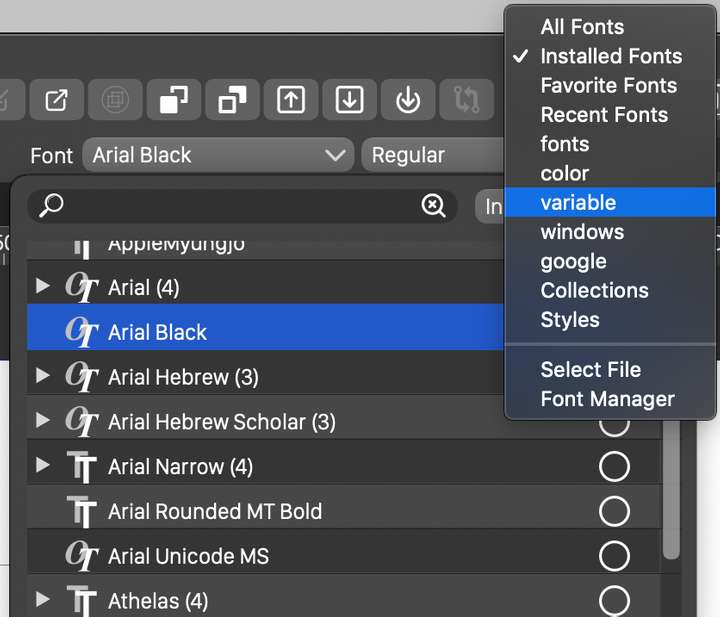
These will be shown as separate font collections in the font popover, and to select a font from one of these collections, the collection must be selected first (see below).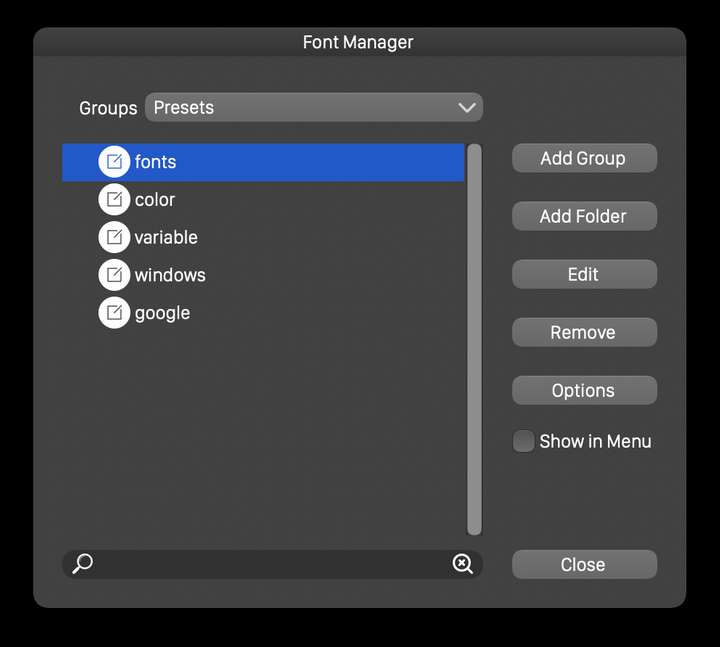
To access a collection, click on the Installed Fonts button on the upper-right corner of the font list popover.
-
@vectoradmin said in Online fonts not listed in Windows version:
@Arde BTW: Type 1 fonts will be (and should be) supported in VS, if something does not work then it is a bug.
Thanks, I now managed to get them listed. I thing that I tried this once already but I now added FontFolio8 root folder directly in VS font manager, and it works.
For many fonts, export to PDF fails even if subsetting is not allowsd: only part of the glyphs are rendered. However if I export to EPS and distill, the resulting PDF has all fonts perfectly embedded and all glyphs render fine. I'll send those PDFs tomorrow for your examination.
Not being able to use legacy mac Type 1s is not a big issue (to me), as they are so difficult to get exchanged between systems, and even FontLab can no longer create mac legacy versions, so making. fixes to mac versions (without converting to another font format) would not be possible.
It is great to have a modern app on both Windows and macOS that can use Type 1 even without direct OS support.
-
@Arde I will add the exporting to PDF as a bug to the backlog. Are there any specific fonts (name) with this issue?
-
@Arde Type 1 font exporting into PDF format should work in build 1.0.045
