VectorStyler
    • Categories
    • Unread
    • Recent
    • Tags
    • Popular
    • Register
    • Login

    Drag-scaling text element does not change displayed point size

    Scheduled Pinned Locked Moved Resolved Issues
    17 Posts 4 Posters 22.0k Views 1 Watching
    Loading More Posts
    • Oldest to Newest
    • Newest to Oldest
    • Most Votes
    Reply
    • Reply as topic
    Log in to reply
    This topic has been deleted. Only users with topic management privileges can see it.
    • G Offline
      Gremriel
      last edited by Gremriel

      To chime in, I'm seeing the same. Create a Lorem Ipsum, scale with the Transform Tool, and the fontsize stays at 12pt.

      Edit: nvm, I saw it stay at 12pt at first, but when I tried again, the pointsize changed.

      WIndows 11

      1 Reply Last reply Reply Quote 0
      • C Offline
        cjochetz
        last edited by

        Thanks, @vectoradmin

        @Gremriel , You bring up a good pot in that it doesn't seem to be completely consistent in how it behaves. Usually, if I change the default 12pt Lorem ipsum to another point size in the Character panel first, and then scale with the tRansform Tool, the character panel will correctly update it's number accordingly. but not always. Weird.

        1 Reply Last reply Reply Quote 0
        • G Offline
          Gremriel
          last edited by

          Hi,

          Yes, the first time I place a Lorem Ipsum and scale it, the value stays at 12pt. If I then change the value, every Lorem is then placed with the value I specified, like when you assign a color to a shape, all other new shapes inherit that color.

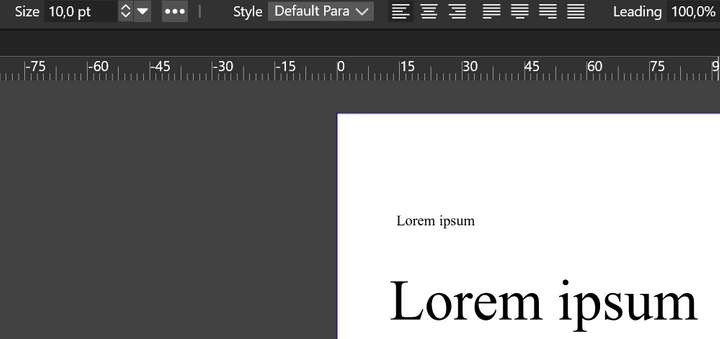
          But it seems VS is getting lost at what value I assign to text at times. In this image, both Lorems are 10pt, according to VS:
          0_1627975432337_VectorStyler_7qUq9aNUUO.png

          The bottom Lorem was scaled up randomly, then I set it to 10pt. The top Lorem is the correct 10pt.

          WIndows 11

          VectorStylerV 1 Reply Last reply Reply Quote 0
          • VectorStylerV Offline
            VectorStyler @cjochetz
            last edited by

            @cjochetz This has been fixed in build 1.0.045

            1 Reply Last reply Reply Quote 0
            • C Offline
              cjochetz
              last edited by

              Confirmed! Thank you @vectoradmin! I'm seeing a new odd behavior now, however. After I place the initial text object, then scale, The Character panel changes from the Default Times New Roman to Arial but the font itself doesn't change. See attached. alt text

              VectorStylerV 1 Reply Last reply Reply Quote 0
              • VectorStylerV Offline
                VectorStyler @cjochetz
                last edited by

                @cjochetz I keep this issue open.

                1 Reply Last reply Reply Quote 0
                • VectorStylerV Offline
                  VectorStyler @Gremriel
                  last edited by

                  @Gremriel Fixed in build 1.0.046

                  1 Reply Last reply Reply Quote 0
                  • G Offline
                    Gremriel
                    last edited by

                    Hi,

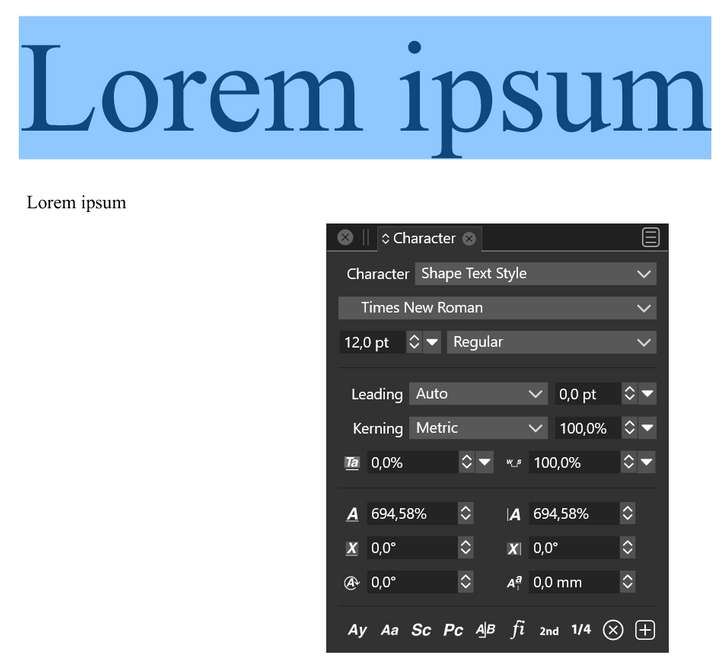
                    I still see a scaled up text display as 12pt in the latest update.
                    0_1630486548739_VectorStyler_QtAHSq7VI9.png

                    WIndows 11

                    VectorStylerV 2 Replies Last reply Reply Quote 1
                    • VectorStylerV Offline
                      VectorStyler @Gremriel
                      last edited by

                      @Gremriel regression, it changes the character scaling instead. will be fixed.

                      1 Reply Last reply Reply Quote 0
                      • VectorStylerV Offline
                        VectorStyler @Gremriel
                        last edited by

                        @Gremriel This should be fixed in build 1.0.048.

                        1 Reply Last reply Reply Quote 0
                        • First post
                          Last post