VectorStyler
    • Categories
    • Unread
    • Recent
    • Tags
    • Popular
    • Register
    • Login

    Offset path issues

    Scheduled Pinned Locked Moved Resolved Issues
    6 Posts 2 Posters 7.1k Views
    Loading More Posts
    • Oldest to Newest
    • Newest to Oldest
    • Most Votes
    Reply
    • Reply as topic
    Log in to reply
    This topic has been deleted. Only users with topic management privileges can see it.
    • BoldlineB Offline
      Boldline
      last edited by

      The width setting for the offset path is clunky. Pulling from the left side of the width setting slider - it seems to jump a bit and the preview does not keep up with the setting... you can see some of the shapes were previewing the offset path and others did not. I had a similar issue doing this in the windows version as well

      Side note question on offset path - would it make sense for the preview to be somewhat transparent so we can see the original compared to what is being created with the offset?

      🍎 macOS Tahoe 26.2, Mac mini (M1, 2020), Chip Apple M1, Memory 16 GB
      Cintiq 27QHD Display and LG Ultra HD Display

      VectorStylerV 2 Replies Last reply Reply Quote 0
      • VectorStylerV Offline
        VectorStyler @Boldline
        last edited by

        @Boldline This issue with Offset Path can be replicated. Will be fixed ASAP.

        The problem with transparent preview is that the original might be deleted (checkbox) and in that case it is not that useful. But I add it to the backlog as an idea, and see what can be done.

        1 Reply Last reply Reply Quote 0
        • VectorStylerV Offline
          VectorStyler @Boldline
          last edited by

          @Boldline There is a new 3-state preview mode in Offset Path view (the destructive version) in build 1.0.052. The options are: no preview, preview with the actual styles, preview with a color and transparency.

          BoldlineB 1 Reply Last reply Reply Quote 0
          • BoldlineB Offline
            Boldline @VectorStyler
            last edited by

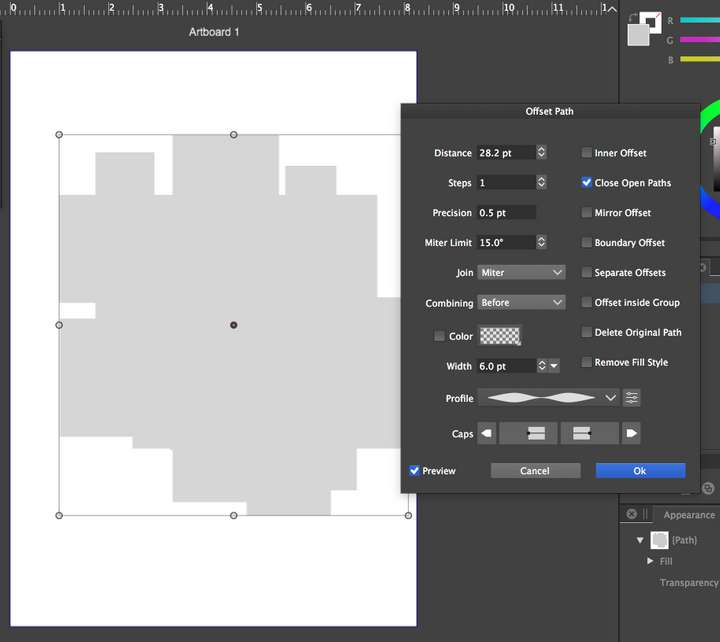
            @vectoradmin Am I not seeing the location of the newly added preview options? ( no preview, preview with the actual styles, preview with a color and transparency.)
            0_1632247061789_07bc6b00-a0b2-4c98-8484-f10acc22900b-image.png

            🍎 macOS Tahoe 26.2, Mac mini (M1, 2020), Chip Apple M1, Memory 16 GB
            Cintiq 27QHD Display and LG Ultra HD Display

            VectorStylerV 1 Reply Last reply Reply Quote 0
            • VectorStylerV Offline
              VectorStyler @Boldline
              last edited by

              @Boldline There are no options. The Preview checkbox can be used to get to to transparent preview mode.
              After the first click, the preview mode is as it used to be (with the object styles).
              Clicking again will show a dot in the preview (3rd state), in which case the preview is a transparent gray color.

              1 Reply Last reply Reply Quote 1
              • BoldlineB Offline
                Boldline
                last edited by

                @vectoradmin ok just tested that - I get it now - thank you!

                🍎 macOS Tahoe 26.2, Mac mini (M1, 2020), Chip Apple M1, Memory 16 GB
                Cintiq 27QHD Display and LG Ultra HD Display

                1 Reply Last reply Reply Quote 1
                • First post
                  Last post
