VectorStyler
    • Categories
    • Unread
    • Recent
    • Tags
    • Popular
    • Register
    • Login

    Some panels are not responsive
    Scheduled Pinned Locked Moved Resolved Issues
    4 Posts 2 Posters 4.7k Views
    Loading More Posts
    • Oldest to Newest
    • Newest to Oldest
    • Most Votes
    Reply
    • Reply as topic
    Log in to reply
    This topic has been deleted. Only users with topic management privileges can see it.
    • K Offline
      KF
      last edited by

      Hi,
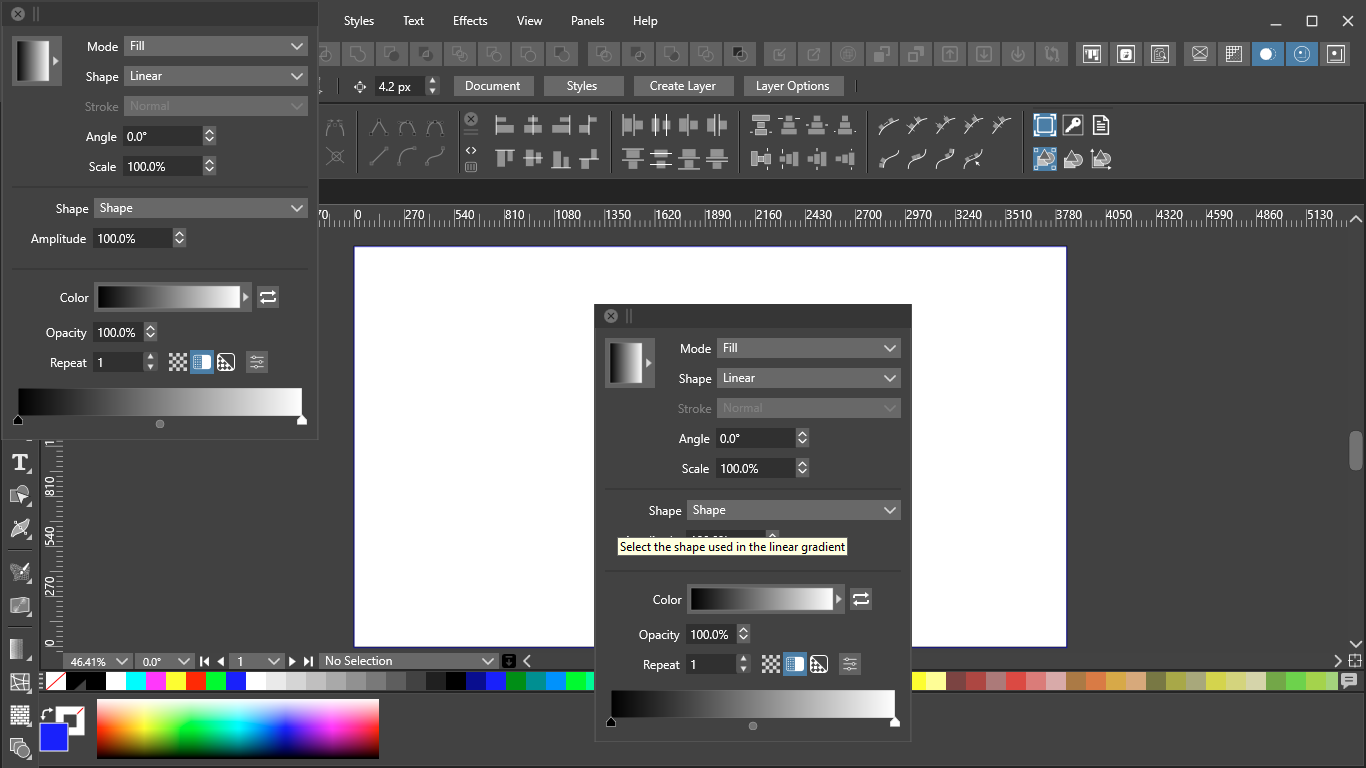
      I on off the panels via the Panels menu but I noted some panels with missing panel name ( I noted path and gradient panel without the panel name at the top. ). For gradient panel, I can activate the panel and cannot hide it by clicking the X button. If click the gradient panel again in the Panels menu, a duplicate gradient panel appear again.
      0_1632882261314_88c6e777-362c-418a-b2c3-bc7117036ce9-image.png

      VectorStylerV 2 Replies Last reply Reply Quote 0
      • VectorStylerV Offline
        VectorStyler @KF
        last edited by

        @KF Something gone wrong with the workspace. Exit the app and start it while holding Control+Alt+Shift to reset the workspace.

        1 Reply Last reply Reply Quote 0
        • K Offline
          KF
          last edited by

          Thank you.

          1 Reply Last reply Reply Quote 0
          • VectorStylerV Offline
            VectorStyler @KF
            last edited by

            @KF There are some fixes regarding panel management regressions, in build 1.0.055

            1 Reply Last reply Reply Quote 0
            • First post
              Last post