panels regression
-
@Boldline There might be an issue with the panels, that require the cleaning of the workspace (removing the workspace.xml file or a reset).
-
@vectoradmin I tried removing the workspace.xml file and then restarting VS and got the same panel issues.
I then did the reset on restart (Shift+Option+Command) and again there was no improvement with the panelsIs there another option to try? Do the panels operate correctly on your copy of El Capitan?
🍎 macOS Tahoe 26.2, Mac mini (M1, 2020), Chip Apple M1, Memory 16 GB
Cintiq 27QHD Display and LG Ultra HD Display -
@Boldline I will test it on ElCapitan.
-
@Boldline Can panels be moved from the title area (dark background outside of the title text region)?
-
"title area (dark background outside of the title text region)"
Sorry - I'm not sure what area this means - can you show me a screenshot pointing to it?
I was able to move panels out from the far right side that were adjacent to the work area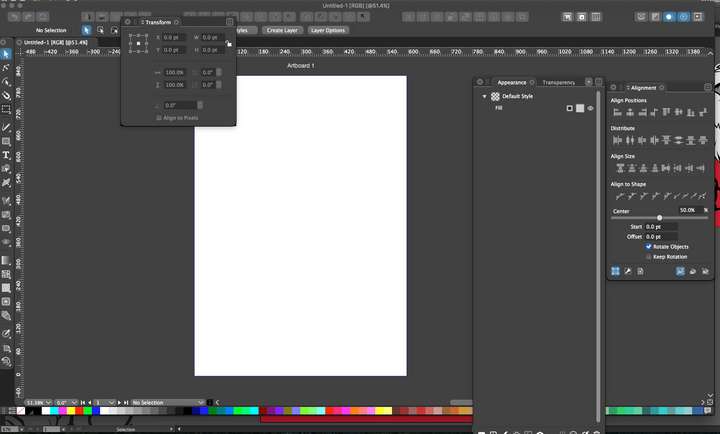
-
Tried again - removing the workspace file and doing a reset.
Still ran into massive issues with the panels - it's like they now do the complete opposite from before the update today. I'm running el capitan if that plays a factor. Is anyone else running into these issues? i also tried doing a total reinstall and that did not help anything.UPDATE: I just updated VS on my Windows 10 laptop to the newest build (54) and ran into the exact same issues there as well.
Panels could only be moved by the three line "grip" section... the large "X" on the left side did not function, panels could be compressed but if you moved it while compressed, it would open automatically when you let go. Some panels disappeared entirely when they were compressed and were moved around on the screen.
my non-developer thought: Seems like the issue is not with El Capitan in particular🍎 macOS Tahoe 26.2, Mac mini (M1, 2020), Chip Apple M1, Memory 16 GB
Cintiq 27QHD Display and LG Ultra HD Display -
@Boldline Looks like a regression in the recent panel changes.
For a real clean install you need to remove the ~/Library/Application Support/NumericPath/VectorStyler1.0 folder.
This also contains the user presets in /vector/data/presets/.I could not yet replicate the issue. From the recording it is clear that something is broken, the panel margins become rectangular.
Also: did the error occur for panels that were never minimized (the changes are related to this)?One thing to try (after cleaning VS data) is to avoid minimizing panels.
-
@Boldline The workspace file is ~/Library/Application Support/NumericPath/VectorStyler1.0/vector/data/resources/workspace.xml
This contains all the panel related state. Could you email me this file, I think the issue is with compatibility with panel states form the previous versions.
-
@vectoradmin sure thing. Does it matter that the workplace file is recent? As in, I deleted it twice trying to solve it here earlier yesterday and it created a replacement workspace file the next time I opened VS.
I guess if I never ready did a totally clean install and if the issue remains even after all that, it would still be something helpful.
I assume you saw my update that I ran into the same problems on the Windows version when I updated there as well?🍎 macOS Tahoe 26.2, Mac mini (M1, 2020), Chip Apple M1, Memory 16 GB
Cintiq 27QHD Display and LG Ultra HD Display -
@Boldline It does not matter if it is recent. The problem is that the workspace file stores the collapsed size of panels (even when they are not collapsed, to remember it), and I want to check if that causes the issue.
Also from Windows: c:\Users<user name>\NumericPath\VectorStyler1.0\vector\data\resources\workspace.xml -
@Boldline Partially replicated! If the panel is minimized, and it is moved from the dark title region (not the leaf with the text), then it will expand and goes broke.
It can be fixed by moving the panel from its title.
I added the bug to the backlog. -
@vectoradmin I can confirm on the Windows and Mac version of VS, if I drag a collapsed panel by the panel title, it moves fine and stays collapsed as it should.I can confirm also that the broken panels, you can see the sharp corners of a black box near the rounded edges of the panels
I can recover most broken panels - there were a few that just got worse before I tried the drag and drop from the title text to remake the panel.Since then I have been able to recover them all.
I assume all the crazy stuff happening with the broken panels goes away when you fix the issue that led to it.
It also sounds like you don't need the other workspace file from me!thank you for finding a solution to that! -
@vectoradmin said in panels regression:
The problem is that the workspace file stores the collapsed size of panels (even when they are not collapsed, to remember it), and I want to check if that causes the issue.
I assume so long as I don't collapse panels anywhere aside from the panel title text, until next week's build release that fixes this, I don't need to do anything more with clean reinstalls of VS or clearing out the workplace xml file?
-
@Boldline This regression is fixed in build 1.0.055

