VectorStyler
    • Categories
    • Unread
    • Recent
    • Tags
    • Popular
    • Register
    • Login

    Not seeing line attributes
    Scheduled Pinned Locked Moved Resolved Issues
    6 Posts 2 Posters 5.9k Views
    Loading More Posts
    • Oldest to Newest
    • Newest to Oldest
    • Most Votes
    Reply
    • Reply as topic
    Log in to reply
    This topic has been deleted. Only users with topic management privileges can see it.
    • J Offline
      Jono
      last edited by

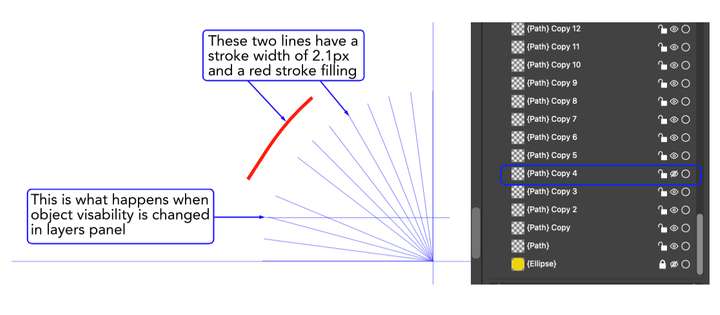
      Hi, for some reason I can’t see the changes applied to some lines. (screenshot below). The lines in question have been duplicated rather cloned, but they all seem to behave the same way. The red coloured line has the same attributes as the duplicated lines. I have the VectorStyler file save if it's helpful.
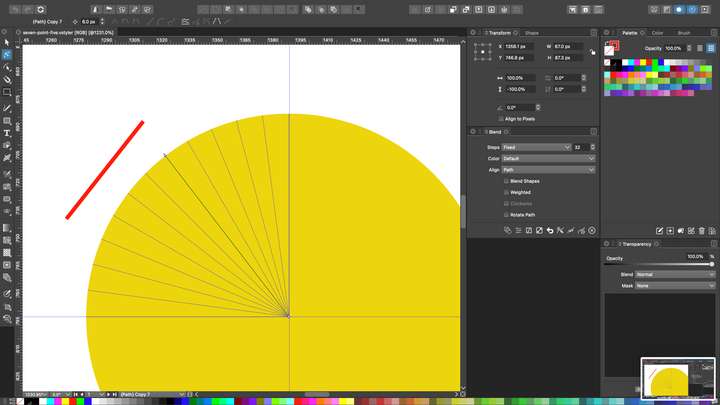
      0_1633079356906_Screenshot 2021-10-01 at 10.08.43.png

      Also, when I hide the layer some horizontal lines are displayed on the screen. (screenshot below).
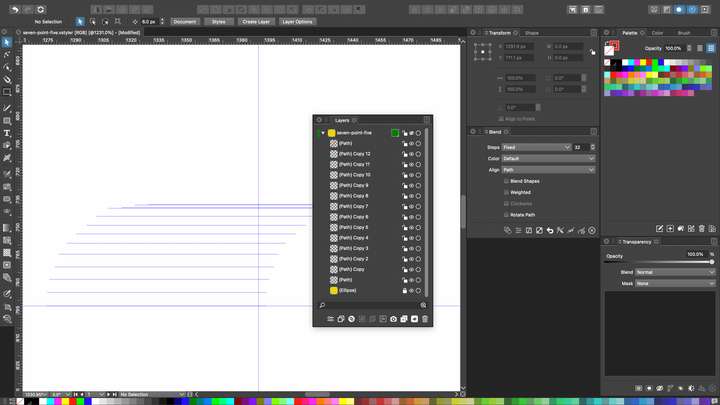
      0_1633079191172_Screenshot 2021-10-01 at 10.06.04.png

      Mac mini (M1, 2020) | Tahoe 26.1 | Wacom Cintiq 16 (1920 x 1080 px)

      VectorStylerV 1 Reply Last reply Reply Quote 0
      • VectorStylerV Offline
        VectorStyler @Jono
        last edited by

        @Jono What are the changes that are not applied (or visible)? Are these the stroke attributes?
        A file would be helpful of course, and a bit more explanation of what attribute / change is not seen.

        1 Reply Last reply Reply Quote 0
        • J Offline
          Jono
          last edited by

          Hi, apologies for scant details. I was intending to attach the file which hopefully would have demonstrated the issue without further explanation. I could not do that due to insufficient forum privileges. I then ran out of time, but have now emailed the file on to you. Hopefully it's just something I'm not understanding.
          0_1633124167292_lines.png

          Mac mini (M1, 2020) | Tahoe 26.1 | Wacom Cintiq 16 (1920 x 1080 px)

          VectorStylerV 1 Reply Last reply Reply Quote 0
          • VectorStylerV Offline
            VectorStyler @Jono
            last edited by

            @Jono Got the file, the issue is identified. These lines were turned into Guide shapes (View -> Guides -> Make Guides).
            Select the lines and use View -> Guides -> Release Guides to return them to regular shapes.

            The horizontal blue line is a guide shape rendering bug. This will be fixed.

            1 Reply Last reply Reply Quote 0
            • J Offline
              Jono
              last edited by

              Thanks. I didn’t know about guides shapes, that’s a useful feature to have in the back pocket.

              Mac mini (M1, 2020) | Tahoe 26.1 | Wacom Cintiq 16 (1920 x 1080 px)

              VectorStylerV 1 Reply Last reply Reply Quote 1
              • VectorStylerV Offline
                VectorStyler @Jono
                last edited by

                @Jono The guide rendering bug should be fixed in build 1.0.055

                1 Reply Last reply Reply Quote 0
                • First post
                  Last post