VectorStyler
    • Categories
    • Unread
    • Recent
    • Tags
    • Popular
    • Register
    • Login

    Snapping to the center

    Scheduled Pinned Locked Moved Implemented Features
    12 Posts 5 Posters 18.3k Views 5 Watching
    Loading More Posts
    • Oldest to Newest
    • Newest to Oldest
    • Most Votes
    Reply
    • Reply as topic
    Log in to reply
    This topic has been deleted. Only users with topic management privileges can see it.
    • 861475_VctSt8 Offline
      861475_VctSt
      last edited by

      I would like to see snapping and guidelines when centering objects on the artboard (not using the Alignment Panel feature).
      It would be nice to have them when centering objects together as well.

      LIc. 0 OS10.15.7
      MacBook Air (13-inch, Mid 2012) / Intel Core i5, 8GB / Intel HD Graphics 4000
      LIc. 1 OS13.6.7
      MacBook Pro (14-inch, 2023) / Apple M2 Pro, 16GB / Apple GPU

      VectorStylerV 2 Replies Last reply Reply Quote 0
      • VectorStylerV Offline
        VectorStyler @861475_VctSt
        last edited by

        @861475_VctSt View -> Guides -> Snap to Artboard should also enable snapping to artboard center.

        861475_VctSt8 1 Reply Last reply Reply Quote 0
        • 861475_VctSt8 Offline
          861475_VctSt @VectorStyler
          last edited by

          @vectoradmin

          I am using that setting. And there is a feeling that I am Snaping somewhere.
          However, if I have other snap options turned on at the same time, it's hard to tell if that's the center.
          That's why I also want a snap guideline indicator.

          LIc. 0 OS10.15.7
          MacBook Air (13-inch, Mid 2012) / Intel Core i5, 8GB / Intel HD Graphics 4000
          LIc. 1 OS13.6.7
          MacBook Pro (14-inch, 2023) / Apple M2 Pro, 16GB / Apple GPU

          b77B 1 Reply Last reply Reply Quote 0
          • b77B Offline
            b77 @861475_VctSt
            last edited by

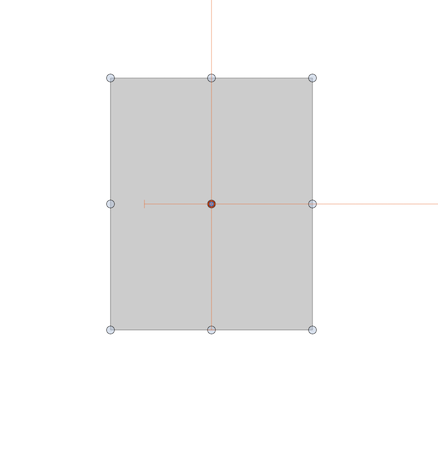
            @861475_VctSt When 'Snap to Artboards' is enabled, here the app displays orange guides when the object snaps to the center of the artboard:
            0_1634893908693_snap_indicator.png

            MacBook Pro (Intel) running Monterey 12.6.4

            861475_VctSt8 1 Reply Last reply Reply Quote 0
            • 861475_VctSt8 Offline
              861475_VctSt @b77
              last edited by

              @b77
              @vectoradmin

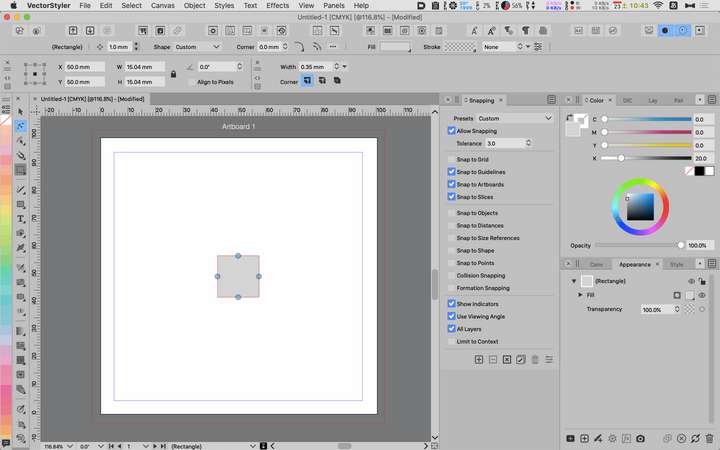
              I'm sure my settings are ready. Why can't I do it?
              Do I need Prefarence settings?

              0_1634953726161_2021-10-23.png

              LIc. 0 OS10.15.7
              MacBook Air (13-inch, Mid 2012) / Intel Core i5, 8GB / Intel HD Graphics 4000
              LIc. 1 OS13.6.7
              MacBook Pro (14-inch, 2023) / Apple M2 Pro, 16GB / Apple GPU

              VectorStylerV 1 Reply Last reply Reply Quote 0
              • VectorStylerV Offline
                VectorStyler @861475_VctSt
                last edited by

                @861475_VctSt Is the issue with Snapping, or with Pasting?
                The snapping should work when the object is moved with the settings form then screenshot.
                Pasting only works if a different artboard is active (I will improve on this one).

                861475_VctSt8 1 Reply Last reply Reply Quote 0
                • 861475_VctSt8 Offline
                  861475_VctSt @VectorStyler
                  last edited by 861475_VctSt

                  @vectoradmin

                  Sorry. Let's get back to the topic at hand.
                  I want to move the object to the center of the artboard by dragging it with the mouse.
                  I want to display the guide indicater at the same time, so that it is attached to the center of the artboard.

                  That's my first post about wanting that feature.
                  I have received several answers since then, but I can't do it.

                  LIc. 0 OS10.15.7
                  MacBook Air (13-inch, Mid 2012) / Intel Core i5, 8GB / Intel HD Graphics 4000
                  LIc. 1 OS13.6.7
                  MacBook Pro (14-inch, 2023) / Apple M2 Pro, 16GB / Apple GPU

                  VectorStylerV 1 Reply Last reply Reply Quote 0
                  • G Offline
                    Gremriel
                    last edited by

                    I tried it, and I can't get the object snapping to the artboard center either.

                    WIndows 11

                    1 Reply Last reply Reply Quote 0
                    • VectorStylerV Offline
                      VectorStyler @861475_VctSt
                      last edited by

                      @861475_VctSt It looks like there are some issues with the indicator (at least for me), but the snapping works. I will open a bug on this one.

                      1 Reply Last reply Reply Quote 1
                      • VectorStylerV Offline
                        VectorStyler @861475_VctSt
                        last edited by

                        @861475_VctSt This feature is available now in 1.1.002 (beta)

                        861475_VctSt8 1 Reply Last reply Reply Quote 0
                        • 861475_VctSt8 Offline
                          861475_VctSt @VectorStyler
                          last edited by

                          @vectoradmin

                          VS 1.1.010
                          MacOS X 10.15.7

                          I have confirmed that it is fixed.

                          Thank you.
                          I've been waiting for this.

                          LIc. 0 OS10.15.7
                          MacBook Air (13-inch, Mid 2012) / Intel Core i5, 8GB / Intel HD Graphics 4000
                          LIc. 1 OS13.6.7
                          MacBook Pro (14-inch, 2023) / Apple M2 Pro, 16GB / Apple GPU

                          1 Reply Last reply Reply Quote 0
                          • IngolfI Offline
                            Ingolf
                            last edited by Ingolf

                            Indeed fixed, yes.

                            🍏 macOS Sequoia Apple Silicon

                            1 Reply Last reply Reply Quote 0
                            • First post
                              Last post