VectorStyler
    • Categories
    • Unread
    • Recent
    • Tags
    • Popular
    • Register
    • Login

    Blend tool : different thickness
    Scheduled Pinned Locked Moved Questions and Support
    13 Posts 4 Posters 12.2k Views 4 Watching
    Loading More Posts
    • Oldest to Newest
    • Newest to Oldest
    • Most Votes
    Reply
    • Reply as topic
    Log in to reply
    This topic has been deleted. Only users with topic management privileges can see it.
    • B Offline
      B-Vs-V
      last edited by B-Vs-V

      I wanted to test the blend tool with a few obvious steps :

      • I draw a first line with the pencil
      • idem for a second line
      • I use the Blend tool by clicking from the 1st to the 2d line.
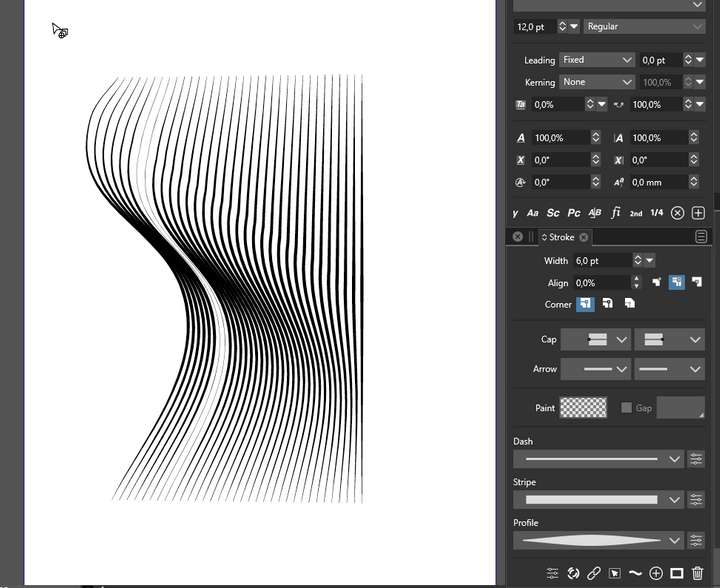
        I get a drawing with apparent different thickness of the blend lines
      0_1636650559500_316fa190-50b1-4564-8396-15b9277bfef0-image.png

      I save the file but I don't see how to upload it herein.
      Patrick

      W11 Pro 25H2 - 12th Gen Intel(R) i7-12700K 3.61 GHz - RAM 64 Go - NVIDIA GF GTX 4070 Ti - Intuos - Dell UP3216Q / Eizo ColorEdge
      W11 Pro 25H2 - 12th Gen Intel(R) i7-12700KF 3.60 GHz -RAM 64 Go - NVIDIA GF GTX 3080 - IntuosPro- ProArt PA329C

      1 Reply Last reply Reply Quote 0
      • b77B Offline
        b77
        last edited by

        @PatrickM Click the last button here to upload the file:

        0_1636651835052_uplo.png

        MacBook Pro (Intel) running Monterey 12.6.4

        1 Reply Last reply Reply Quote 0
        • B Offline
          B-Vs-V
          last edited by B-Vs-V

          @b77 thank you for your reply... I've tried but I don't have yet the possibility to upload file.

          W11 Pro 25H2 - 12th Gen Intel(R) i7-12700K 3.61 GHz - RAM 64 Go - NVIDIA GF GTX 4070 Ti - Intuos - Dell UP3216Q / Eizo ColorEdge
          W11 Pro 25H2 - 12th Gen Intel(R) i7-12700KF 3.60 GHz -RAM 64 Go - NVIDIA GF GTX 3080 - IntuosPro- ProArt PA329C

          b77B VectorStylerV 2 Replies Last reply Reply Quote 0
          • b77B Offline
            b77 @B-Vs-V
            last edited by

            @PatrickM Make sure the file is not too big (copy the blend object to a new file if necessary) then upload it by clicking the last button.

            MacBook Pro (Intel) running Monterey 12.6.4

            1 Reply Last reply Reply Quote 0
            • VectorStylerV Offline
              VectorStyler @B-Vs-V
              last edited by

              @PatrickM There could be some issue with the forum.
              Try drag&drop into the text box when replying to the post. If the file is not too large, it should work.

              1 Reply Last reply Reply Quote 0
              • B Offline
                B-Vs-V
                last edited by

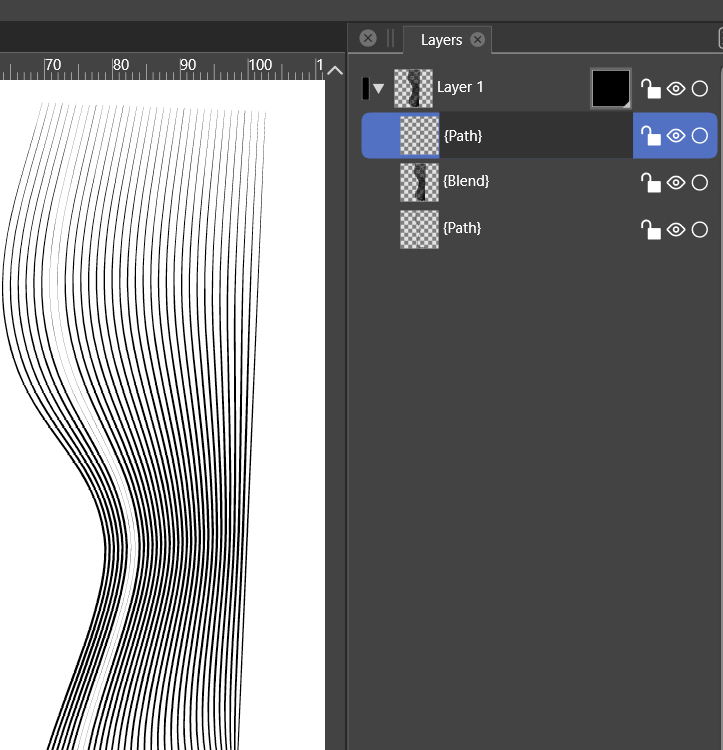
                0_1636652783431_3964dd12-b176-46f2-88ea-b300e9c34652-image.png

                W11 Pro 25H2 - 12th Gen Intel(R) i7-12700K 3.61 GHz - RAM 64 Go - NVIDIA GF GTX 4070 Ti - Intuos - Dell UP3216Q / Eizo ColorEdge
                W11 Pro 25H2 - 12th Gen Intel(R) i7-12700KF 3.60 GHz -RAM 64 Go - NVIDIA GF GTX 3080 - IntuosPro- ProArt PA329C

                VectorStylerV 1 Reply Last reply Reply Quote 0
                • encartE Offline
                  encart
                  last edited by encart

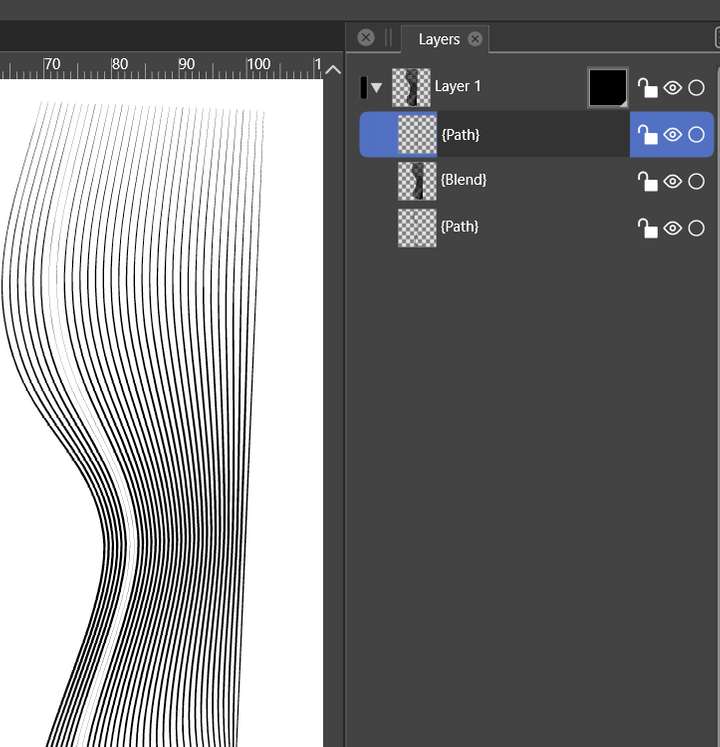
                  0_1636653539464_screenshot_20211111_185657.png

                  In both cases problem appears in 7&8th line
                  @vectoradmin File sent

                  MacBook Air M4 24Gb, Tahoe 26.2

                  VectorStylerV encartE 2 Replies Last reply Reply Quote 0
                  • VectorStylerV Offline
                    VectorStyler @encart
                    last edited by

                    @encart Can be replicated. Looks like a bug.

                    1 Reply Last reply Reply Quote 0
                    • VectorStylerV Offline
                      VectorStyler @B-Vs-V
                      last edited by

                      @PatrickM I will try to find out what settings are wrong on the forum.

                      1 Reply Last reply Reply Quote 1
                      • encartE Offline
                        encart @encart
                        last edited by

                        @vectoradmin This file contain another bug I'm fighting with. In often have problems with Undo/Redo. I tried to undo 5-10 steps and the lines created in Blend tool(as the last object) were still visible together with nodes from objects deleted previously. Deleted objects were present in Layer panel and I could select them, but werent visible on canvas even when I changed the fill and stroke. Just selection box was visible.

                        MacBook Air M4 24Gb, Tahoe 26.2

                        VectorStylerV B 2 Replies Last reply Reply Quote 0
                        • VectorStylerV Offline
                          VectorStyler @encart
                          last edited by

                          @encart I add this to the backlog as a bug.

                          1 Reply Last reply Reply Quote 1
                          • B Offline
                            B-Vs-V @encart
                            last edited by

                            @encart said in Blend tool : different thickness:

                            @vectoradmin This file contain another bug I'm fighting with. In often have problems with Undo/Redo. I tried to undo 5-10 steps and the lines created in Blend tool(as the last object) were still visible together with nodes from objects deleted previously. Deleted objects were present in Layer panel and I could select them, but werent visible on canvas even when I changed the fill and stroke. Just selection box was visible.

                            I had similar issues too with Undo, even a line drawn with pencil on the artboard went out the artboard.
                            I've just opened the file from yesterday and the blended lines are not there (they were when I saved)...
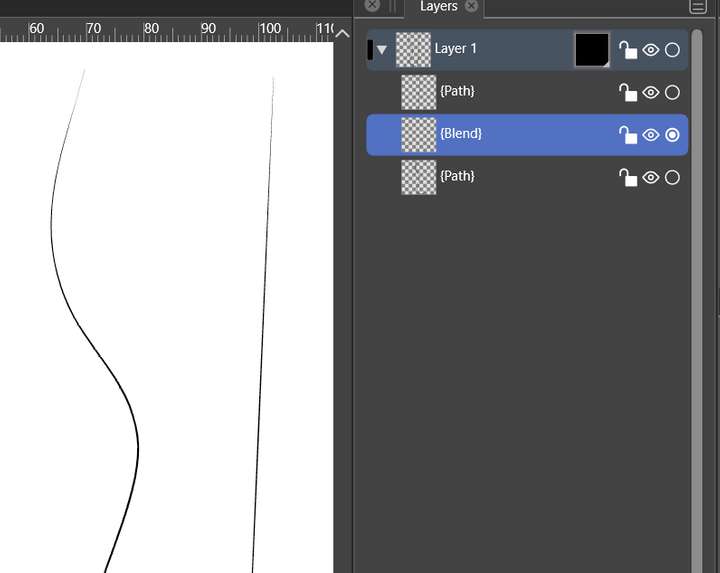
                            0_1636713535437_814c1e23-9254-4220-8951-2f060829de41-image.png. I don't know if it helps.
                            Patrick

                            W11 Pro 25H2 - 12th Gen Intel(R) i7-12700K 3.61 GHz - RAM 64 Go - NVIDIA GF GTX 4070 Ti - Intuos - Dell UP3216Q / Eizo ColorEdge
                            W11 Pro 25H2 - 12th Gen Intel(R) i7-12700KF 3.60 GHz -RAM 64 Go - NVIDIA GF GTX 3080 - IntuosPro- ProArt PA329C

                            VectorStylerV 1 Reply Last reply Reply Quote 0
                            • VectorStylerV Offline
                              VectorStyler @B-Vs-V
                              last edited by

                              @PatrickM The fix for earlier blend issue will be in the next build.
                              But this latest reported issue is not replicated yet.

                              1 Reply Last reply Reply Quote 1
                              • First post
                                Last post