VectorStyler
    • Categories
    • Unread
    • Recent
    • Tags
    • Popular
    • Register
    • Login

    Document setup : some remarks/questions

    Scheduled Pinned Locked Moved Questions and Support
    12 Posts 3 Posters 10.9k Views 3 Watching
    Loading More Posts
    • Oldest to Newest
    • Newest to Oldest
    • Most Votes
    Reply
    • Reply as topic
    Log in to reply
    This topic has been deleted. Only users with topic management privileges can see it.
    • B Offline
      B-Vs-V
      last edited by

      I want to create a document with two artboards corresponding to the dimensions of a PowerPoint presentation (4/3) and I want to save it as a template.
      In document setup :

      • "Artboard" : not a big deal but although I have modified the artboards dimensions, the format mentioned remains A4;
      • "Margins" : for me it is about defining inner margins to the document, useful to make sure that the final dimensions of the drawing/graphic do not interfere with PP objects. However, I only see bleed and slug. I know I can do it with guides but it seems strange to me that "margins" does not include inner document margins.
        Thanks,
        Patrick

      W11 Pro 25H2 - 12th Gen Intel(R) i7-12700K 3.61 GHz - RAM 64 Go - NVIDIA GF GTX 4070 Ti - Intuos - Dell UP3216Q / Eizo ColorEdge
      W11 Pro 25H2 - 12th Gen Intel(R) i7-12700KF 3.60 GHz -RAM 64 Go - NVIDIA GF GTX 3080 - IntuosPro- ProArt PA329C

      b77B VectorStylerV 2 Replies Last reply Reply Quote 0
      • b77B Offline
        b77 @B-Vs-V
        last edited by

        @PatrickM To change the size of the artboard you need to use the Artboard Editor tool (shortcut: Shift-O).

        Activate it, click the existing artboard, then you can change its size, location, orientation, etc from the context panel at the top.

        You can also duplicate the selected artboard with Shift-drag.

        Settings in 'Document Setup' change the default parameters for documents.

        …………………………………

        Inner margins… can you explain in more detail what these should be? Terms are a bit different in vector graphic apps.

        MacBook Pro (Intel) running Monterey 12.6.4

        1 Reply Last reply Reply Quote 1
        • B Offline
          B-Vs-V
          last edited by

          @b77 thanks. I did find the Artboard tool that allows resizing etc; but my questions are more related to the document specifications.
          This screenshot shows the margins in a template/document :
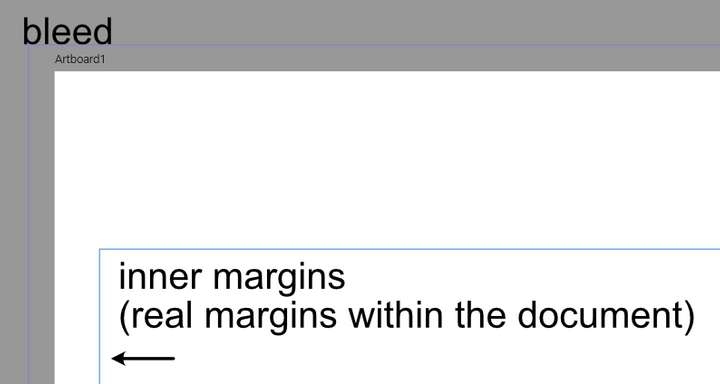
          0_1636889419397_48a2310e-c551-4fdf-9136-291bde7d00f3-image.png

          W11 Pro 25H2 - 12th Gen Intel(R) i7-12700K 3.61 GHz - RAM 64 Go - NVIDIA GF GTX 4070 Ti - Intuos - Dell UP3216Q / Eizo ColorEdge
          W11 Pro 25H2 - 12th Gen Intel(R) i7-12700KF 3.60 GHz -RAM 64 Go - NVIDIA GF GTX 3080 - IntuosPro- ProArt PA329C

          b77B 1 Reply Last reply Reply Quote 0
          • b77B Offline
            b77 @B-Vs-V
            last edited by b77

            @PatrickM So inner margins would be a visual help for the user to keep an empty area around the objects, area that get included on export?

            MacBook Pro (Intel) running Monterey 12.6.4

            B 1 Reply Last reply Reply Quote 0
            • B Offline
              B-Vs-V
              last edited by

              @b77 yes for the visual help & I don't know yet for including it on export in VS. In other apps one can decide to export only the scheme and not all the artboard. Margins are very useful when vector graphics/schemes have to fit into a canvas and respect certain dimensions to avoid enlarging or shrinking them afterwards.
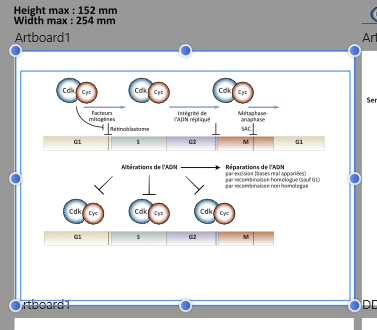
              0_1636892595291_9474cafb-8c83-49ca-9ffe-38e39b847849-image.png

              W11 Pro 25H2 - 12th Gen Intel(R) i7-12700K 3.61 GHz - RAM 64 Go - NVIDIA GF GTX 4070 Ti - Intuos - Dell UP3216Q / Eizo ColorEdge
              W11 Pro 25H2 - 12th Gen Intel(R) i7-12700KF 3.60 GHz -RAM 64 Go - NVIDIA GF GTX 3080 - IntuosPro- ProArt PA329C

              1 Reply Last reply Reply Quote 0
              • B Offline
                B-Vs-V
                last edited by B-Vs-V

                Margins could also be very useful in VS for a layout that would be printed directly from VS (in pdf or not).

                W11 Pro 25H2 - 12th Gen Intel(R) i7-12700K 3.61 GHz - RAM 64 Go - NVIDIA GF GTX 4070 Ti - Intuos - Dell UP3216Q / Eizo ColorEdge
                W11 Pro 25H2 - 12th Gen Intel(R) i7-12700KF 3.60 GHz -RAM 64 Go - NVIDIA GF GTX 3080 - IntuosPro- ProArt PA329C

                b77B 1 Reply Last reply Reply Quote 0
                • B Offline
                  B-Vs-V @b77
                  last edited by

                  @b77 said in Document setup : some remarks/questions:

                  @PatrickM So inner margins would be a visual help for the user to keep an empty area around the objects, area that get included on export?

                  It's true that if we don't have the possibility to export only the graphic, margins would only be interesting for a layout directly in VS (as much as bleeds).

                  W11 Pro 25H2 - 12th Gen Intel(R) i7-12700K 3.61 GHz - RAM 64 Go - NVIDIA GF GTX 4070 Ti - Intuos - Dell UP3216Q / Eizo ColorEdge
                  W11 Pro 25H2 - 12th Gen Intel(R) i7-12700KF 3.60 GHz -RAM 64 Go - NVIDIA GF GTX 3080 - IntuosPro- ProArt PA329C

                  1 Reply Last reply Reply Quote 0
                  • b77B Offline
                    b77 @B-Vs-V
                    last edited by b77

                    @PatrickM Currently you can draw a rectangle that's smaller than the artboard, and double-clicking it will let you draw or paste inside it.
                    Or you can draw anything, select all, cut, draw the rectangle and paste everything inside it (Edit > Paste Inside).

                    Would that help?

                    Also: in the Export window you have options to export the current canvas, current artboard or only the selected objects:
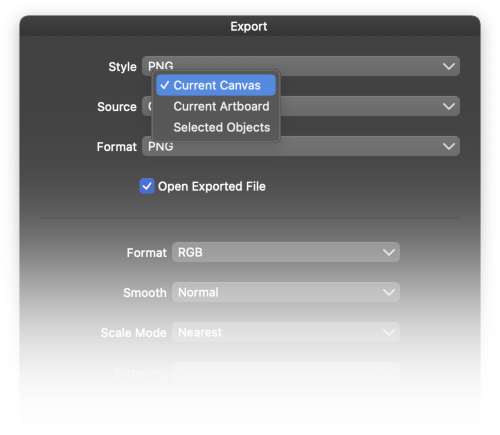
                    0_1636894059302_export_source.png

                    MacBook Pro (Intel) running Monterey 12.6.4

                    1 Reply Last reply Reply Quote 1
                    • B Offline
                      B-Vs-V
                      last edited by

                      @b77 sure, thanks for the tip 👍
                      If there are no margins, I will adapt my workflow. I might too setup one artboard with guides and copy-paste the scheme on a second artboard with the dimensions of the scheme, etc.

                      W11 Pro 25H2 - 12th Gen Intel(R) i7-12700K 3.61 GHz - RAM 64 Go - NVIDIA GF GTX 4070 Ti - Intuos - Dell UP3216Q / Eizo ColorEdge
                      W11 Pro 25H2 - 12th Gen Intel(R) i7-12700KF 3.60 GHz -RAM 64 Go - NVIDIA GF GTX 3080 - IntuosPro- ProArt PA329C

                      1 Reply Last reply Reply Quote 0
                      • VectorStylerV Offline
                        VectorStyler @B-Vs-V
                        last edited by

                        @PatrickM The artboard margins cannot be set in the document setup.
                        It can be set in the Canvas -> Artboard Options once the document is created.

                        b77B 1 Reply Last reply Reply Quote 1
                        • b77B Offline
                          b77 @VectorStyler
                          last edited by

                          @vectoradmin said in Document setup : some remarks/questions:

                          @PatrickM The artboard margins cannot be set in the document setup.
                          It can be set in the Canvas -> Artboard Options once the document is created.

                          Oh… 🙂

                          MacBook Pro (Intel) running Monterey 12.6.4

                          1 Reply Last reply Reply Quote 0
                          • B Offline
                            B-Vs-V
                            last edited by

                            @vectoradmin great 👍
                            It's a detail but the title "Margins" in the document setup is somehow confusing. One would expect to be able to set the internal margins at the beginning of one file setup. Maybe just name "Bleeds/slug" or include the margins? I leave that to you ☺

                            W11 Pro 25H2 - 12th Gen Intel(R) i7-12700K 3.61 GHz - RAM 64 Go - NVIDIA GF GTX 4070 Ti - Intuos - Dell UP3216Q / Eizo ColorEdge
                            W11 Pro 25H2 - 12th Gen Intel(R) i7-12700KF 3.60 GHz -RAM 64 Go - NVIDIA GF GTX 3080 - IntuosPro- ProArt PA329C

                            1 Reply Last reply Reply Quote 0
                            • First post
                              Last post
