Shortcut to selected object
-
Maybe Cmd-4 / Ctrl-4 should zoom to the selected object(s) on the canvas AND also scroll to the selected object(s) in the Layers panel.
@b77 Maybe that particluar shortcut should - but the "locale object in panel" shortcut should not. If it is a small object ... zooming into it is not a great idea

🍏 macOS Sequoia Apple Silicon
-
@Boldline said in Shortcut to selected object:
@Ingolf @b77 piggybacking on this topic. I agree affinity is on the right track with their layer location option. The preferences there were set to go to the selected vector in the layer panel when you selected it. This could be handy in some ways given the structure of layers in affinity, but also not something I'd want on all the time. I think it should be a potential preference for some people, but I know I'd prefer the keyboard option or relative menu option to click on in relation to what @ingolf described. I want the option accessible for when I need it, but not on or off permanently.
I rarely enable the always jump to the selected layer preference in Affinity, that is another feature. I am looking for/requesting the control + K equivalent that I use very often to show the currently selected layer to continue working from there. Or to "debug"
-
@Ingolf You're right.
So I guess it's either a Preferences setting to scroll to the selected object(s), or a special shortcut for that. Cmd/Ctrl-K seems to be available. -
@Ingolf
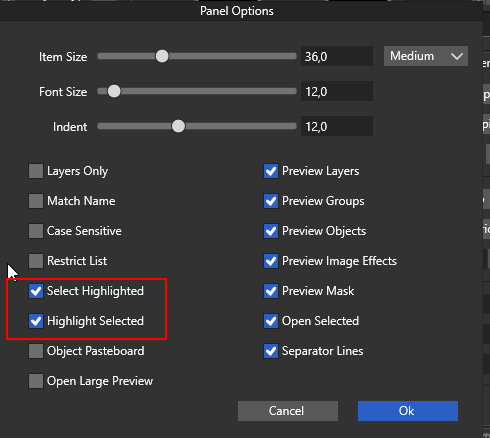
I'm not sure If I understand your expectations right, but Layers Panel should scroll to selected object with these two options active.
MacBook Air M4 24Gb, Tahoe 26.3.1
-
@encart said in Shortcut to selected object:
I'm not sure If I understand your expectations right, but Layers Panel should scroll to selected object with these two options active.
That option is equivalent to "auto scroll to show selection in layers panel" in Affinity and is great if you always need it, but if you want the layers panel not to jump from layer to layer as you work it is best left disabled. I make documents with hundreds and hundreds of layers and objects grouped and carefully structured and I collapse them all the time, so when the software expands it here and there I go insane.
This is what I would like as well - handly exactly when you need they layer panel to reflect the selection:

-
@Ingolf Thanks for the explanation! I agree with you. It is a useful mechanic.
-
@Ingolf No such shortcut, I add this as a feature request.
-
@encart said in Shortcut to selected object:
@Ingolf
I'm not sure If I understand your expectations right, but Layers Panel should scroll to selected object with these two options active.
Where exactly did you find these settings?
-
@vectoradmin
"Various aspects of the Layers panel can be configured, using the Panel Options command from the panel menu."
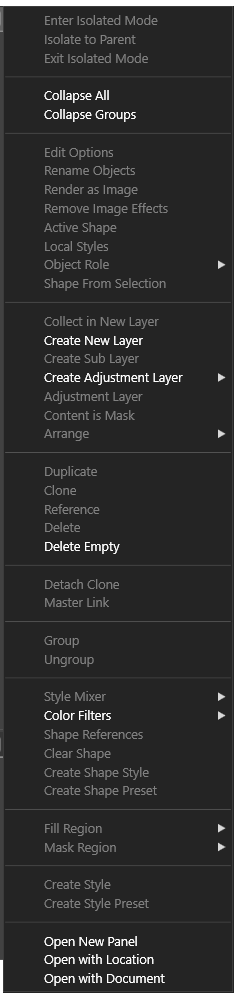
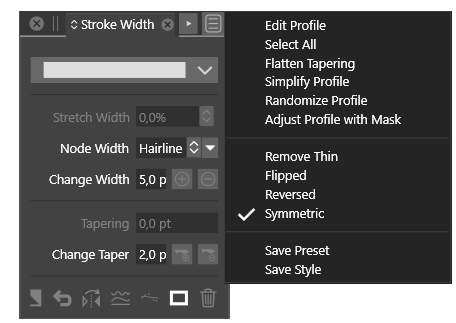
I don't see Panel Options anywhere in Windows port:
-
@Ingolf Did you scroll the menu to the end? It should be the last menu entry of the Layers panel: http://g.recordit.co/AFVI5EWdfw.gif
-
@b77 said in Shortcut to selected object:
@Ingolf Did you scroll the menu? It should be the last menu entry of the Layers panel: http://g.recordit.co/AFVI5EWdfw.gif
B77 to the rescue! THX! There it was. As you can see from my post there is no scroll down symbol, but I could scroll with the mouse wheel now you gave me a (vital) clue.
@vectoradmin When I scroll down with the mouse wheel to the last item (Panel Options) I see a scroll symbol at the top of the (too) long list. But in the lower part I never see one whatever I do.



