Insert new object in layer panel when drawing with pen tool - exactly where you are
-
I am probably too tired now - but also curious


How do I configure VS to insert new object where I actually am - here I have selected the second layer, where I am actually going to place these objects, but when drawing a new shape with the pen tool, it is inserted in the top most layer.
I don't find this default behavior logical at all.
🍏 macOS Sequoia Apple Silicon
-
🍎 macOS Tahoe 26.2, Mac mini (M1, 2020), Chip Apple M1, Memory 16 GB
Cintiq 27QHD Display and LG Ultra HD Display -
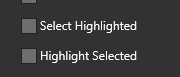
@Ingolf @Boldline This is a bug with two options in the layers panel.
 .
.
They must be turned off for placing objects on layers correctly. The next build will probably solve this problem.MacBook Air M4 24Gb, Tahoe 26.3.1
-
@Boldline said in Insert new object in layer panel when drawing with pen tool - exactly where you are:
I wonder if it's tied to the cut and paste issue I brought up recently.
Perhaps, whatever I create here in a freshly started VS gets inserted into the first layer created (default by VS).
-
@encart said in Insert new object in layer panel when drawing with pen tool - exactly where you are:
@Ingolf @Boldline This is a bug with two options in the layers panel.
.
They must be turned off for placing objects on layers correctly. The next build will probably solve this problem.@vectoradmin Oh yeah, this should be solved.
🍏 macOS Sequoia Apple Silicon
-
Ohh sorry . I didn't check your link.
-
Crazy workaround:
- deselect the two from panel options, OK
- go back, enable 'Select Highlighted', OK
- go back, enable 'Highlight selected', OK
Now it works for me in this document only - until next program start.
-
@vectoradmin mentioned it would get fixed in the upcoming build, "The fix for the problems caused by these two options will be in the next build."
Now the question is.... when do we see this new build? We get spoiled getting weekly updates! -
@Boldline said in Insert new object in layer panel when drawing with pen tool - exactly where you are:
@Ingolf
@vectoradmin mentioned it would get fixed in the upcoming build, "The fix for the problems caused by these two options will be in the next build."
Now the question is.... when do we see this new build? We get spoiled getting weekly updates!Oh, good. I can wait for well thought out and well designed changes and fixes - although this particular bug hurts a little.
Speaking of hurt - nighty night from Europe.

-
@Ingolf this is a bug with those options. The fix will be in then next build.
-
@vectoradmin said in Insert new object in layer panel when drawing with pen tool - exactly where you are:
@Ingolf this is a bug with those options. The fix will be in then next build.
Do we have any further control over where the object is inserted? Above, below currently selected object? Currently the new object is inserted topmost in the active layer which I never need. I think I saw options for this but can't find them.
-
@Ingolf In Select -> Drawing there are some options for drawing location. Is this the one you need?
-
@vectoradmin said in Insert new object in layer panel when drawing with pen tool - exactly where you are:
@Ingolf In Select -> Drawing there are some options for drawing location. Is this the one you need?
Exactly those. A shame they are menu options though - it is tedious accessing them multiple times in a workflow - therefore I added above, below, inside and normal (top) to the toolboxes -> context panel.
I played around with them - I have to report back later. I found som erratic behavior and need to establish the patterns. Draw above seemed to insert in the previously selected group or the first layer (like normal mode) and some objects (in a new document) were created outside the page. I made a simple documents with 4 layers and made some object above and below and inside using the toolbar buttons.
-
@Ingolf said in Insert new object in layer panel when drawing with pen tool - exactly where you are:
Exactly those. A shame they are menu options though - it is tedious accessing them multiple times in a workflow - therefore I added above, below, inside and normal (top) to the toolboxes -> context panel.
They could be added to the context panel, toolbox, or create a new toolbox for these. Using Customize Toolboxes .
-
@vectoradmin said in Insert new object in layer panel when drawing with pen tool - exactly where you are:
@Ingolf said in Insert new object in layer panel when drawing with pen tool - exactly where you are:
They could be added to the context panel, toolbox, or create a new toolbox for these. Using Customize Toolboxes .I managed to create my own toolbox - but I will create a new thread for these options I found to be broken or illogical or both on both macOS and Windows.



