VectorStyler
    • Categories
    • Unread
    • Recent
    • Tags
    • Popular
    • Register
    • Login

    Add a rotation handle to the selection box

    Scheduled Pinned Locked Moved Implemented Features
    3 Posts 2 Posters 5.7k Views
    Loading More Posts
    • Oldest to Newest
    • Newest to Oldest
    • Most Votes
    Reply
    • Reply as topic
    Log in to reply
    This topic has been deleted. Only users with topic management privileges can see it.
    • P Offline
      postdes
      last edited by postdes

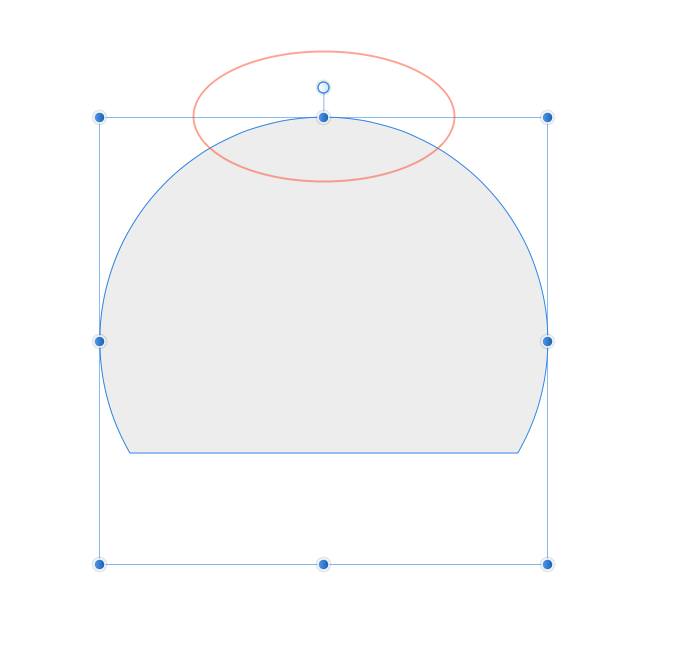
      I hope you could consider adding a rotation handle to the selection box, like Affinity Designer. I find it sometimes difficult to grab the box in the right position to rotate an object. Adding this extra handle would make it easier. See the screenshot to know what I mean. Also, is there an options to change the size and/or the color of handles etc.? On certain backgrounds they are hard to see.

      0_1607947845231_Schermafbeelding 2020-12-14 om 13.09.39.png

      0_1607947973733_Schermafbeelding 2020-12-14 om 13.12.22.png

      1 Reply Last reply Reply Quote 1
      • VectorStylerV Offline
        VectorStyler
        last edited by

        Yes, I think this is doable.
        Currently, rotation is just a bit outside of the corner handles.

        Added to the backlog.

        1 Reply Last reply Reply Quote 0
        • VectorStylerV Offline
          VectorStyler
          last edited by

          In the new build (194): selection box mode can be changed with the Preferences -> Adjustments -> Selection Box drop down.

          The Rotate with Knob mode will show a separate rotate knob handle for rotation.

          1 Reply Last reply Reply Quote 2
          • First post
            Last post