VectorStyler
    • Categories
    • Unread
    • Recent
    • Tags
    • Popular
    • Register
    • Login

    Automatic Vertical Roman option not working properly

    Scheduled Pinned Locked Moved Resolved Issues
    6 Posts 3 Posters 6.2k Views 3 Watching
    Loading More Posts
    • Oldest to Newest
    • Newest to Oldest
    • Most Votes
    Reply
    • Reply as topic
    Log in to reply
    This topic has been deleted. Only users with topic management privileges can see it.
    • A Offline
      ash-f
      last edited by ash-f

      Regardless of Automatic Vertical Roman status, roman characters are shown in the same orientation as Japanese characters.

      861475_VctSt8 VectorStylerV 3 Replies Last reply Reply Quote 0
      • A Offline
        ash-f
        last edited by ash-f

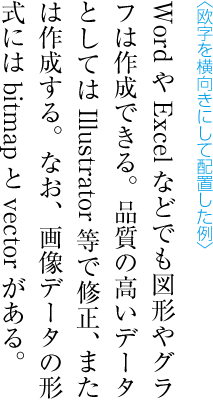
        English words and numbers are usually not upright in vertical format in Japanese.
        (Numbers I mean is standard numeric characters which do not include Japanese double width numeric characters.)
        0_1638755800521_5_3_.png

        1 Reply Last reply Reply Quote 0
        • 861475_VctSt8 Away
          861475_VctSt @ash-f
          last edited by 861475_VctSt

          This post is deleted!
          1 Reply Last reply Reply Quote 0
          • VectorStylerV Offline
            VectorStyler @ash-f
            last edited by

            @ash-f I will check what is going on with this. It could be a regression.

            A 1 Reply Last reply Reply Quote 0
            • A Offline
              ash-f @VectorStyler
              last edited by ash-f

              @vectoradmin
              It seems that Automatic Vertical Roman status is reflected on the text in the opposite way.
              checked - sideways
              unchecked - upright

              Also it often doesn't change the orientation of characters, that's why I thought it's not working.

              1 Reply Last reply Reply Quote 1
              • VectorStylerV Offline
                VectorStyler @ash-f
                last edited by

                @ash-f This problem should be fixed now.

                1 Reply Last reply Reply Quote 0
                • First post
                  Last post
