VectorStyler
    • Categories
    • Unread
    • Recent
    • Tags
    • Popular
    • Register
    • Login

    pen tool leaves odd starting node with handle
    Scheduled Pinned Locked Moved Resolved Issues
    5 Posts 2 Posters 5.2k Views 1 Watching
    Loading More Posts
    • Oldest to Newest
    • Newest to Oldest
    • Most Votes
    Reply
    • Reply as topic
    Log in to reply
    This topic has been deleted. Only users with topic management privileges can see it.
    • BoldlineB Offline
      Boldline
      last edited by

      I'm using the regular pen tool to create paths on my design. Most times I click to start a new path, the first node gets wonky... here is a close up of a typical wonky node:
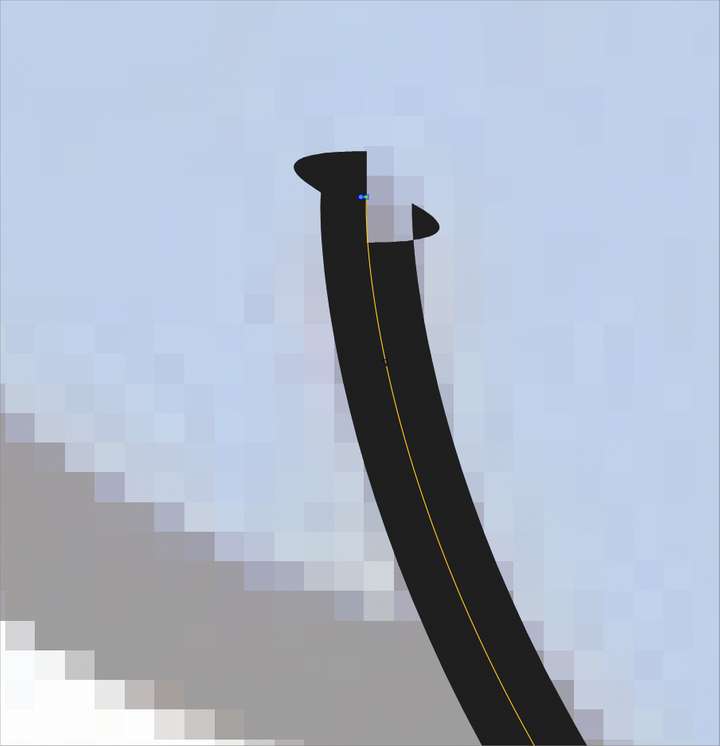
      0_1638991258472_80e0fb2c-555c-4190-b80c-49fe209d1e99-image.png

      I am using a stylus on a Cintiq screen if that plays a factor. It seems to immediately start with a node with handle, causing the odd look. Is there a way to fix this from happening?

      🍎 macOS Tahoe 26.2, Mac mini (M1, 2020), Chip Apple M1, Memory 16 GB
      Cintiq 27QHD Display and LG Ultra HD Display

      VectorStylerV 1 Reply Last reply Reply Quote 0
      • VectorStylerV Offline
        VectorStyler @Boldline
        last edited by

        @Boldline Yes, this can happen if the control point is very close to that node.

        BoldlineB 2 Replies Last reply Reply Quote 0
        • BoldlineB Offline
          Boldline @VectorStyler
          last edited by

          @vectoradmin ok but this is happening when I click a point to start or finish a path with nodes using the pen tool. I'm not wanting it to have any open control handles

          🍎 macOS Tahoe 26.2, Mac mini (M1, 2020), Chip Apple M1, Memory 16 GB
          Cintiq 27QHD Display and LG Ultra HD Display

          1 Reply Last reply Reply Quote 0
          • BoldlineB Offline
            Boldline @VectorStyler
            last edited by

            @vectoradmin Hopefully this video explains better the two issues I'm having with the pen tool.
            You can see in the first two paths made with the pen tool, it gives the odd result . the third pen path works fine, then the fourth one has a common issue we've discussed before where it has a "false-start"

            🍎 macOS Tahoe 26.2, Mac mini (M1, 2020), Chip Apple M1, Memory 16 GB
            Cintiq 27QHD Display and LG Ultra HD Display

            VectorStylerV 1 Reply Last reply Reply Quote 0
            • VectorStylerV Offline
              VectorStyler @Boldline
              last edited by

              @Boldline This issue should be fixed in the new build 1.1.002 (beta)
              For existing paths, adjusting the control point at the starting node will fix the issue.

              1 Reply Last reply Reply Quote 0
              • First post
                Last post
