Scaling object with transparency mask.
-
I have an object I want to scale that has an transparency mask. When the object is scaled the transparency mask does not scale with the object. I used more complex objects created in Adobe Illustrator and Affinity Designer and the transparency mask would not scale with the group. I tried a more simple test - I created an ellipse with a smaller ellipse in a transparency mask creating a torus. Same issue - the ellipse in the transparency mask did not scale with the object.
When I right click on the mask in the layer panel, there seems to be an option to "Transform Mask Content" as shown.
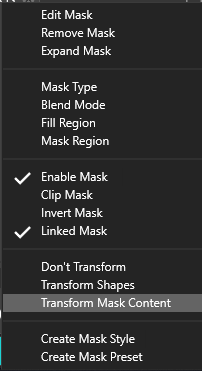
Assuming that by checking this option would help, this seems to have no effect and I can't seem to select it anyway.
Also, when scaling an object in the mask, around what should be the center of the object, it scales as though the center is far outside the object and moves toward wherever the center while scaling.
Thanks!
Windows 11 / Zorin OS Linux * AMD Threadripper 3960X * 128 GB Ram * Two Nvidia Quadro RTX 4000 graphics cards * Two monitor setup plus a Huion Kamvas 22 Plus pen display.
-
@Qode5 Welcome to VectorStyler!
Besides enabling 'Transform Mask Content', in the same Appearance panel select the Fill attribute, then from the panel's menu choose 'Transform Content': https://recordit.co/Wzuwd9ZJRQ
Also: if the transparency mask is a pattern, I would disable 'Absolute Origin' in the pattern's properties.
If this doesn't help, you can post a test file here on the forum (click the last button named 'Upload File').
-
@b77 Thank you for the welcome.
Thank you - that did indeed do the trick and the transparency mask now scaled with the object. I would like to suggest, though, that this option should be checked by default. Affinity Designer has option on the toolbar, at least for clipping masks, to check a box to lock the children to affect transforms for the clipping mask and leave the contents inside unaffected. Maybe could something similar for transparency and clipping masks.
With the tools the VS has in place, I would definitely like to get away from Illustrator and hopefully Adobe. VS looks very promising.
Cheers!
-
FYI
So, today I updated VS and went to scale an object with a transparency mask again. Although the "'Transform Mask Content" option was checked in the Fill attribute in the Appearance panel, the transparency mask was not scaling with the object again. I found the option in the Transparency panel menu. Once I checked the "'Transform Mask Content" option there the transparency mask once again scaled as expected.
Cheers!
-
@Qode5 One issue that happened here is that when scaling some shapes (rectangle or ellipse) the object is not scaled, only the shape size is adjusted, which blocks the mask scaling.
This is fixed bow in build 1.1.002, by always scaling the object if it has a transparency mask.