VectorStyler
    • Categories
    • Unread
    • Recent
    • Tags
    • Popular
    • Register
    • Login

    My mouse wheel no longer works - in VS Beta 1.1

    Scheduled Pinned Locked Moved Resolved Issues
    13 Posts 5 Posters 11.7k Views 4 Watching
    Loading More Posts
    • Oldest to Newest
    • Newest to Oldest
    • Most Votes
    Reply
    • Reply as topic
    Log in to reply
    This topic has been deleted. Only users with topic management privileges can see it.
    • S Offline
      Subpath
      last edited by

      I have installed the 1.1 version of VS (Win10)
      and found out that my mouse wheel no longer works.

      Neither to zoom in and out,
      nor in number fields
      nor when scrolling in panels.

      In all my other programs it works as usual.

      Win 11
      CPU: AMD Ryzen 5 9600X, 6-core.
      GPU: Nvidia Geforce RTX 5070.

      BoldlineB VectorStylerV 2 Replies Last reply Reply Quote 0
      • BoldlineB Online
        Boldline @Subpath
        last edited by

        @Subpath I assume you tried restarting VS?

        🍎 macOS Tahoe 26.2, Mac mini (M1, 2020), Chip Apple M1, Memory 16 GB
        Cintiq 27QHD Display and LG Ultra HD Display

        S 1 Reply Last reply Reply Quote 0
        • S Offline
          Subpath @Boldline
          last edited by

          @Boldline

          No, why you assume that ?
          Resp. what is to follow from this ?

          I just installed VS 1.1 over the old Installation
          of VS, like i done it bevor. This include also
          to Start the new Version of VS, like in previous
          installation.

          In the previous Installation of VS everthings works fine.

          Win 11
          CPU: AMD Ryzen 5 9600X, 6-core.
          GPU: Nvidia Geforce RTX 5070.

          b77B BoldlineB 3 Replies Last reply Reply Quote 0
          • IngolfI Offline
            Ingolf
            last edited by

            Not seeing the problem here on a plain vanilla Windows 10 using no additional mouse drivers other than what Windows provided itself.

            🍏 macOS Sequoia Apple Silicon

            1 Reply Last reply Reply Quote 0
            • b77B Offline
              b77 @Subpath
              last edited by b77

              @Subpath Since this is a beta version, when encountering issues restarting the app can help you confirm that the glitch (in this case no mouse scrolling) was not caused by some other combination of commands or by a particular file. That's why Boldline asked if you restarted the app.

              Other than that… I don't run Windows so I can't test. πŸ˜†

              MacBook Pro (Intel) running Monterey 12.6.4

              1 Reply Last reply Reply Quote 1
              • BoldlineB Online
                Boldline @Subpath
                last edited by

                @Subpath As @b77 said, many things are just glitches and that can be confirmed in large part by restarting the VS program on your computer and trying again. I know I've run into this many times myself where I have a glitch and I document it and post it on the forum and someone reminds me to try restarting the program and when I do so, the glitch is resolved. I've tried to make testing a restart of VS when I run into issues before I take the time to post it on the forum.

                🍎 macOS Tahoe 26.2, Mac mini (M1, 2020), Chip Apple M1, Memory 16 GB
                Cintiq 27QHD Display and LG Ultra HD Display

                1 Reply Last reply Reply Quote 0
                • b77B Offline
                  b77 @Subpath
                  last edited by b77

                  @Subpath In the long release log for version 1.1 "scrolling on Windows" is mentioned a few times. Maybe there's some conflict between the new changes and your saved preferences that causes this.

                  You could try resetting the app (hold Ctrl-Alt-Shift when starting it) which also resets all prefs, and see if it helps.

                  MacBook Pro (Intel) running Monterey 12.6.4

                  1 Reply Last reply Reply Quote 0
                  • S Offline
                    Subpath
                    last edited by Subpath

                    @Boldline , @b77 , @Ingolf

                    Thanks to you for help and tips. But unfortunately nothing
                    works so far. Even resetting the settings via Ctrl-Alt-Shift
                    does not work.

                    My mouse is a Logitech G300s but I don't use no additional
                    driver, only the standard Windows mouse driver.

                    And as I wrote, scrolling with the mouse works fine in all other
                    programs. It's only VectorStyler where it doesn't work.

                    The only thing I can see is when I start Vectorstyler and turn
                    the mouse scroll wheel for the first time the Text "Artboard 1"
                    (above my Canvas) flickers briefly and from then on stands
                    there quietly as normal.

                    Win 11
                    CPU: AMD Ryzen 5 9600X, 6-core.
                    GPU: Nvidia Geforce RTX 5070.

                    BoldlineB 1 Reply Last reply Reply Quote 0
                    • BoldlineB Online
                      Boldline @Subpath
                      last edited by

                      @Subpath This is not related directly to your mouse issue (I wish I had an answer) , but I was thinking about your comment earlier in this thread about not wanting to have to reset VS .

                      You may already be doing this, but saving a custom preferences file has been really handy for me. As I dig further into customizing settings I keep updating the file. I need to do a similar thing with the Application Shortcuts as well. Then I am less hesitant to reset VS because once I do so I can test if things get fixed and reload the pref file and Application shortcuts file and be right back in business
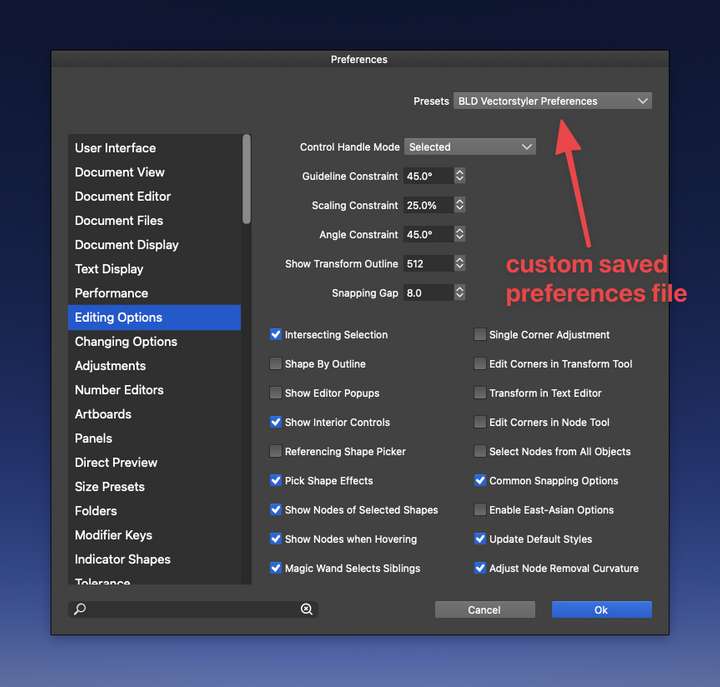
                      0_1639466432511_CleanShot 2021-12-14 at 02.18.00.png

                      🍎 macOS Tahoe 26.2, Mac mini (M1, 2020), Chip Apple M1, Memory 16 GB
                      Cintiq 27QHD Display and LG Ultra HD Display

                      S 1 Reply Last reply Reply Quote 2
                      • VectorStylerV Offline
                        VectorStyler @Subpath
                        last edited by

                        @Subpath I tried here on Windows 10 and mouse wheel works.
                        One thing to try is to reset the settings / workspace or to remove the c:\Users<username>\NumericPath folder that contains previous settings and workspace files (maybe backing up first).

                        Are there other pointer devices (like a tablet) attached?

                        S 1 Reply Last reply Reply Quote 1
                        • S Offline
                          Subpath @Boldline
                          last edited by

                          Thanks @Boldline, I will keep that in mind.

                          But my settings changes are usually are just minor things.
                          Therefore I normally have no problem to reset a program
                          to its default settings.

                          Win 11
                          CPU: AMD Ryzen 5 9600X, 6-core.
                          GPU: Nvidia Geforce RTX 5070.

                          1 Reply Last reply Reply Quote 1
                          • S Offline
                            Subpath @VectorStyler
                            last edited by

                            @vectoradmin

                            No tablet or other device are attached on my PC.
                            Only mouse and keyboard.

                            Will try your Tip with the NumericPath folder, thanks.

                            Win 11
                            CPU: AMD Ryzen 5 9600X, 6-core.
                            GPU: Nvidia Geforce RTX 5070.

                            1 Reply Last reply Reply Quote 0
                            • S Offline
                              Subpath
                              last edited by

                              @vectoradmin

                              Problem solved.
                              Scrolling with the mouse wheel seems to work now.
                              I decided to reinstall VectorStyler. Was going to install
                              the program to a different folder anyway.

                              And after the reinstallation the mouse wheel scrolling
                              works as usual.

                              Win 11
                              CPU: AMD Ryzen 5 9600X, 6-core.
                              GPU: Nvidia Geforce RTX 5070.

                              1 Reply Last reply Reply Quote 2
                              • First post
                                Last post
