VectorStyler
    • Categories
    • Unread
    • Recent
    • Tags
    • Popular
    • Register
    • Login

    New Brush Preset Panel empty

    Scheduled Pinned Locked Moved Resolved Issues
    10 Posts 2 Posters 8.9k Views 1 Watching
    Loading More Posts
    • Oldest to Newest
    • Newest to Oldest
    • Most Votes
    Reply
    • Reply as topic
    Log in to reply
    This topic has been deleted. Only users with topic management privileges can see it.
    • BoldlineB Offline
      Boldline
      last edited by

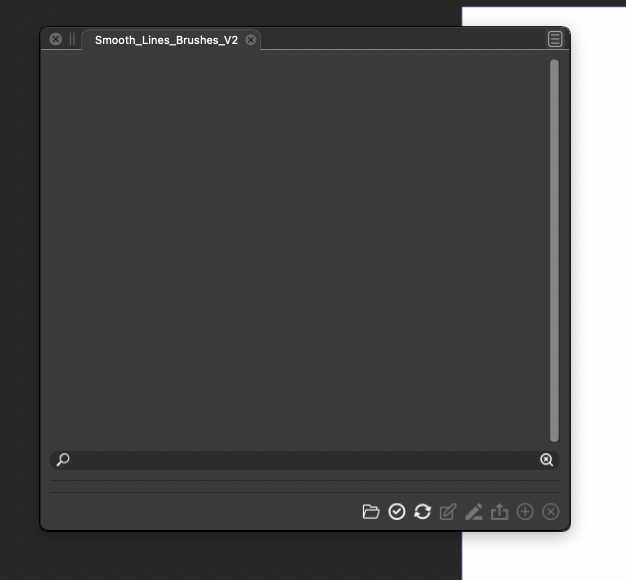
      I was trying to add a brush set to the presets but when I do, the result is an empty folder. This is a brush set that has worked previously in older versions of VS, so I assume it should work in VS1.1

      I went to Panels>Presets>Brush Presets then selected "open from panel" and selected the brush set. It was an AI file. The result is an empty panel with a title only.
      Is there something else I need to be doing to show the brush set?
      0_1639756645111_Screen Shot 2021-12-17 at 10.51.19 AM.png

      🍎 macOS Tahoe 26.2, Mac mini (M1, 2020), Chip Apple M1, Memory 16 GB
      Cintiq 27QHD Display and LG Ultra HD Display

      VectorStylerV 1 Reply Last reply Reply Quote 0
      • VectorStylerV Offline
        VectorStyler @Boldline
        last edited by

        @Boldline Verified the AI brush opening just now and it is working for me.
        Send me the problematic AI file by email.

        BoldlineB 1 Reply Last reply Reply Quote 1
        • BoldlineB Offline
          Boldline @VectorStyler
          last edited by

          @vectoradmin Just emailed it to you. thanks!

          🍎 macOS Tahoe 26.2, Mac mini (M1, 2020), Chip Apple M1, Memory 16 GB
          Cintiq 27QHD Display and LG Ultra HD Display

          VectorStylerV 1 Reply Last reply Reply Quote 0
          • VectorStylerV Offline
            VectorStyler @Boldline
            last edited by

            @Boldline This one opens here.
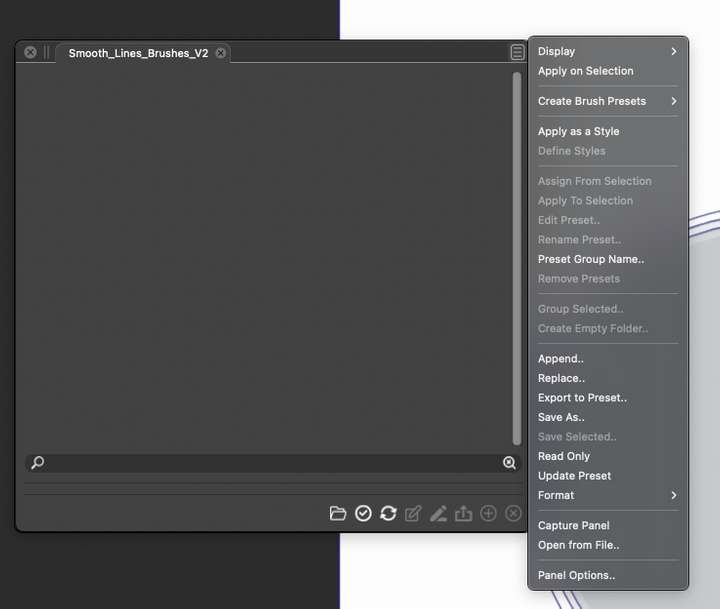
            Maybe the "Reveal Hidden Presets" from the "Smooth_Lines..." panel menu is needed.

            BoldlineB 1 Reply Last reply Reply Quote 0
            • BoldlineB Offline
              Boldline @VectorStyler
              last edited by

              @vectoradmin where would I find that option?
              0_1639758930808_Screen Shot 2021-12-17 at 11.34.32 AM.png

              🍎 macOS Tahoe 26.2, Mac mini (M1, 2020), Chip Apple M1, Memory 16 GB
              Cintiq 27QHD Display and LG Ultra HD Display

              VectorStylerV 1 Reply Last reply Reply Quote 0
              • VectorStylerV Offline
                VectorStyler @Boldline
                last edited by

                @Boldline It is only shown if the preset collection was hidden. Could be that it is not the issue here.

                From what panel or menu was the "Open From File" command selected? (it determines which presets are loaded from the AI file).

                BoldlineB 1 Reply Last reply Reply Quote 0
                • BoldlineB Offline
                  Boldline @VectorStyler
                  last edited by Boldline

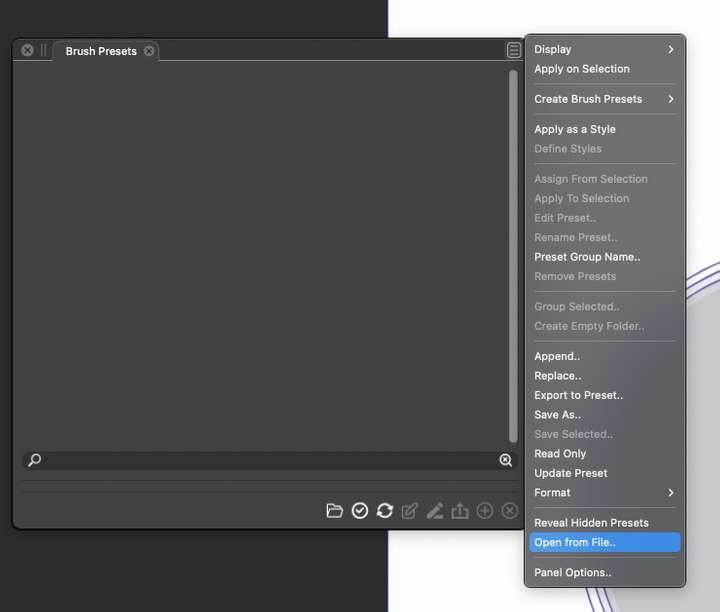
                  @vectoradmin I went to Panels>Presets>Brush Presets then selected "open from panel" and selected the brush set.
                  0_1639759361806_Screen Shot 2021-12-17 at 11.41.23 AM.png

                  🍎 macOS Tahoe 26.2, Mac mini (M1, 2020), Chip Apple M1, Memory 16 GB
                  Cintiq 27QHD Display and LG Ultra HD Display

                  VectorStylerV 1 Reply Last reply Reply Quote 0
                  • VectorStylerV Offline
                    VectorStyler @Boldline
                    last edited by

                    @Boldline That is the right one. Here it is working.
                    Can you select the "Reveal Hidden Preset" in that menu. It might have an impact.

                    I sent you the VS preset file by email. Try with that also.

                    BoldlineB 1 Reply Last reply Reply Quote 0
                    • BoldlineB Offline
                      Boldline @VectorStyler
                      last edited by

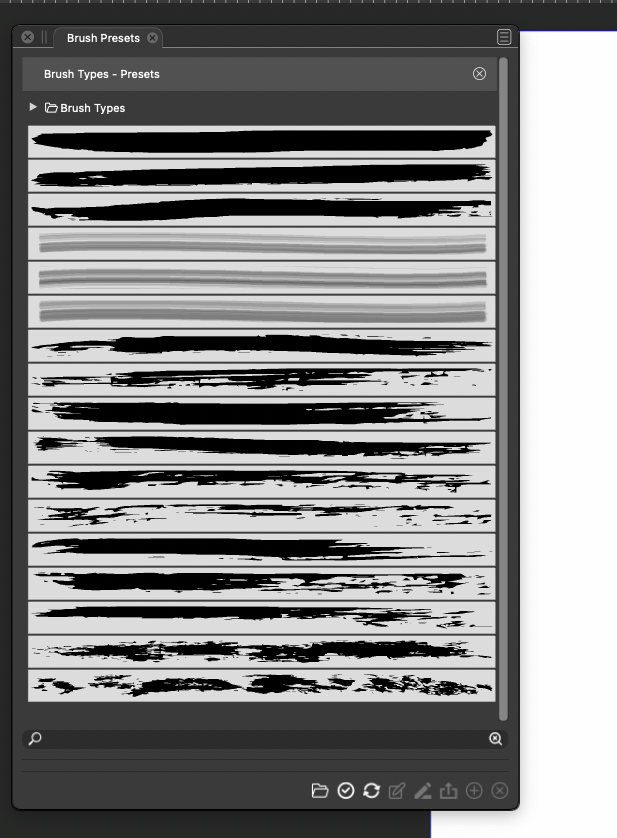
                      @vectoradmin The "reveal hidden presets" worked to show the default brush presets. The option is not there for the set I was trying to import.

                      The file you sent me worked correctly! I just wish I knew what kept the AI brush set from showing properly on my side. I will test out some other ai brush sets and see what happens
                      0_1639759885594_Screen Shot 2021-12-17 at 11.49.21 AM.png

                      🍎 macOS Tahoe 26.2, Mac mini (M1, 2020), Chip Apple M1, Memory 16 GB
                      Cintiq 27QHD Display and LG Ultra HD Display

                      BoldlineB 1 Reply Last reply Reply Quote 0
                      • BoldlineB Offline
                        Boldline @Boldline
                        last edited by

                        @vectoradmin I just emailed you back - it seems when I opened the AI brush set file in VS and it was not visible - when I closed out VS and logged out, but then logged back in, the brushes were suddenly visible in the brush preset panel!
                        I sent you the workspace.xml file just in case it helps with anything

                        🍎 macOS Tahoe 26.2, Mac mini (M1, 2020), Chip Apple M1, Memory 16 GB
                        Cintiq 27QHD Display and LG Ultra HD Display

                        1 Reply Last reply Reply Quote 1
                        • First post
                          Last post
