VectorStyler
    • Categories
    • Unread
    • Recent
    • Tags
    • Popular
    • Register
    • Login

    Beta 1.1 - double clicking in text mode should not activate node editing mode

    Scheduled Pinned Locked Moved Resolved Issues
    13 Posts 4 Posters 12.0k Views 3 Watching
    Loading More Posts
    • Oldest to Newest
    • Newest to Oldest
    • Most Votes
    Reply
    • Reply as topic
    Log in to reply
    This topic has been deleted. Only users with topic management privileges can see it.
    • BoldlineB Online
      Boldline @Ingolf
      last edited by

      @vectoradmin I am noticing the double click to enter node editing mode (that's what I have the standard double-click now set up to do) not only interferes with double clicking live type to select it all, but it also affects when I double click on a node handle to delete it and make that side a cusp edge

      You can see in this video as I select different nodes and double their handle to remove them and make the cusp side.... the first one worked fine, the second one did not - it ironically switched the transform tool when in that case I want it to remain in the node editing tool

      I don't know what the best solution would be aside from either removing the new node editing feature from the solo double click and keeping the shift and option modifiers for those tasks
      or I select a node handle and remove it with the delete key. Ideally there's got to be a way to differentiate between someone is double clicking on a node handle versus clicking on any other part of a vector shape - just like there needs to be a way to not allow a double click to do anything aside from highlighting text when selecting live type as discussed earlier in the thread.
      If there's a way to turn off the new double click function for node handles and live text - would that solve the issues and still allow a double click to have an added function?

      🍎 macOS Tahoe 26.2, Mac mini (M1, 2020), Chip Apple M1, Memory 16 GB
      Cintiq 27QHD Display and LG Ultra HD Display

      1 Reply Last reply Reply Quote 1
      • VectorStylerV Offline
        VectorStyler @Ingolf
        last edited by

        @Ingolf @Boldline @b77 @Ingolf Looks like there are some implications of the new double click handling causing bugs.
        These will be fixed.

        BoldlineB 1 Reply Last reply Reply Quote 1
        • BoldlineB Online
          Boldline @VectorStyler
          last edited by

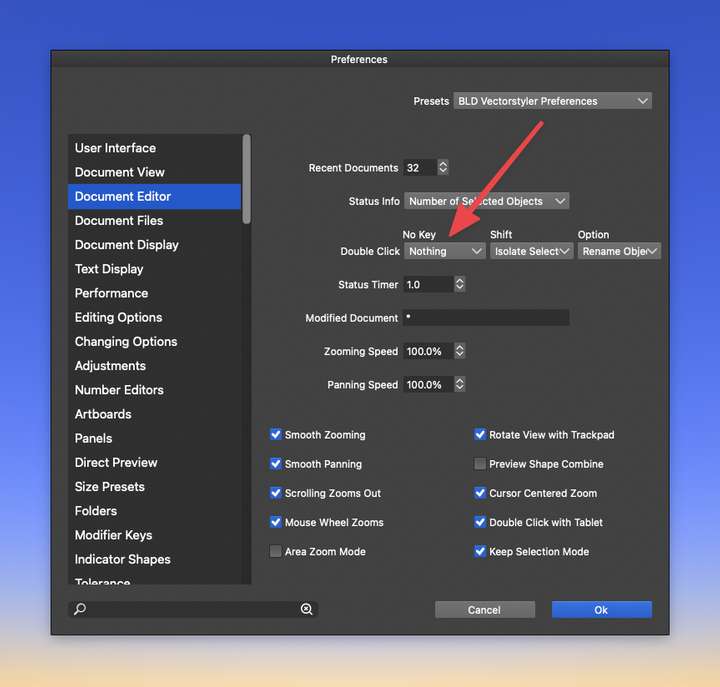
          @vectoradmin Even when I have the double click sans modifiers set to none - I still can't double click to select live text.
          0_1639503419153_6f50ddd2-3386-4eae-aeb9-4aba0a1bf1bd-image.png

          🍎 macOS Tahoe 26.2, Mac mini (M1, 2020), Chip Apple M1, Memory 16 GB
          Cintiq 27QHD Display and LG Ultra HD Display

          b77B 1 Reply Last reply Reply Quote 0
          • b77B Offline
            b77 @Boldline
            last edited by b77

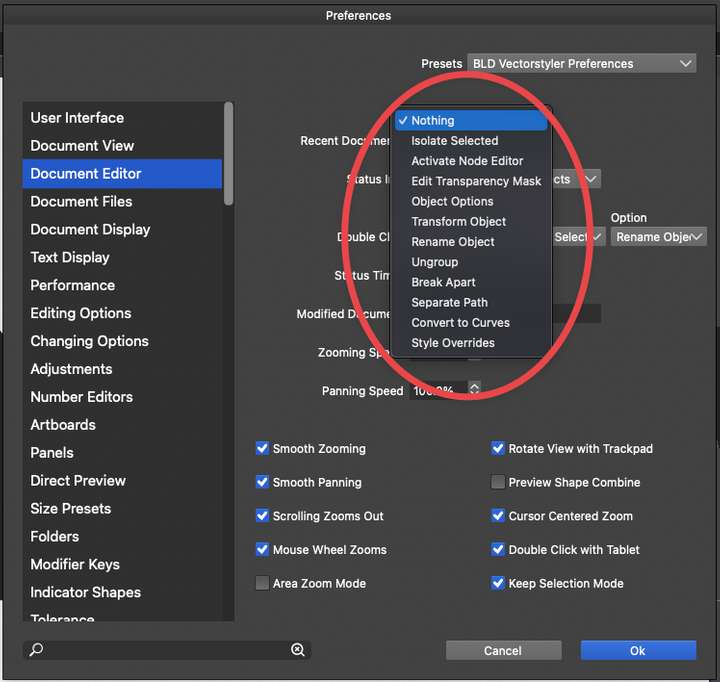
            @Boldline Set it for now to ‘Isolate Selected’ (the default) and text editing should work.

            MacBook Pro (Intel) running Monterey 12.6.4

            BoldlineB 1 Reply Last reply Reply Quote 1
            • BoldlineB Online
              Boldline @b77
              last edited by

              @b77 Where do I do that? Am I missing it?
              0_1639504245207_8829f22a-aa65-4237-9a17-c6770f1d60d7-image.png

              🍎 macOS Tahoe 26.2, Mac mini (M1, 2020), Chip Apple M1, Memory 16 GB
              Cintiq 27QHD Display and LG Ultra HD Display

              b77B 1 Reply Last reply Reply Quote 0
              • b77B Offline
                b77 @Boldline
                last edited by

                @Boldline It’s the second in the list.

                MacBook Pro (Intel) running Monterey 12.6.4

                BoldlineB 1 Reply Last reply Reply Quote 0
                • BoldlineB Online
                  Boldline @b77
                  last edited by Boldline

                  @b77 ok I get it now - I was looking for a literal "default" but right now "isolate selected" would be default - thanks!

                  🍎 macOS Tahoe 26.2, Mac mini (M1, 2020), Chip Apple M1, Memory 16 GB
                  Cintiq 27QHD Display and LG Ultra HD Display

                  b77B 1 Reply Last reply Reply Quote 1
                  • b77B Offline
                    b77 @Boldline
                    last edited by

                    @Boldline Should the developer add ‘(Default)’ after ‘Isolate Selected’?

                    MacBook Pro (Intel) running Monterey 12.6.4

                    BoldlineB 1 Reply Last reply Reply Quote 0
                    • BoldlineB Online
                      Boldline @b77
                      last edited by

                      @b77 No, I don't think so because "default" won't mean anything once he fixes the issues with it with live text and double clicking node handles to remove them. I was not necessarily looking for literal "default" wording initially but was just in the mindset based on your reply.That was just me misunderstanding your answer - nothing you did wrong

                      🍎 macOS Tahoe 26.2, Mac mini (M1, 2020), Chip Apple M1, Memory 16 GB
                      Cintiq 27QHD Display and LG Ultra HD Display

                      1 Reply Last reply Reply Quote 2
                      • VectorStylerV Offline
                        VectorStyler @Ingolf
                        last edited by

                        @Ingolf This issue should be fixed in the new build 1.1.002 (beta)

                        1 Reply Last reply Reply Quote 0
                        • First post
                          Last post
