VectorStyler
    • Categories
    • Unread
    • Recent
    • Tags
    • Popular
    • Register
    • Login

    Can't scale individual objects after VS 1.1.002 Beta update.

    Scheduled Pinned Locked Moved Resolved Issues
    7 Posts 2 Posters 6.8k Views 2 Watching
    Loading More Posts
    • Oldest to Newest
    • Newest to Oldest
    • Most Votes
    Reply
    • Reply as topic
    Log in to reply
    This topic has been deleted. Only users with topic management privileges can see it.
    • Qode5Q Offline
      Qode5
      last edited by

      Since the update I can't scale an object with the Transform Tool. I'm also unable to scale numerically in the Properties panel. I can however scale all objects by selecting the layer and then scale the layer with the Transform tool and numerically in the Properties panel as well - regardless of whether the object is locked or not.

      Thanks

      Windows 11 / Zorin OS Linux * AMD Threadripper 3960X * 128 GB Ram * Two Nvidia Quadro RTX 4000 graphics cards * Two monitor setup plus a Huion Kamvas 22 Plus pen display.

      VectorStylerV 1 Reply Last reply Reply Quote 0
      • VectorStylerV Offline
        VectorStyler @Qode5
        last edited by

        @Qode5 It must be something with settings or workspace
        Try resetting, by holding Control+Alt+Shift when starting VS.

        1 Reply Last reply Reply Quote 0
        • Qode5Q Offline
          Qode5
          last edited by

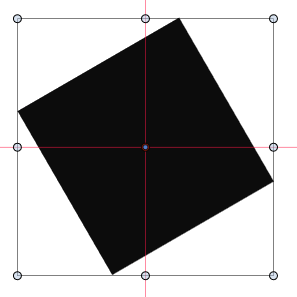
          @vectoradmin I gave that try and there was no change. I should have also stated that I can't rotate in the same way that I can't scale. I work around this by putting everything on it's own layer, but if I need to rotate the layer, the bounding box does not rotate with the object.
          0_1640806811360_22c38d89-d099-4e34-8f86-670029e54ed9-image.png

          Scaling then skews the object.

          0_1640806872166_642a92ec-bce4-41e1-87a8-eb6cb533b4da-image.png

          I looked through the settings, butting nothing I saw or tried made a difference.

          Windows 11 / Zorin OS Linux * AMD Threadripper 3960X * 128 GB Ram * Two Nvidia Quadro RTX 4000 graphics cards * Two monitor setup plus a Huion Kamvas 22 Plus pen display.

          VectorStylerV 1 Reply Last reply Reply Quote 0
          • VectorStylerV Offline
            VectorStyler @Qode5
            last edited by

            @Qode5 Yes, I think I can replicate it, and looks like the "Reset" button in the Transform panel may cause some issues.
            One thing to try in this case is Object -> Convert to Curves.

            1 Reply Last reply Reply Quote 0
            • Qode5Q Offline
              Qode5
              last edited by

              @vectoradmin I'm not sure if there's a glitch in the matrix here, but since my last reply I haven't touched VS. Went back in when I saw your reply and now it works as expected. Discovered a couple of cool features in the process. Updated to VS 1.1.003 as well and tested again with no issue.
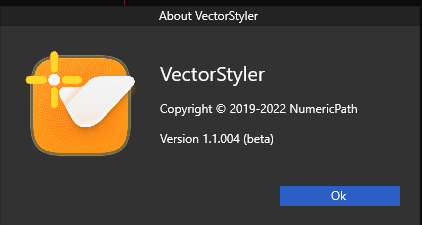
              (About VectorStyler in the help menu does say 1.1.004 and start-up screen says 1.1.003)
              0_1640815870828_280e8810-d9dc-4c91-b264-27fda3e85e9a-image.png

              Windows 11 / Zorin OS Linux * AMD Threadripper 3960X * 128 GB Ram * Two Nvidia Quadro RTX 4000 graphics cards * Two monitor setup plus a Huion Kamvas 22 Plus pen display.

              VectorStylerV 2 Replies Last reply Reply Quote 0
              • VectorStylerV Offline
                VectorStyler @Qode5
                last edited by

                @Qode5 Yes, there was a problem in 1.1.003 with file Save dialog on Windows that required a quick update. The startup version number is not updated, and 1.1.004 exists only on Windows.

                1 Reply Last reply Reply Quote 0
                • VectorStylerV Offline
                  VectorStyler @Qode5
                  last edited by

                  @Qode5 This problem should be fixed in the latest build, let me know if it still occurs.

                  1 Reply Last reply Reply Quote 0
                  • First post
                    Last post