VectorStyler
    • Categories
    • Unread
    • Recent
    • Tags
    • Popular
    • Register
    • Login

    Symbol selection highlight not clearing after deleting object used to create symbol
    Scheduled Pinned Locked Moved Resolved Issues
    3 Posts 2 Posters 4.1k Views 2 Watching
    Loading More Posts
    • Oldest to Newest
    • Newest to Oldest
    • Most Votes
    Reply
    • Reply as topic
    Log in to reply
    This topic has been deleted. Only users with topic management privileges can see it.
    • J Offline
      Jono
      last edited by

      There is an occasion when a symbol looks like it is selected but it's not. (see screenshot).

      The easiest way to see this is:

      1. draw an object
      2. add it to the symbols panel
      3. delete the object from step 1
      4. the symbol is still showing as selected in the symbols panel
      5. select the symbol spray brush (for example)
      6. tap canvas and then warning occurs

      The quick way around this is to deselect then reselect (again) the symbol in the symbols panel.
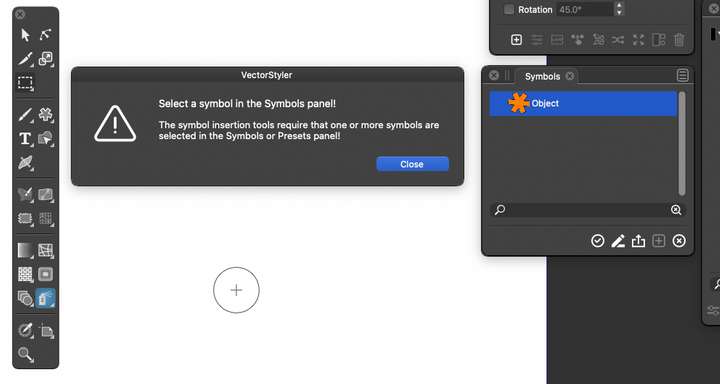
      0_1641318101960_Screenshot 2022-01-04 at 17.32.31.png

      Mac mini (M1, 2020) | Tahoe 26.1 | Wacom Cintiq 16 (1920 x 1080 px)

      VectorStylerV 2 Replies Last reply Reply Quote 0
      • VectorStylerV Offline
        VectorStyler @Jono
        last edited by

        @Jono I added this issue to the backlog as a bug.

        1 Reply Last reply Reply Quote 0
        • VectorStylerV Offline
          VectorStyler @Jono
          last edited by

          @Jono This problem should be fixed in build 1.1.008

          1 Reply Last reply Reply Quote 1
          • First post
            Last post