VectorStyler
    • Categories
    • Unread
    • Recent
    • Tags
    • Popular
    • Register
    • Login

    Tools, Color panel

    Scheduled Pinned Locked Moved Resolved Issues
    7 Posts 2 Posters 6.3k Views 2 Watching
    Loading More Posts
    • Oldest to Newest
    • Newest to Oldest
    • Most Votes
    Reply
    • Reply as topic
    Log in to reply
    This topic has been deleted. Only users with topic management privileges can see it.
    • P Offline
      Petar_MK
      last edited by

      Hi,

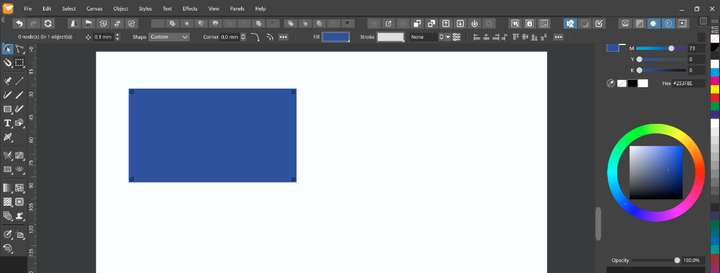
      1. I can't find "Move Tool" in the Toolbox, so I can't select the rectangle;
      2. Cyan color slider is not visible in the Color panel.
      VectorStylerV 1 Reply Last reply Reply Quote 0
      • VectorStylerV Offline
        VectorStyler @Petar_MK
        last edited by

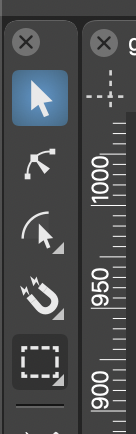
        @Petar_MK You should have this at the top of the toolbox:
        0_1642585569449_toolbox.png

        1 Reply Last reply Reply Quote 0
        • P Offline
          Petar_MK
          last edited by

          Sorry, I didn't attached the picture.0_1642585981080_bugs.png

          VectorStylerV 1 Reply Last reply Reply Quote 0
          • VectorStylerV Offline
            VectorStyler @Petar_MK
            last edited by

            @Petar_MK Looks like the context panel (top two rows with buttons and some number editors) has been detached and it is covering the toolbox.

            Move away the context panel (or dock it back to the top margin of the document view), by dragging from some empty area (for example where the "0 nodes" test is).

            1 Reply Last reply Reply Quote 0
            • P Offline
              Petar_MK
              last edited by

              OK, thanks, but what about Color panel?

              VectorStylerV 1 Reply Last reply Reply Quote 0
              • VectorStylerV Offline
                VectorStyler @Petar_MK
                last edited by

                @Petar_MK said in Tools, Color panel:

                OK, thanks, but what about Color panel?

                Same issue, as long as the Context panel is floating, it will overlap something. When you drag it close to the top margin, and a blue highlight is show (as wide as the app window), then it should dock and not float.

                1 Reply Last reply Reply Quote 0
                • P Offline
                  Petar_MK
                  last edited by

                  Thank you.

                  1 Reply Last reply Reply Quote 0
                  • First post
                    Last post