VectorStyler
    • Categories
    • Unread
    • Recent
    • Tags
    • Popular
    • Register
    • Login

    Color indicator+selector in layers panel superfluous
    Scheduled Pinned Locked Moved Implemented Features
    13 Posts 4 Posters 18.5k Views 3 Watching
    Loading More Posts
    • Oldest to Newest
    • Newest to Oldest
    • Most Votes
    Reply
    • Reply as topic
    Log in to reply
    This topic has been deleted. Only users with topic management privileges can see it.
    • BoldlineB Online
      Boldline @Ingolf
      last edited by

      @Ingolf Oh gotcha! yeah.... well with VS I know I was one of the ones advocating for color coded layers that also translated into corresponding selection boundaries and path selected lines, etc to be added to VS. You're preaching to the choir about the value they have!

      🍎 macOS Tahoe 26.2, Mac mini (M1, 2020), Chip Apple M1, Memory 16 GB
      Cintiq 27QHD Display and LG Ultra HD Display

      1 Reply Last reply Reply Quote 0
      • VectorStylerV Offline
        VectorStyler @Ingolf
        last edited by

        @Ingolf @Boldline This can be easily fixed. But would there be another quick (and easy) way to adjust the layer color?

        1 Reply Last reply Reply Quote 0
        • IngolfI Offline
          Ingolf
          last edited by Ingolf

          My thoughts visualized:

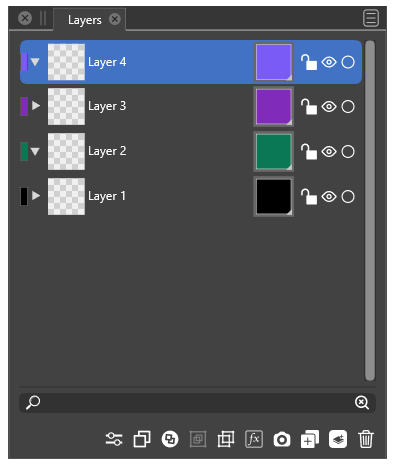
          VS today:
          0_1641370985623_cf247305-1806-4d3f-9795-7284ae905d48-image.png

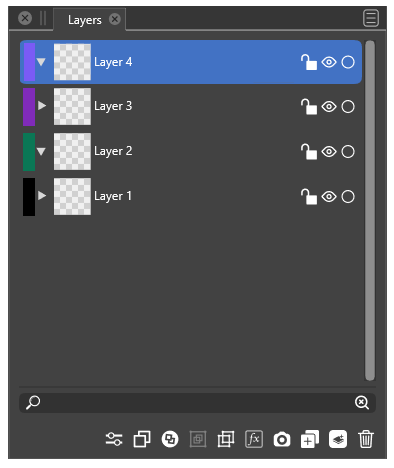
          My idea:
          0_1641372037309_cbae679b-6b0b-42b3-b0c0-2b2af4855fd0-image.png

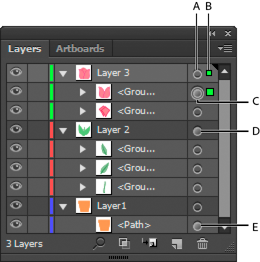
          When pointer hovers the colored rectangle the pointer changes like in Illustrator:

          alt text

          🍏 macOS Sequoia Apple Silicon

          S 1 Reply Last reply Reply Quote 3
          • S Offline
            Subpath @Ingolf
            last edited by

            @Ingolf

            like this idea

            Win 11
            CPU: AMD Ryzen 5 9600X, 6-core.
            GPU: Nvidia Geforce RTX 5070.

            1 Reply Last reply Reply Quote 1
            • BoldlineB Online
              Boldline
              last edited by

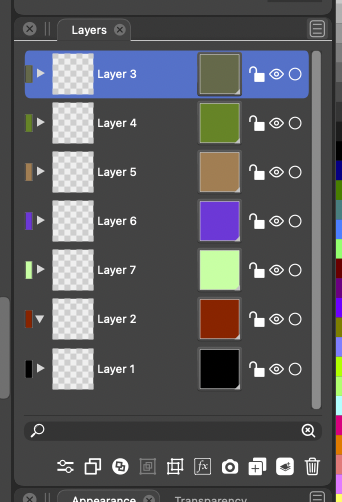
              @Ingolf I agree with you on layout for this part - when you mentioned the full squares on the right being superfluous - enlarging the rectangles on the far left a little more made sense
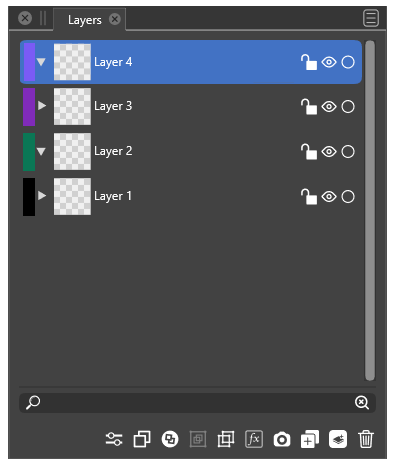
              0_1641394964899_2606912a-613b-44f2-944a-695820d98b9f-image.png

              On your idea for a color selection method using those smaller left-aligned rectangles, why can't it stay what it currently is? When the cursor hovers the colored rectangle the same color wheel menu appears like it does already with the large squares. I love the flexibility of choosing a color that way. Opening a menu of static squares feels clunky and limits the color options

              🍎 macOS Tahoe 26.2, Mac mini (M1, 2020), Chip Apple M1, Memory 16 GB
              Cintiq 27QHD Display and LG Ultra HD Display

              IngolfI 1 Reply Last reply Reply Quote 0
              • IngolfI Offline
                Ingolf @Boldline
                last edited by

                @Boldline The could also be right-aligned - but I would prefer it placed next to the scroll bar - not next to the lock icon. Next to the border of the panel it looks less intrusive.

                🍏 macOS Sequoia Apple Silicon

                BoldlineB 1 Reply Last reply Reply Quote 0
                • BoldlineB Online
                  Boldline @Ingolf
                  last edited by Boldline

                  @Ingolf I think we agree on that part. I prefer the color rectangles as you displayed them in this image -on the left side of the layer tabs - making them a little wider than they are right now.
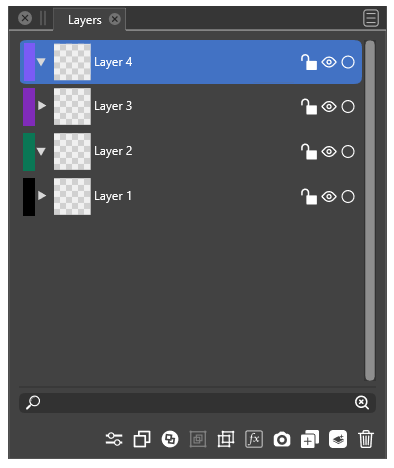
                  0_1641402067414_797aa8fc-cbae-41a1-81b9-b2f389dc1c9d-image.png
                  I was hoping we could keep the existing layer color picker as it currently is and just move it over to the small rectangles on the left. Like I am trying to demonstrate in the pic below 🙂
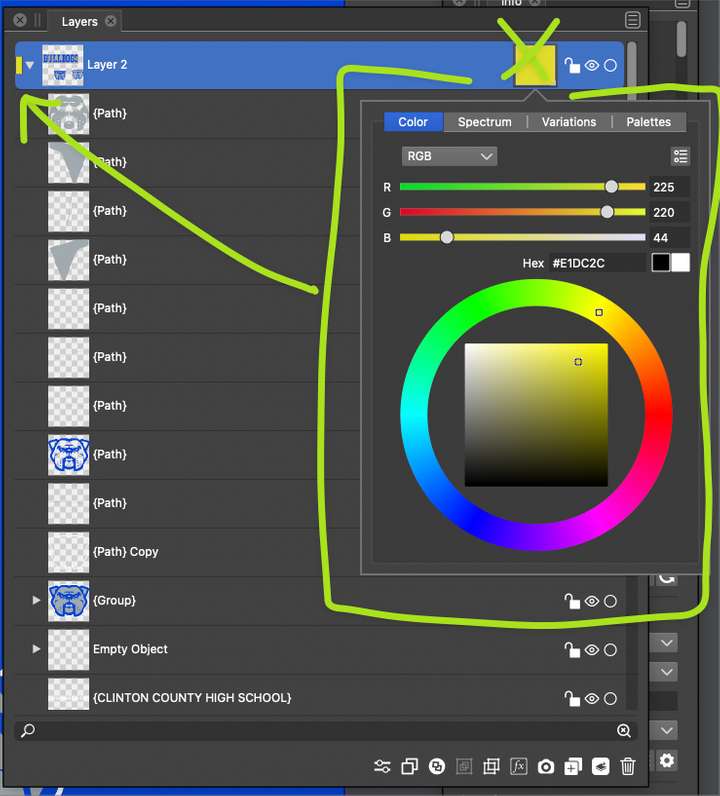
                  0_1641402218593_b77f34cc-6c31-46f2-899d-5274a1a7f8b1-BLD 2022-01-05 at 12.01.57.png

                  I was less excited about switching the layer color picker to a set of static clunky boxes of color lol
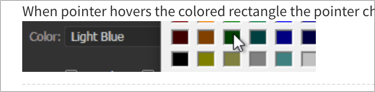
                  0_1641402357141_681df98e-b8ea-4706-a0f2-333fef5357c2-BLD 2022-01-05 at 12.05.12.png

                  🍎 macOS Tahoe 26.2, Mac mini (M1, 2020), Chip Apple M1, Memory 16 GB
                  Cintiq 27QHD Display and LG Ultra HD Display

                  1 Reply Last reply Reply Quote 1
                  • IngolfI Offline
                    Ingolf
                    last edited by

                    Well, ultimately not my decision 🙂

                    Just moving the huge box? Eh, no thank you. Personally I find it horribly big - huge - the colors catches my attention all the time, no matter where they would be, the small rectangle doesn't. And it is more than enough to hit with the pointer.

                    NOTE: I didn't at all suggest introducing the color picker from Illustrator (it is the ancient Windows color picker it activates, yuck), that is what happens in Illustrator, just showed how the cursor switching to a hand above the rectangle indicates that you can adjust something here. Elegant nudging at work.

                    To clarify: when the cursor changes to a hand symbol, click once and the current VS color selector appears.

                    🙂

                    🍏 macOS Sequoia Apple Silicon

                    BoldlineB 1 Reply Last reply Reply Quote 0
                    • BoldlineB Online
                      Boldline @Ingolf
                      last edited by Boldline

                      @Ingolf I'm not following what we disagree on then. It sounds like we're asking for the same thing. Removing the color square on the right side of each layer tab.... making the existing rectangle of color on the left side of layer tab wider and being able to click on that left-aligned rectangle to change the color. When you click on it, the current VS color selector appears (which is the same 'large" color box in the image below)
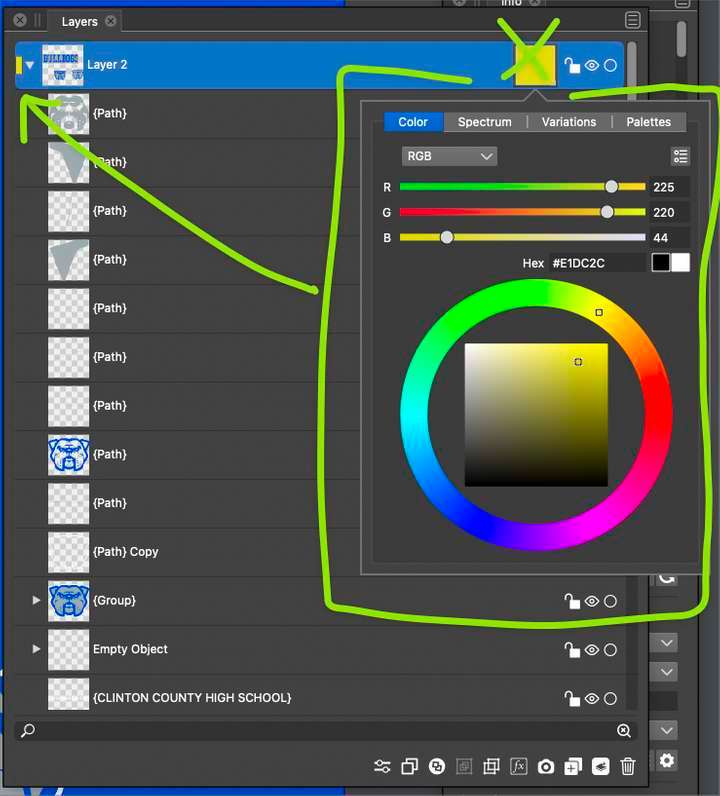
                      0_1641403163527_17f3685f-5fda-4eb5-907f-e343c30e3ff9-image.png

                      @Ingolf , you mentioned "To clarify: when the cursor changes to a hand symbol, click once and the current VS color selector appears." - Isn't what I am showing in the picture above the current VS color selector?

                      🍎 macOS Tahoe 26.2, Mac mini (M1, 2020), Chip Apple M1, Memory 16 GB
                      Cintiq 27QHD Display and LG Ultra HD Display

                      1 Reply Last reply Reply Quote 1
                      • VectorStylerV Offline
                        VectorStyler @Ingolf
                        last edited by

                        @Ingolf Layers panel layout is improved in build 1.1.008

                        1 Reply Last reply Reply Quote 1
                        • First post
                          Last post