VectorStyler
    • Categories
    • Unread
    • Recent
    • Tags
    • Popular
    • Register
    • Login

    Windows - isolated mode greyed out after one use

    Scheduled Pinned Locked Moved Resolved Issues
    9 Posts 4 Posters 11.6k Views 4 Watching
    Loading More Posts
    • Oldest to Newest
    • Newest to Oldest
    • Most Votes
    Reply
    • Reply as topic
    Log in to reply
    This topic has been deleted. Only users with topic management privileges can see it.
    • IngolfI Offline
      Ingolf
      last edited by

      Is it me? Windows 10, latest build:

      • New document
      • Create to or three shapes
      • Select one shape
      • Panel menu, select isolated mode
      • Hit escape directly when in isolated mode
      • Select the shape again (why is it un-selected after isolated mode?)
      • Panel menu, select isolated mode
      • I can't it is disabled
      • Happens a lot and suddenly I can - pattern is not clear to me

      🍏 macOS Sequoia Apple Silicon

      VectorStylerV 1 Reply Last reply Reply Quote 0
      • encartE Offline
        encart
        last edited by

        @Ingolf I think it works for me, if I understand correctly
        https://recordit.co/VyhXbnGvPv

        MacBook Air M4 24Gb, Tahoe 26.2

        1 Reply Last reply Reply Quote 0
        • VectorStylerV Offline
          VectorStyler @Ingolf
          last edited by

          @Ingolf Is the Layers panel / on Canvas selection synchronized (Select Highlighted ... options)?
          I tried to replicated this on windows, but all seems ok.
          If you could have a short recording, maybe some different steps are involved.

          1 Reply Last reply Reply Quote 1
          • IngolfI Offline
            Ingolf
            last edited by

            Select hightlighted/highlight selected disabled - I'll never touch them again. πŸ™‚

            🍏 macOS Sequoia Apple Silicon

            1 Reply Last reply Reply Quote 0
            • S Offline
              Subpath
              last edited by

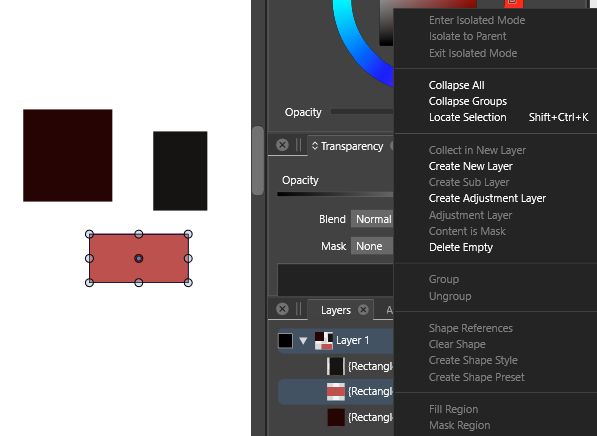
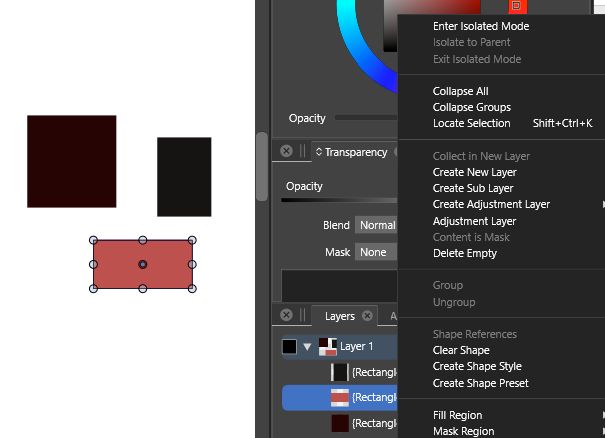
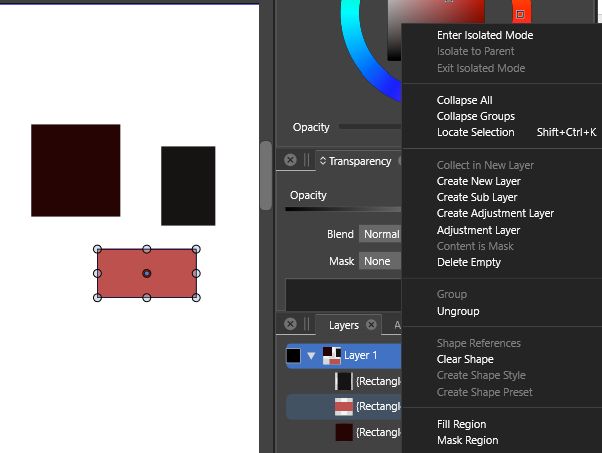
              It seems to me that it occurs
              when no Object is selected in layers.

              If you select the Object just on the Canvas
              and look at the Panel MenΓΌ the Option
              is grayed out.

              0_1642777722661_Pic-1.jpg

              0_1642777736360_Pic-2.jpg

              0_1642777746549_Pic-3.jpg

              Win 11
              CPU: AMD Ryzen 5 9600X, 6-core.
              GPU: Nvidia Geforce RTX 5070.

              VectorStylerV 1 Reply Last reply Reply Quote 0
              • VectorStylerV Offline
                VectorStyler @Subpath
                last edited by

                @Subpath Yes, Layers panel menu commands refer to the object selected in the panel.

                1 Reply Last reply Reply Quote 0
                • IngolfI Offline
                  Ingolf
                  last edited by

                  I have to admit I loathe and hate the highlighted and selected object difference and behavior inherited from Illustrator. πŸ™‚

                  🍏 macOS Sequoia Apple Silicon

                  VectorStylerV 1 Reply Last reply Reply Quote 0
                  • VectorStylerV Offline
                    VectorStyler @Ingolf
                    last edited by

                    @Ingolf It can be configured in the Layers panel options (panel menu -> Panel Options).

                    IngolfI 1 Reply Last reply Reply Quote 1
                    • IngolfI Offline
                      Ingolf @VectorStyler
                      last edited by

                      @vectoradmin Yes, I know, it was disabled here for some reason I don't remember on the Windows computer. But the feature itself ...


                      🍏 macOS Sequoia Apple Silicon

                      1 Reply Last reply Reply Quote 0
                      • First post
                        Last post