Double click renaming of layers/shapes not working
-
I'm still having problems getting the double-click with modifier to work to rename sublayers and groups. Here is a video
I can rename them in every other way, just not using the double click-modifier method, which is a shame because it's awesome!
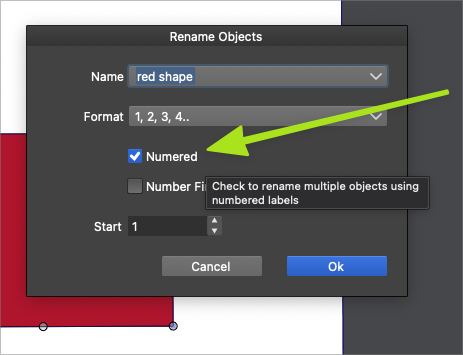
Also, there is still what appears to be a spelling error in the "rename objects" panel unless it's a word I'm unfamiliar with.
Should "numered" be "numbered"?
Here is the file i used if that helps.
0_1642806021670_shape rename.vstyler🍎 macOS Tahoe 26.2, Mac mini (M1, 2020), Chip Apple M1, Memory 16 GB
Cintiq 27QHD Display and LG Ultra HD Display -
Strangely enough disabling "double click renames" in panel options makes the preferences -> document editor -> double click setting work.
In either case: Right click selection of layers -> Rename objects FTW
-
@Ingolf Hmmm it's not working that way for me.
"double click renames" in panel options is already disabled and it's NOT letting my document editor > double click setting work correctly
I also tested turning it back on and it did not change anything with the double click modifier"In either case: Right click selection of layers -> Rename objects FTW" You got your victory there! lol
The right click selection of layer> rename objects does work - but isn't that more work to get to than double clicking the layer? lol -
"In either case: Right click selection of layers -> Rename objects FTW" You got your victory there! lol
The right click selection of layer> rename objects does work - but isn't that more work to get to than double clicking the layer? lol
Not enough to burn a quarter of a calorie!
 But hey, look at another option Mr Shortcut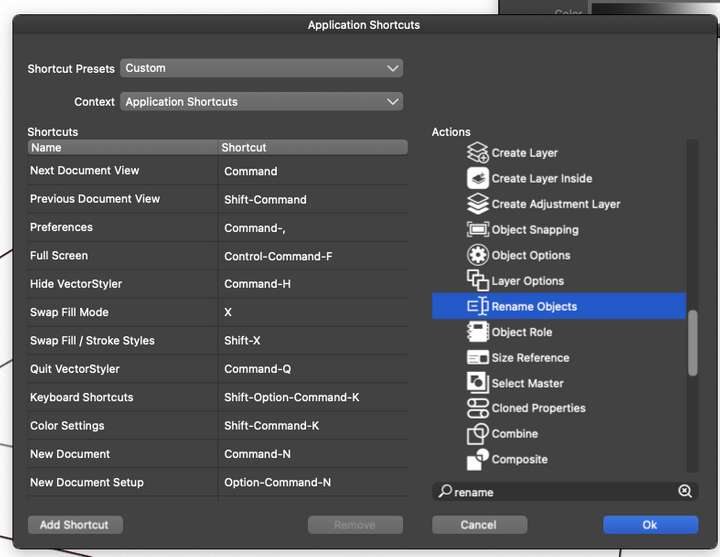
-
@Ingolf said in Double click renaming of layers/shapes not working:
Not enough to burn a quarter of a calorie! But hey, look at another option Mr Shortcut
haha yes, but not all shortcuts are created equal. I am restraining myself from giving it a keyboard shortcut if I can double click on the layer already, or use the double click modifier -
I mixed things up. I think it works as advertised here.
-
@vectoradmin Testing this out more. If I turn off "double click renames" in the layer panel menu, I CAN rename using the double-click+ shift - but I cannot rename using the double click sans modifier or the double click + option. I also notice that even when I get the name to work, if I go to rename another vector sublayer, and give it the same name as the pulldown first name, it does not add a 1 or a 2 after it. If I group two items and then select them and double-click +shift to rename, it will not rename the group at all, just one of the shapes that is grouped.
I also noticed if I cannot do a task, nothing is registering in the history panel either.
I have not gone through every tool and every key combo in full, but each time I try it i get different results and never are they always doing what they are supposed to
Are there other preferences I need set a certain way? -
-
@Boldline This problem should be fixed now.


