select>select by style>fill content only selects what is visible on screen -not entire artboard
-
[It seems when I use select>select by style>fill content to select all of the same color of objects, VS only selects from what is visible on the screen, instead of the entire artboard as I'd expected.
I attached the file below if that helps
0_1643082018661_select by style issue.vstyler -
@Boldline Yes, this is actually a feature. The viewing area (by zoom / pan) restrict the selection zone.
Will make it optional. -
@vectoradmin ok, it helps to know that is a feature. Knowing that is how it currently works, I can use that to my advantage in how I use the screen as a method of limiting the range. That current feature is something I will utilize in my workflow, but it will be nice to have the option with that. thanks for adding a toggle for that.
-
@vectoradmin If possible, include also an option to Select by Style only on the current artboard. To me that seems more useful than only what is visible on the screen.
-
@vectoradmin said in select>select by style>fill content only selects what is visible on screen -not entire artboard:
@Boldline Yes, this is actually a feature. The viewing area (by zoom / pan) restrict the selection zone.
Will make it optional.Wouldn't it be more logical and intuitive to search inside a selection - or everywhere if nothing is selected?
First of all I had never guessed that myself. But even if you know it is hard to scope the search with a rectangular screen when the document is a spaghetti of objects?
-
@Ingolf said in select>select by style>fill content only selects what is visible on screen -not entire artboard:
But even if you know it is hard to scope the search with a rectangular screen when the document is a spaghetti of objects?
@Ingolf Select by attribute exists in other apps also, so there are some expectations. I could try to enable searching inside selection only using modifier keys?
-
@vectoradmin said in select>select by style>fill content only selects what is visible on screen -not entire artboard:
@Ingolf said in select>select by style>fill content only selects what is visible on screen -not entire artboard:
But even if you know it is hard to scope the search with a rectangular screen when the document is a spaghetti of objects?
@Ingolf Select by attribute exists in other apps also, so there are some expectations. I could try to enable searching inside selection only using modifier keys?
I rarely use this feature so I have limited knowledge about how it is used elsewhere and by VS users, so I have no special interest. It just surprises me if other apps scope the search by what is currently visible on screen or not. I wouldn't be able to scope the search this way. I would forget the modifier anyway and I guess few would find it in the help.
Personally I am pretty old school and thorough. When it come to search/select or search and replace I would prefer - as an alternative dialog - with a add criteria (and/not) rows plus a dropdown with search scope: all, selection, visible. No preferences or modifiers to guess, just raw search dialog power. But as I said I am not the target audience here.
I'll get my coat

-
@Ingolf I agree, the search scope for these is not something to be hidden in the bowels of the Preferences.
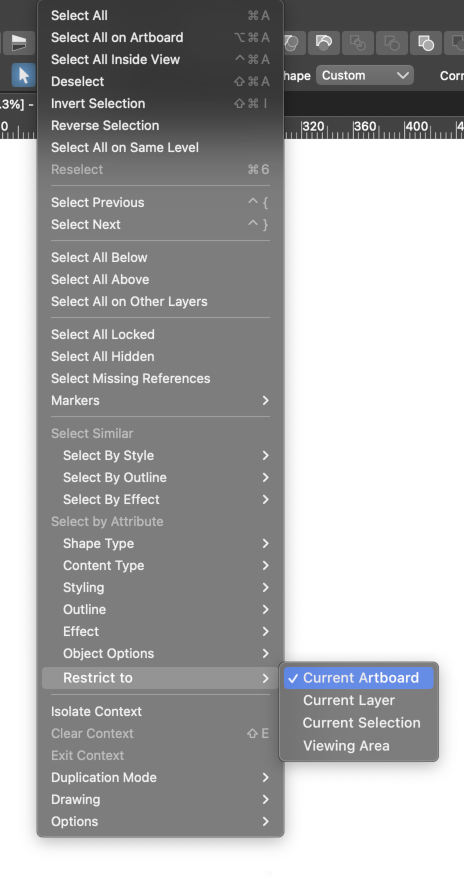
@vectoradmin I like it that VS has the 'Select by Style' and 'Select by Attribute' options "baked" into these submenus — it's faster than having a modal window with its dropdown menus and the 'OK' button confirmation.
Would these options placed in a separate submenu work for this?
-
@b77 I agree with you that it should not be buried in the preferences, especially considering there are several great selection options as you listed in your mock-up. "Current artboard, current layer, current selection, viewing area, are all great options for this. If they are easily accessible, I would use each of them at different times in my work, knowing now that they are available/could be available.
Sometimes the select list feels a little cumbersome and lengthy. There are certain select options I use a lot more than others.
Would it also make sense to have the select options available at the top right? Just throwing the idea out there.




