VectorStyler
    • Categories
    • Unread
    • Recent
    • Tags
    • Popular
    • Register
    • Login

    Certain fonts at times will not register and become active
    Scheduled Pinned Locked Moved Resolved Issues
    4 Posts 2 Posters 4.3k Views 1 Watching
    Loading More Posts
    • Oldest to Newest
    • Newest to Oldest
    • Most Votes
    Reply
    • Reply as topic
    Log in to reply
    This topic has been deleted. Only users with topic management privileges can see it.
    • BoldlineB Offline
      Boldline
      last edited by

      There are times when I cannot get an active font to show up correctly in VS. In this example, I'm using a font called "knuckles" that I have used numerous times prior in VS with no issue. There are 18 variations to the font. When I go to use it now, it will not convert the live font I am using over to it. Going to a new document and trying with a fresh text does not fix the issue, nor does closing out everything and restarting VS.
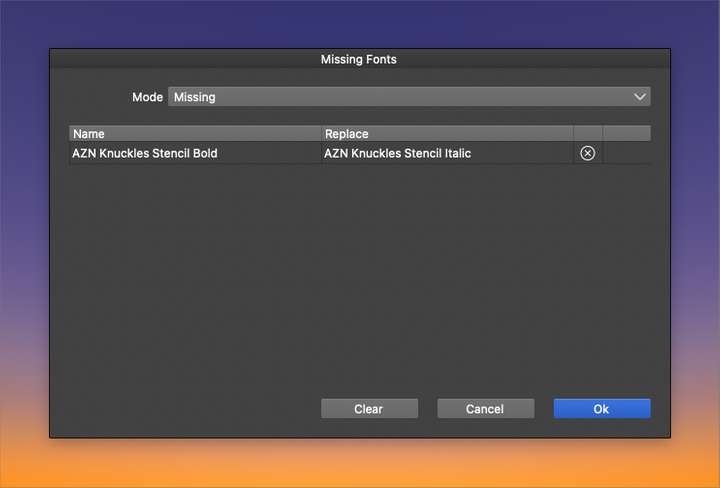
      When I restart VS and open the file - I get a missing font warning - even though both variations of the font are active and were activated together with all the others in that font collection.
      0_1646347000505_6009f804-29ff-4733-a412-beccb992c511-BLD 2022-03-03 at 17.36.32.png

      🍎 macOS Tahoe 26.2, Mac mini (M1, 2020), Chip Apple M1, Memory 16 GB
      Cintiq 27QHD Display and LG Ultra HD Display

      VectorStylerV 2 Replies Last reply Reply Quote 0
      • VectorStylerV Offline
        VectorStyler @Boldline
        last edited by

        @Boldline it could be a bug in the font name matching. I will try to install the same font.

        BoldlineB 1 Reply Last reply Reply Quote 1
        • BoldlineB Offline
          Boldline @VectorStyler
          last edited by Boldline

          @vectoradmin i just emailed them to you for testing
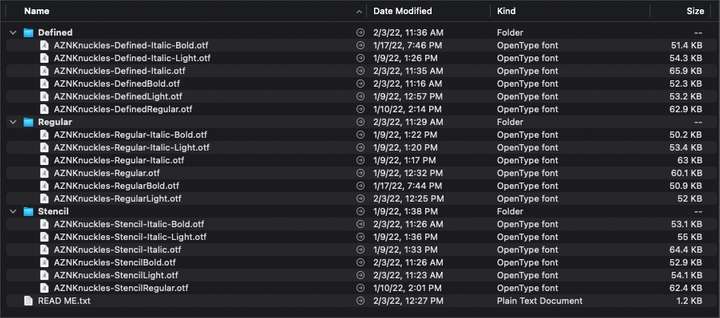
          There are quite a few in this collection - so it wouldn't surprise me if the naming was causing confusion
          0_1646371954703_6bb8e17a-b926-4893-a4d8-7ba6c669c748-BLD 2022-03-04 at 00.32.18.png

          🍎 macOS Tahoe 26.2, Mac mini (M1, 2020), Chip Apple M1, Memory 16 GB
          Cintiq 27QHD Display and LG Ultra HD Display

          1 Reply Last reply Reply Quote 0
          • VectorStylerV Offline
            VectorStyler @Boldline
            last edited by

            @Boldline I just tried to replicate this using the fonts in the example, at least here the Missing Fonts window is not shown.
            If you have a file containing this font that shows the Missing Font view when opened. Thanks!

            1 Reply Last reply Reply Quote 0
            • First post
              Last post
