VectorStyler
    • Categories
    • Unread
    • Recent
    • Tags
    • Popular
    • Register
    • Login

    Copy/Paste issue

    Scheduled Pinned Locked Moved VectorStyler 1.1 Bugs
    10 Posts 3 Posters 9.9k Views 2 Watching
    Loading More Posts
    • Oldest to Newest
    • Newest to Oldest
    • Most Votes
    Reply
    • Reply as topic
    Log in to reply
    This topic has been deleted. Only users with topic management privileges can see it.
    • Devil DinosaurD Offline
      Devil Dinosaur
      last edited by

      Hi everyone,

      I noticed some trouble in the copy/paste function (both using drop menu or keyboard shortcuts). The problem is that it seems to happen after I did something in a layer. I mean that it doesn't occur on a new file, and it doesn't happen on all layers. The result is that when I copy/paste an object, it's not on place, it's slightly bigger and on another layer.

      Video example here

      Fred.
      MacBook Pro (M1) - MacOs Sonoma 14

      BoldlineB VectorStylerV 3 Replies Last reply Reply Quote 0
      • BoldlineB Online
        Boldline @Devil Dinosaur
        last edited by

        @Devil-Dinosaur

        Can you adjust the settings so we can access the video? thanks!

        0_1646792042388_16848a5d-490a-4166-bb06-0ab6e481dff8-BLD 2022-03-08 at 21.13.24.png

        🍎 macOS Tahoe 26.2, Mac mini (M1, 2020), Chip Apple M1, Memory 16 GB
        Cintiq 27QHD Display and LG Ultra HD Display

        1 Reply Last reply Reply Quote 1
        • Devil DinosaurD Offline
          Devil Dinosaur
          last edited by

          Ooops, sorry. I think it's OK now. (?)

          Fred.
          MacBook Pro (M1) - MacOs Sonoma 14

          BoldlineB 1 Reply Last reply Reply Quote 0
          • BoldlineB Online
            Boldline @Devil Dinosaur
            last edited by

            @Devil-Dinosaur yes it works now - thanks. Cool work by the way!

            I don't know about size discrepancies when pasting, but you can set the paste feature to have no offset at all and should paste itself right overtop where it was copied from.
            Here is the option in preferences. I have mine set to zero for that very reason.
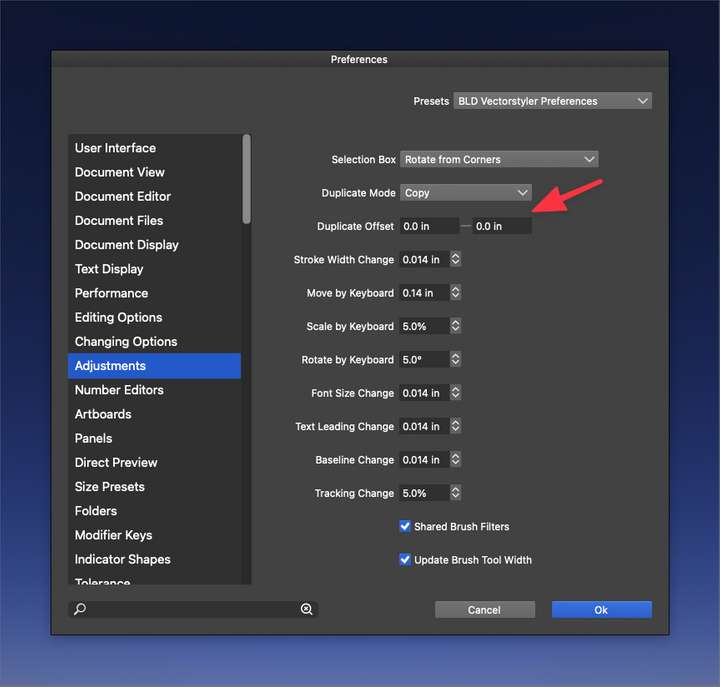
            0_1646793572700_b1ee1678-fbf5-4926-a6b5-23de61fc466d-BLD 2022-03-08 at 21.38.02.png

            There is something to be careful with - if you move around your document more than just a little bit in-between copying and pasting the object, it will not paste in place. It technically "pastes in place", but it's in relation to your new location. @vectoradmin is working on an eventual fix (hopefully!) 🙂

            🍎 macOS Tahoe 26.2, Mac mini (M1, 2020), Chip Apple M1, Memory 16 GB
            Cintiq 27QHD Display and LG Ultra HD Display

            1 Reply Last reply Reply Quote 2
            • Devil DinosaurD Offline
              Devil Dinosaur
              last edited by Devil Dinosaur

              Thank you for your answer. 👍
              Yes, I saw some bad settings in my adjustments but even after setting them at 0-0 the problem is still there. 2 things are weird, first it's incremental and every paste will bring a slightly bigger size and move and then it happen only on some files. Not on new one. So I guess I made something wrong and it affects the file (whenever I reload it). I also tried to copy and paste the entire content into a new file (after testing that it works fine on this one) and it happened again. So I guess it's something inside the file, not the software behavior.
              And you're right about the slight move, it seems to explain the change of layer (but not the move itself).

              Fred.
              MacBook Pro (M1) - MacOs Sonoma 14

              BoldlineB 1 Reply Last reply Reply Quote 0
              • BoldlineB Online
                Boldline @Devil Dinosaur
                last edited by

                @Devil-Dinosaur If you are willing and able to do so, sending @vectoradmin the VS file itself with the issue, it could allow him to test and potentially replicate the problem. If you don't want to send him that file, try replicating the issue on a blank new file and see if it occurs again, then save it and send to him. that's the fastest way to get these types of things looked at and potentially addressed.

                🍎 macOS Tahoe 26.2, Mac mini (M1, 2020), Chip Apple M1, Memory 16 GB
                Cintiq 27QHD Display and LG Ultra HD Display

                1 Reply Last reply Reply Quote 1
                • VectorStylerV Offline
                  VectorStyler @Devil Dinosaur
                  last edited by

                  @Devil-Dinosaur Got the file, and replicated what is in the video!
                  It seems that when pasting, there is an offset that is wrong.

                  I will also check the destination layer, but at least for me it is the last layer selected in the panel (was it Layer 1, because that is not visible in the video?).

                  Added this as a bug to the backlog

                  1 Reply Last reply Reply Quote 1
                  • VectorStylerV Offline
                    VectorStyler @Devil Dinosaur
                    last edited by

                    @Devil-Dinosaur This problem should be fixed in build 1.1.024

                    1 Reply Last reply Reply Quote 0
                    • Devil DinosaurD Offline
                      Devil Dinosaur
                      last edited by

                      Hello,
                      It seems that the problem is back in build 1.1.041. :
                      Paste brings the new object position randomly shifted (and it randomly happens...).

                      I also noticed that sometimes even if I chose and select the layer where to paste, VS paste on the original layer where the shape is coming from.

                      I'll try to obtain a file that makes it all the time and I will share it.

                      Fred.
                      MacBook Pro (M1) - MacOs Sonoma 14

                      Devil DinosaurD 1 Reply Last reply Reply Quote 1
                      • Devil DinosaurD Offline
                        Devil Dinosaur @Devil Dinosaur
                        last edited by

                        I noticed something : I think there's a bad habit I have : to be fast, I copy and paste a shape with the keyboard shortcuts while being on the shape editor tool activated instead of prior going back to the transform tool. The result is that I sometimes use the shortcut while having a node selected... it seems to explain the moves.

                        Fred.
                        MacBook Pro (M1) - MacOs Sonoma 14

                        1 Reply Last reply Reply Quote 2
                        • First post
                          Last post
