VectorStyler
    • Categories
    • Unread
    • Recent
    • Tags
    • Popular
    • Register
    • Login

    Corner inconsistent.
    Scheduled Pinned Locked Moved Resolved Issues
    9 Posts 3 Posters 8.2k Views 3 Watching
    Loading More Posts
    • Oldest to Newest
    • Newest to Oldest
    • Most Votes
    Reply
    • Reply as topic
    Log in to reply
    This topic has been deleted. Only users with topic management privileges can see it.
    • J Offline
      Jayanta Das
      last edited by Jayanta Das

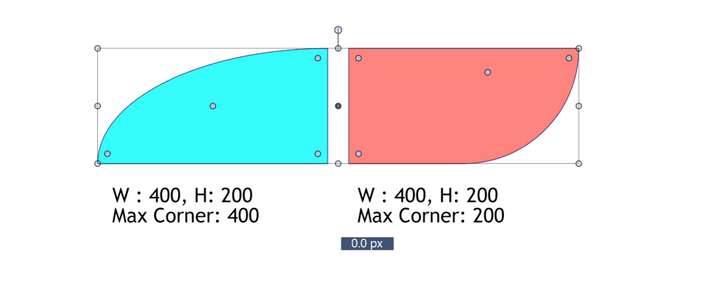
      Take 2 rectangle and apply corner with corner tool dragging to max, what I get is in the image below. The corner should be max 200 as per the dimension of the rectangle.
      0_1647591280976_Screenshot 2022-03-18 134251.png

      Mac Mini M4 Pro | 24Gb
      WIndows 11 | Intel i5 11Gen
      Wacom Intuos Pro

      b77B VectorStylerV 3 Replies Last reply Reply Quote 0
      • b77B Offline
        b77 @Jayanta Das
        last edited by

        @Jayanta-Das Why limit this to the smaller side of the rectangle?

        MacBook Pro (Intel) running Monterey 12.6.4

        J 1 Reply Last reply Reply Quote 0
        • VectorStylerV Offline
          VectorStyler @Jayanta Das
          last edited by VectorStyler

          @Jayanta-Das Yes, this can be replicated. The issue here is the inconsistency of the maximum corner size on different corners of a shape.

          1 Reply Last reply Reply Quote 1
          • J Offline
            Jayanta Das @b77
            last edited by

            @b77 Thats what we get in every other program.

            Mac Mini M4 Pro | 24Gb
            WIndows 11 | Intel i5 11Gen
            Wacom Intuos Pro

            b77B 1 Reply Last reply Reply Quote 0
            • b77B Offline
              b77 @Jayanta Das
              last edited by b77

              @Jayanta-Das That would seriously limit me in this case:

              alt text

              I lost contact with the latest AI and CDR releases, don't use AD, but Inkscape, Glyphs and FontLab allow rounding past the shorter segment limit.

              Maybe there's a need for a "click" paired with a visual indicator when you need a perfect semicircle (when you hit the shorter segment limit)?

              MacBook Pro (Intel) running Monterey 12.6.4

              J 1 Reply Last reply Reply Quote 1
              • J Offline
                Jayanta Das @b77
                last edited by Jayanta Das

                @b77 I mostly used AD. But after your comment I checked Inkscape. I took the same 400x200 rectangle, and when I make it rounded ofcourse I can apply more than 200px but the shape proportion change. Check the recording.

                Mac Mini M4 Pro | 24Gb
                WIndows 11 | Intel i5 11Gen
                Wacom Intuos Pro

                b77B 1 Reply Last reply Reply Quote 0
                • b77B Offline
                  b77 @Jayanta Das
                  last edited by b77

                  @Jayanta-Das Ouch… that looks like a bug if you ask me. ☺

                  Anyway, this limit is not desirable in many cases.

                  What if dragging the rounding control point towards the middle (or end?) of the smaller segment would snap the rounding to what that small segment would allow, while dragging the control point normally in any other direction (away) would allow rounding up to what the longest segment allows?

                  MacBook Pro (Intel) running Monterey 12.6.4

                  J 1 Reply Last reply Reply Quote 2
                  • J Offline
                    Jayanta Das @b77
                    last edited by

                    @b77 Ya thats also another thing to think about in VS. Hope @vectoradmin come up with some solution to this.

                    Mac Mini M4 Pro | 24Gb
                    WIndows 11 | Intel i5 11Gen
                    Wacom Intuos Pro

                    1 Reply Last reply Reply Quote 2
                    • VectorStylerV Offline
                      VectorStyler @Jayanta Das
                      last edited by

                      @Jayanta-Das This problem should be fixed in build 1.1.024
                      For uneven corner sizes, use the Corner editor tool and drag the handles positioned on the shape.

                      1 Reply Last reply Reply Quote 0
                      • First post
                        Last post
