VectorStyler
    • Categories
    • Unread
    • Recent
    • Tags
    • Popular
    • Register
    • Login

    Paste not always keeping position
    Scheduled Pinned Locked Moved Resolved Issues
    4 Posts 2 Posters 4.5k Views 1 Watching
    Loading More Posts
    • Oldest to Newest
    • Newest to Oldest
    • Most Votes
    Reply
    • Reply as topic
    Log in to reply
    This topic has been deleted. Only users with topic management privileges can see it.
    • BoldlineB Offline
      Boldline
      last edited by Boldline

      Frequently when I copy or cur something and then soon after paste it back, it often does not keep the original position. I think this like the other tools that randomly stop functioning because when I restart VS, it works again

      Here is a video - only the first 45 sec are relevant as I thought I had turned off the recorder and it was not actually turned off.
      I have "paste keeps position" and "duplicate offset" set to ).0 for good measure
      in preferences.
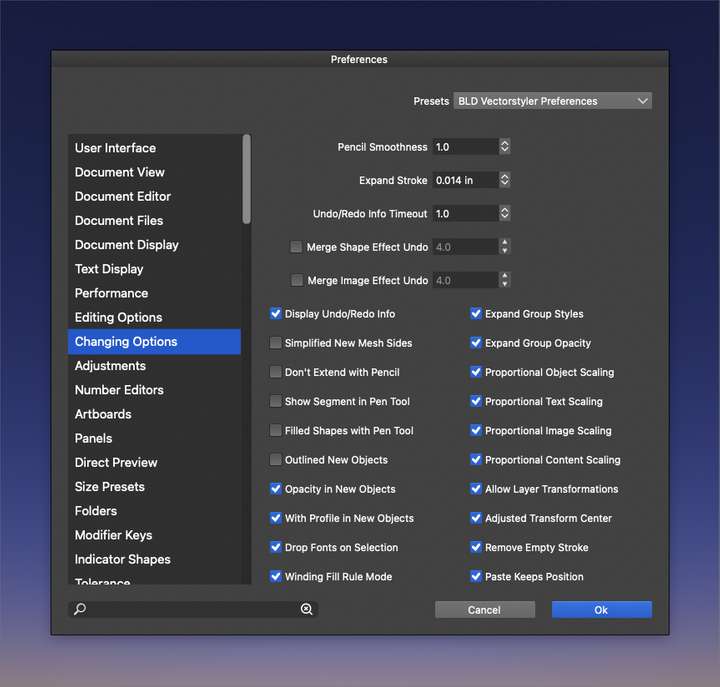
      0_1643241638462_9dc84abe-6f8a-4bba-8cb6-0793efe6ef76-BLD 2022-01-26 at 19.00.30.png

      0_1643241699183_72191bfe-708d-477d-81d2-e078ba7b3d61-BLD 2022-01-26 at 19.01.13.png

      🍎 macOS Tahoe 26.2, Mac mini (M1, 2020), Chip Apple M1, Memory 16 GB
      Cintiq 27QHD Display and LG Ultra HD Display

      VectorStylerV 2 Replies Last reply Reply Quote 0
      • VectorStylerV Offline
        VectorStyler @Boldline
        last edited by

        @Boldline I tried to replicate this, but so far could not.
        One reason why paste may change its position if there was some (even small) panning.
        I will improve that part.

        BoldlineB 1 Reply Last reply Reply Quote 0
        • BoldlineB Offline
          Boldline @VectorStyler
          last edited by

          @vectoradmin said in Paste not always keeping position:

          One reason why paste may change its position if there was some (even small) panning.

          yes! this might be the cause with some of them. I just tested this possibility you brought up and it is an indeed an issue.

          That may have been the cause of the issue in my case, I can't remember now if I panned at that time, but I do pan often, so it's a strong possibility. In any case, I will keep that in mind for now, not to pan in between pasting in place objects I am using until that gets fixed for the long term.thanks!

          🍎 macOS Tahoe 26.2, Mac mini (M1, 2020), Chip Apple M1, Memory 16 GB
          Cintiq 27QHD Display and LG Ultra HD Display

          1 Reply Last reply Reply Quote 0
          • VectorStylerV Offline
            VectorStyler @Boldline
            last edited by

            @Boldline This problem should be fixed now, let me know if it still occurs.

            1 Reply Last reply Reply Quote 0
            • First post
              Last post